

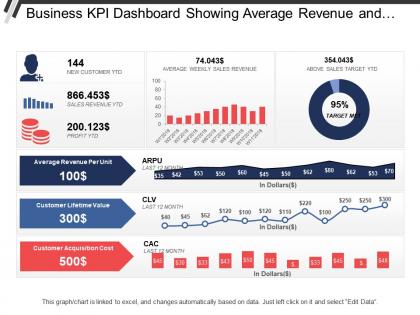
Business Kpi Dashboard Showing Average Revenue And Clv
You must be logged in to download this presentation.




Try Before you Buy Download Free Sample Product
 Impress Your
 Audience
 100%
100% Editable
 Save Hours
 of Time


Eliminate any cause for despair with our Business Kpi Dashboard Showing Average Revenue And Clv. It helps institute better health care.
People who downloaded this PowerPoint presentation also viewed the following :
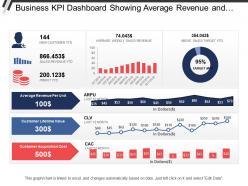
Business Kpi Dashboard Showing Average Revenue And Clv with all 6 slides:
Adorn your thoughts with our Business Kpi Dashboard Showing Average Revenue And Clv. They will add all the frills.
FAQs for Business Kpi Dashboard Showing Average
So for KPI dashboards, you want metrics that actually connect to what your business cares about - not just vanity numbers that look pretty. Real-time data's crucial, and honestly? Keep it simple with visuals people can read fast. I always put the most important stuff right up top because nobody has time to hunt for key info. Don't forget trend analysis though - seeing patterns over time beats just staring at today's numbers. Make it so different team members can customize their view. If someone can't figure out what to do within 30 seconds of looking at it, you've overcomplicated things.
Honestly, your brain just processes visuals way faster than scanning through spreadsheet rows. When you throw KPI data into charts, you'll catch trends and weird outliers right away - like noticing revenue tanked right when marketing went quiet. Different people on your team will probably gravitate toward different chart styles too. Some folks are obsessed with those gauge things, others want simple bar charts. I'd pick your most important KPIs first and try out maybe 2-3 chart types. See what actually makes sense to everyone instead of just looking pretty.
Here's what I'd do: First, match every KPI to a real business goal. Can't connect them? Toss it. Too many dashboards become these sad collections of meaningless numbers that nobody acts on. Keep it to 5-7 KPIs tops. Mix some leading indicators (stuff that predicts what'll happen) with lagging ones (results you already got). The key thing? Make sure people can actually DO something with the data. Oh, and definitely loop in whoever's gonna use this thing daily. They know which metrics actually matter for decisions vs. what just looks good in presentations.
Honestly, it's all about what your business actually needs. Most KPIs work fine with daily or weekly updates. Website traffic and sales? Those can refresh hourly or even live if you're feeling ambitious. Financial stuff usually only needs weekly/monthly updates since that data takes forever to process anyway - plus who has time to stare at revenue numbers all day? Match your refresh rate to how fast you need to react. Don't bother updating customer satisfaction scores hourly when you only survey once a month. Start daily for your main metrics, then tweak based on what actually helps you make decisions.
Honestly, it's all about your budget and how tech-savvy your team is. Tableau and Power BI are amazing but yeah, they'll make your brain hurt at first. Google Data Studio is solid if you're broke - totally free and does most things you'd want, just gets weird sometimes. Excel works fine too for basic stuff, which people forget. I've actually seen some pretty slick dashboards made in Google Sheets of all things. My advice? Just use whatever your team already knows instead of forcing everyone to learn something new right away. You can always upgrade later when you hit the limits.
You'll want solid data governance first - figure out who owns each data source and build in regular validation. Automated quality checks are your friend here, they'll catch outliers and missing stuff before it messes up your dashboard. Pull from one source of truth instead of juggling multiple conflicting systems (learned that one the hard way). Document how you calculate everything so there's no confusion later. The real test though? Schedule audits where you compare dashboard numbers against actual business results. Catches drift early and honestly saves you from some embarrassing meetings where your data doesn't match reality.
Dude, get your users involved from day one or you'll build something nobody touches. I've watched so many gorgeous dashboards just sit there unused because the team never asked what people actually need. Talk to them before you even start coding - find out which metrics they care about, how they want stuff organized, all that. Then check back regularly while you're building it. Trust me, what looks obvious to you won't make sense to them half the time. The whole point is making their jobs easier, right? So let them tell you what that looks like instead of guessing.
Honestly, just ask each team what they actually look at every day. Executives want the big picture stuff - trends, financials, that kind of thing. But your department managers? They need metrics they can actually do something about. Sales doesn't give a damn about server uptime - they want to see their pipeline and conversion numbers. Finance team's gonna want detailed cost breakdowns (obviously). The trick is figuring out what decisions people make regularly, then only showing data that matters for those choices. I'd start by grabbing 2-3 people from each department and asking about their biggest daily headaches. Way easier than guessing.
Don't cram everything onto one screen - it becomes total visual chaos. Vanity metrics are the worst too, like tracking page views when they don't actually help you decide anything. Your KPIs need to match what the business actually cares about. I swear, half the dashboards I see look like someone just threw charts at a wall. Keep it clean so people can spot trends without getting a headache. Test with real users first! Oh, and make sure the data updates regularly - nothing kills credibility like stale numbers. Focus on metrics that'd actually make your team do something different.
Dashboards are honestly amazing for this stuff. Real-time data beats guessing any day, and your team can actually see how they're doing against their targets. People get weirdly competitive when they can watch their numbers go up - I've seen it happen so many times. Plus during reviews you're talking about actual performance instead of just vibes. The transparency thing is huge too. Just don't measure dumb stuff though, because people will absolutely game whatever metrics you give them. Pick the ones that actually matter or you'll regret it later.
Honestly, tracking your KPIs across different time periods is a game changer. You'll catch trends and seasonal stuff you'd totally miss otherwise. Like, did that Q3 marketing push actually work? Is customer retention quietly tanking month by month? The trick is staying consistent - same metrics, same calculations each time. Otherwise you're comparing random stuff. Set up your dashboard to automatically show these comparisons so you're not just staring at today's numbers. Way more useful than snapshots. Your data actually tells a story when you look at it over time, which sounds cheesy but it's true.
So dashboards are honestly game-changers for catching patterns - way better than drowning in Excel sheets. Track your main metrics over time and you'll start seeing seasonal stuff, growth patterns, weird dips that keep happening. I'd focus on maybe 3-5 critical KPIs first before you go crazy adding everything. Most tools have trend analysis built right in, which saves you tons of work. Set up alerts when things hit certain numbers. Oh, and use that historical data for forecasting - it's pretty solid once you get enough info. The visual aspect makes everything click way faster than just looking at raw numbers.
Dude, accessibility is super important for remote dashboards. Your team's scattered everywhere using different devices and setups. Some might have visual issues you don't even know about. I've totally seen dashboards that looked amazing on the designer's fancy monitor but were trash on my crappy laptop at Starbucks. Use good color contrast and readable fonts - honestly, so many people mess this up. Make it mobile-friendly too since half your team probably checks stuff on their phones. Test it on different devices and actually ask people what they think. You'll be surprised what accessibility problems pop up that you never thought of.
Pick 3-5 things that actually matter to your business first. Then find KPIs that tell you if you're nailing those goals or totally missing the mark. I swear, half the companies I know track stuff like "page views" when they should be watching revenue or customer retention instead. Use them in your quarterly planning - that's when they're most useful. Monthly check-ins work great too. The cool part is catching problems early before they blow up your budget. Oh, and make sure they're driving real decisions, not just sitting there looking pretty on a dashboard nobody reads.
Honestly, start with the big three: revenue growth, gross profit margin, and cash flow. Those will tell you everything you need to know about whether you're actually healthy or just pretending to be. Net profit matters too, obviously. But I've seen so many people go overboard and cram every metric imaginable onto one screen - total mess. If you're growing fast, throw in customer acquisition cost and lifetime value. Get those basics working first, make sure the data's actually updating right, then add fancier stuff once people are using it regularly.
-
very creative and good impact
-
good
-
usable charts
-
Easily Editable.
-
Excellent work done on template design and graphics.
-
well depicted!!!