


Commercial Bank Powerpoint Presentation Slides





Try Before you Buy Download Free Sample Product
 Impress Your
 Audience
 100%
100% Editable
 Save Hours
 of Time


With our content-ready 44 slides Commercial Bank PowerPoint Presentation Slides, you can easily showcase different topics related to commercial banking. This will save you money, time and business resources as you will not require to make the PPT from scratch. You can take advantage of these financial institution's PPT slides to understand various topics such as banking organizational hierarchy with designations, banking structure, major trends in banking Industry, key growth drivers banking industry, various services provided by banks to its customers, etc. Here we have comprehensively covered each and every aspect of community banking. Download our readymade cash management PowerPoint presentation slideshow to easily sail through the tough task of planning everything on your own. What are you waiting for just click download and increase the extent of your accomplishments by using our financial bank PowerPoint presentation deck? Give their aspirations a fresh boost. Our Commercial Bank Powerpoint Presentation Slides will convince them to go one better.
People who downloaded this PowerPoint presentation also viewed the following :
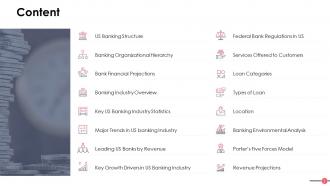
Content of this Powerpoint Presentation
Apart from learning the major purposes of a commercial bank such as lending and borrowing, understanding other features is important. The functions, types, and responsibilities of this financial institution are accountable for managing the economic backbone of the country. To make things easier, we have designed PPT Slides that explain the banking hierarchy, designations, and services provided to the customers.
For loan application related information, check out the PPT presentation slides on the commercial bank loan application proposal template
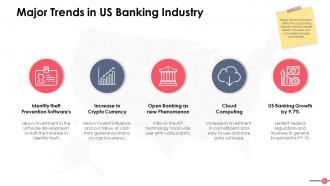
These templates also help you stay abreast of the latest banking trends.
Commercial Bank Powerpoint Presentation Slides
These PPT slides put forward banking prospects that need to be covered to understand the functioning of the commercial banks.
These are 100% editable and customizable, and so you can modify or add/ remove categories as per requirement. Using these templates, you can get the banking resources in a content ready document. You can change the layout, fonts, colors, add/ remove banking symbols ( or icons) and make it your own in a few minutes.
Also take a look at this PPT template guide - Commercial banking value chain including risk management.
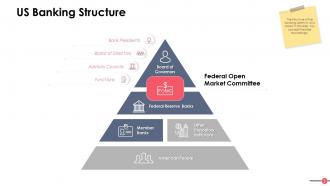
Template 1: US Banking Structure
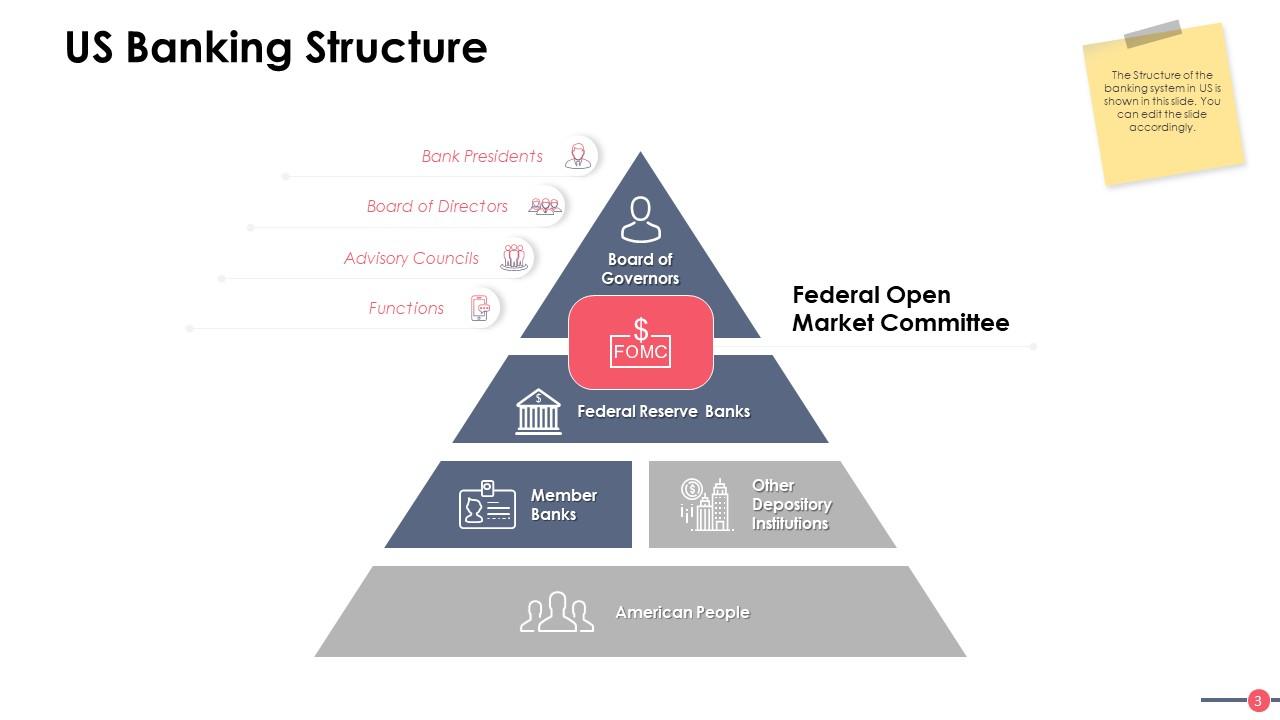
In this hierarchy triangle, the structure of the banking system has been laid down. Here it is given that the top triangle is occupied by the head of the system i.e. the Board of Governors, followed by the Federal Open Market Committee. Under this committee, Federal Reserve Banks, other member banks, depository institutions and at last, American people can be included.
You can also divide the structure into more categories - Bank Presidents, Board of Directors, Advisory Councils and list their roles in the respective fields. Depending on your requirements or the financial institution you work for, you can also make other changes to this template as well.
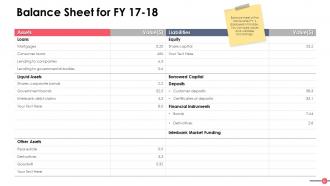
Template 2: Balance Sheet for FY 17-18
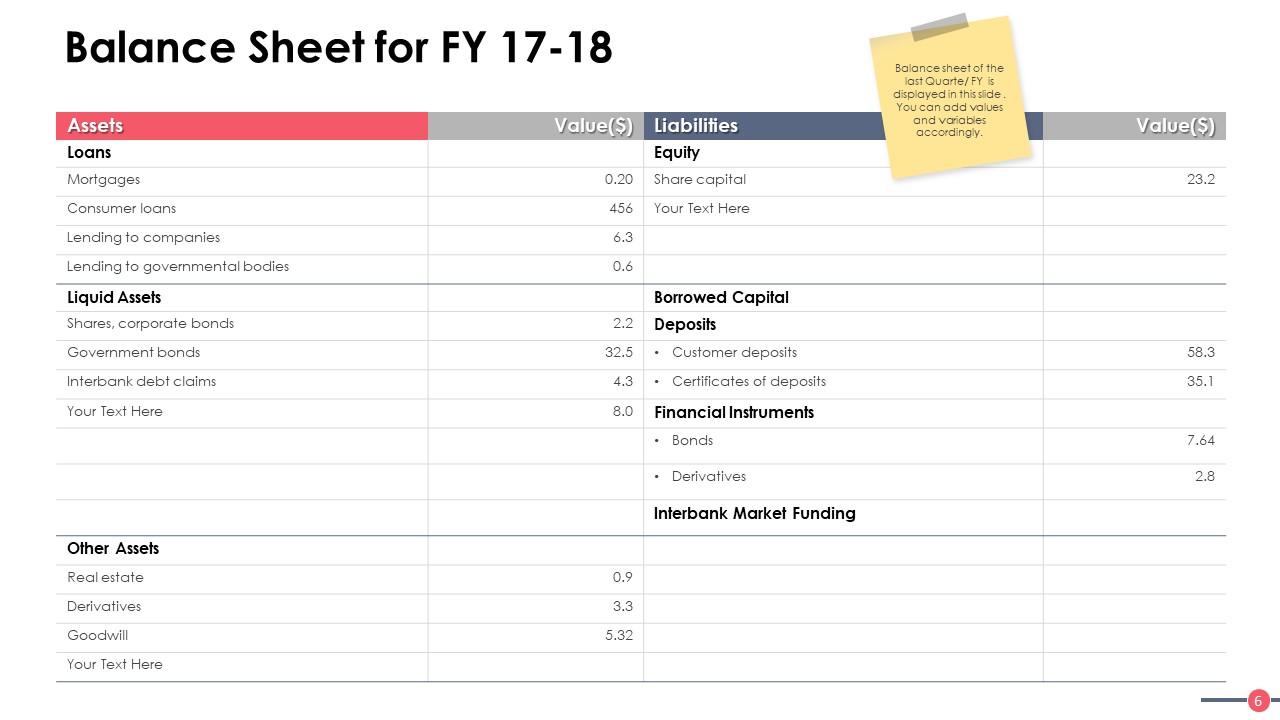
Assets and liabilities are two important aspects that need to be managed well for the smooth functioning of any bank. The above template lists the balance sheet, which depicts assets, liabilities and their corresponding values in tables. So, let us group the assets and liabilities into their sub-parts:
1. Assets: These refer to the entities that the bank owns. It can be categorized into loans, liquid assets, and some additional assets. Some of its examples are:
-
Loans: Mortgages, Consumer Loans, Lending to Companies, etc.
-
Liquid Assets: Shares, Corporate bonds, Government Bonds, etc
-
Other Assets: Real estate, Derivatives, etc.
2. Liabilities: Mainly this section can be divided into equity, borrowed capital and other monetary units which are basically financial obligations that the bank holds.
Under equity, you can mention the values for shared capital and other entities.
Borrowed capital can also be categorized into categories, which are deposits: Customer Deposits, Certificates of Deposits; financial instruments: Bonds, derivative and the third segment of interbank market funding.
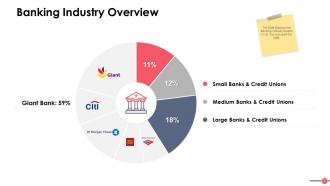
Template 3: Banking Industry Overview
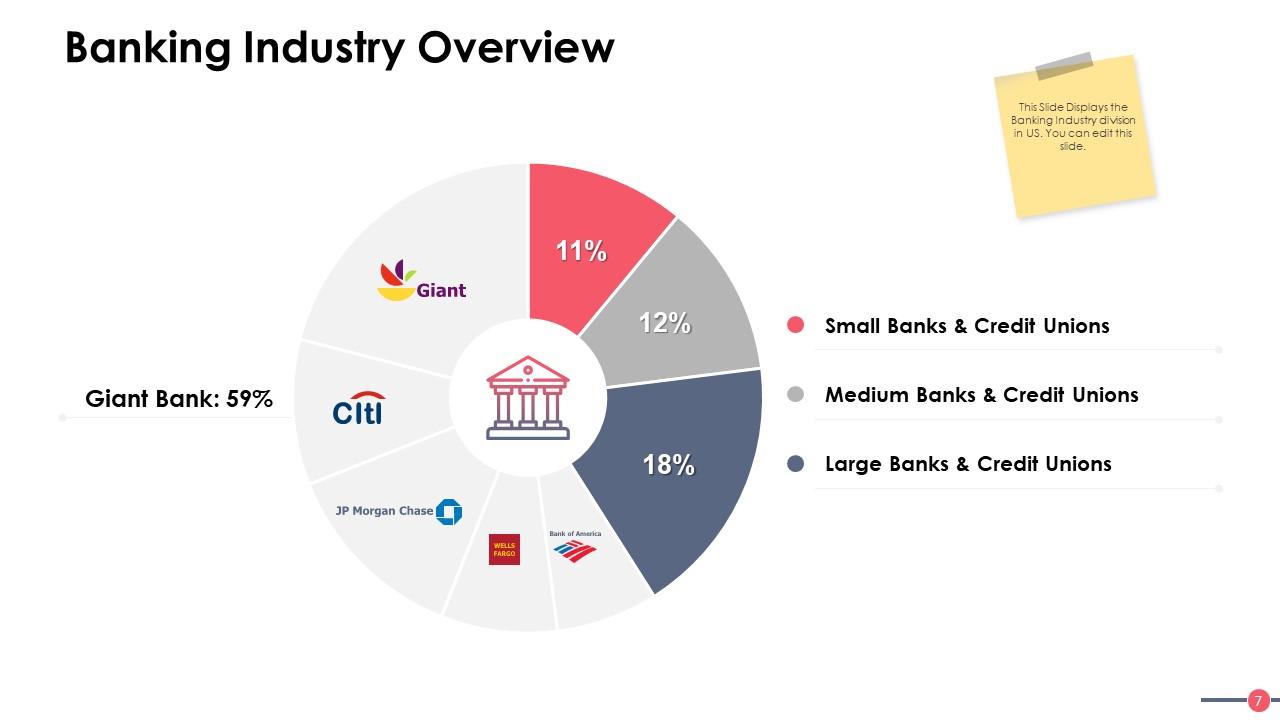
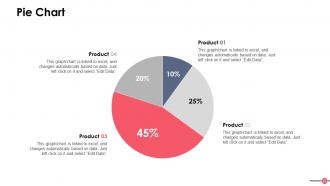
Use this template to showcase banking industry division in the United States. Here you can see that the Giant Bank holds the maximum percentage followed by Citi Bank and JP Morgan Chase. Also, other small, medium and large banks are included in this pie chart.
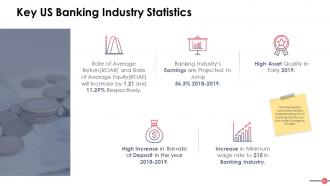
Template 4: Key US Banking Industry Statistics

Under this section, banking statistics of the United States are covered.
-
For example, we can mention the stats for Rate of Average Return (ROAR) and Rate of Average Equity (ROAE), like how much they can increase or decrease in the next year.
-
Next, you can write about the earning projections and the asset quality details.
-
You can add the deposit rate and minimum wage rate in the US banking industry.
Template 5: Leading US Banks by Revenue
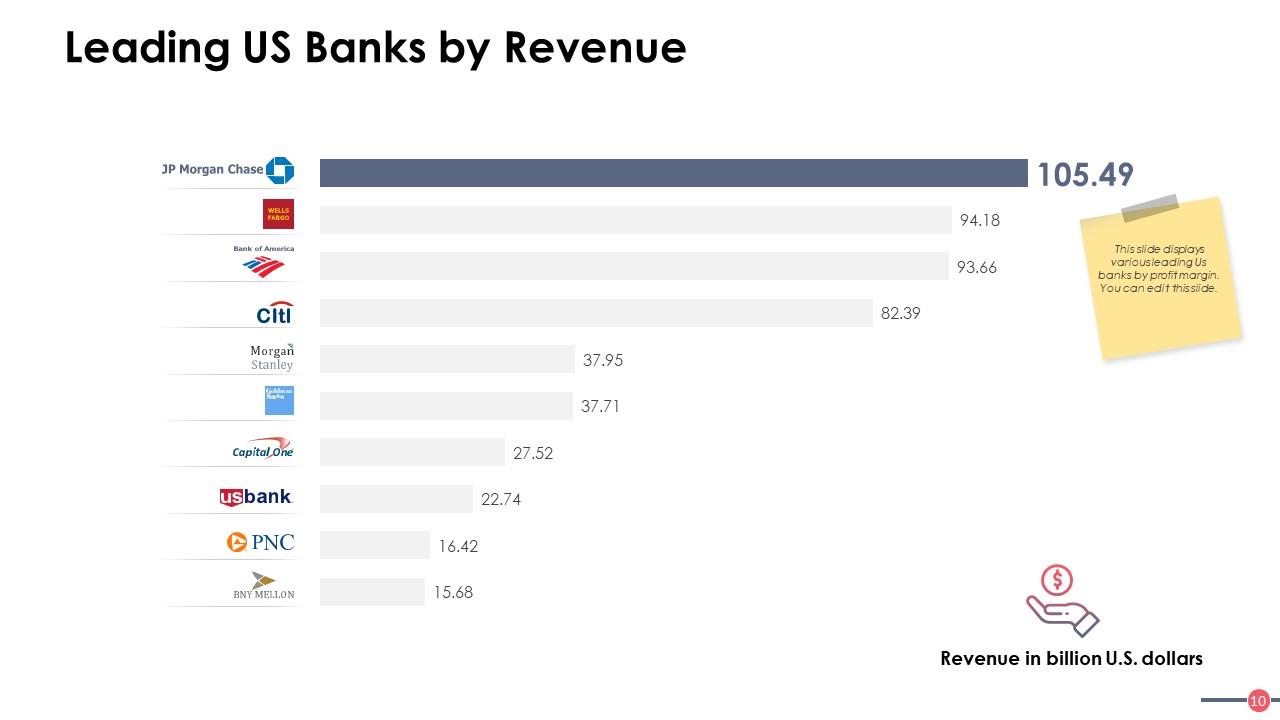
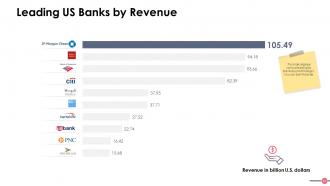
This Commercial Bank PowerPoint Presentation Slide is all about the profit made by the largest banks in the United States. This list is curated based on profits made by these leading banks.
According to this template, J.P. Morgan Chase is the number one US bank and made more than a hundred billion dollars in revenue. It is followed by some reputed financial institutions such as Wells Fargo, Bank of America, Citibank, and the like.
Template 6: Key Growth Drivers in US Banking Industry
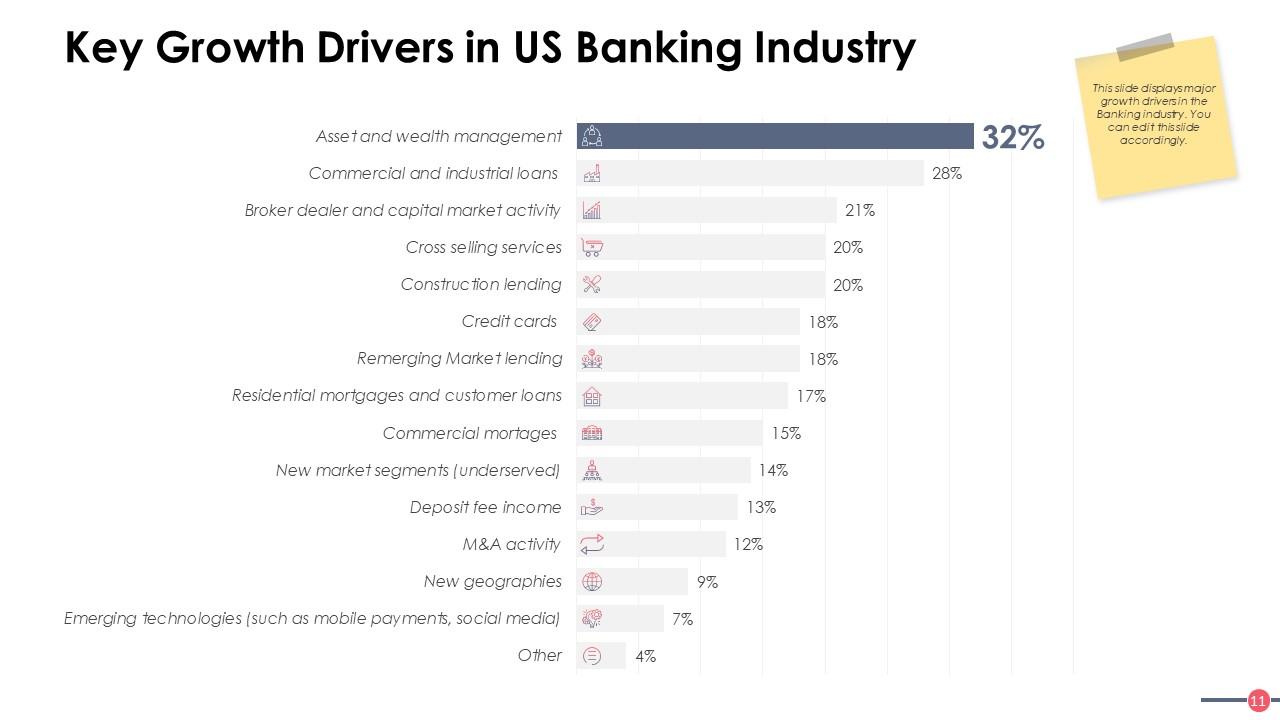
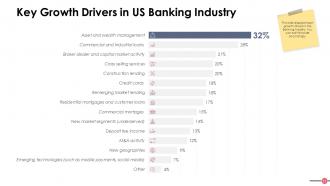
This template highlights the most important financial growth drivers responsible for a bank’s operations. These performance drivers are listed in this slide along with their percentage values. The major contributors to this section are asset and wealth management followed by commercial and industrial loans, broker dealer and capital market activity, and such similar banking entities.
Template 7: Federal Bank Regulations in US
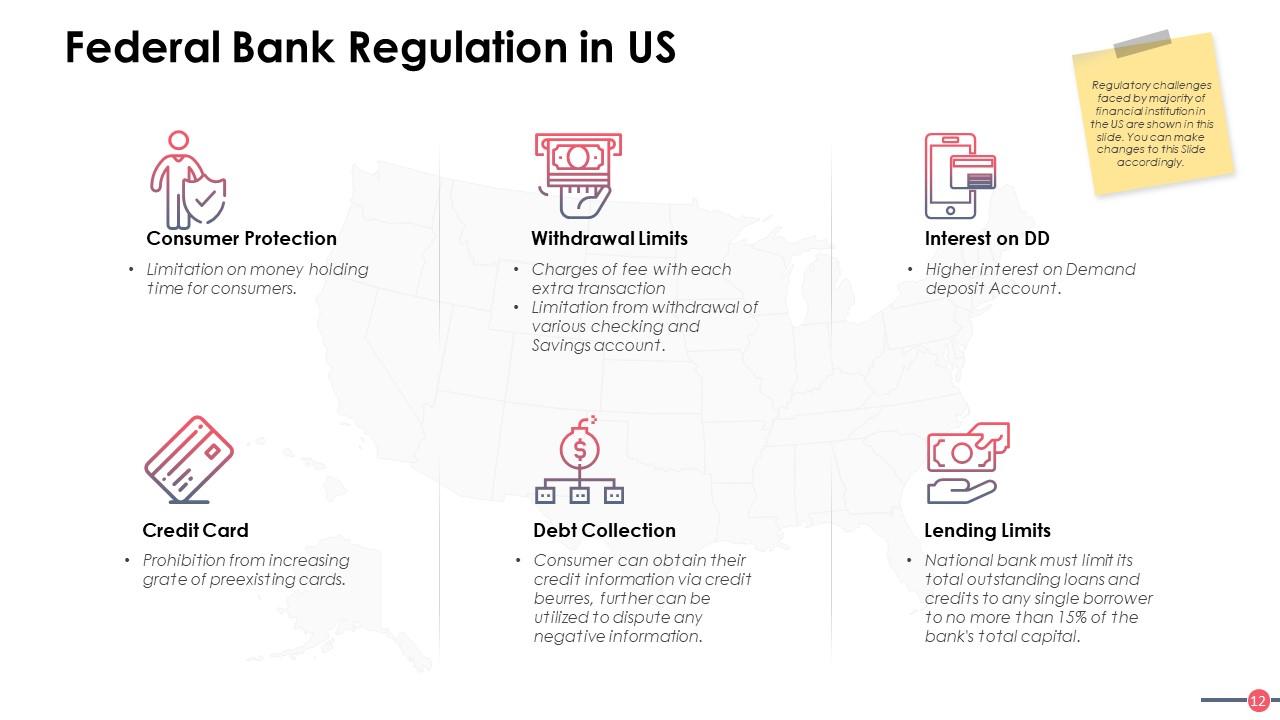
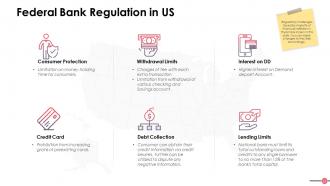
In this slide, the regulatory problems encountered by the bank are mentioned in a detailed presentable way. Let us take a look at some of these issues:
-
Consumer Protection: Time constraints for customers
-
Withdrawal Limits: Extra charge applicable for extra transaction
-
Interest on DD: High interest rate
-
Credit Card: Limitations on upgrading existing cards
Depending on the current banking scenario, you can modify this list. Also, if you want, you can change the icons/ symbols and the layout of this page.
Template 8: Services Offered to Customers
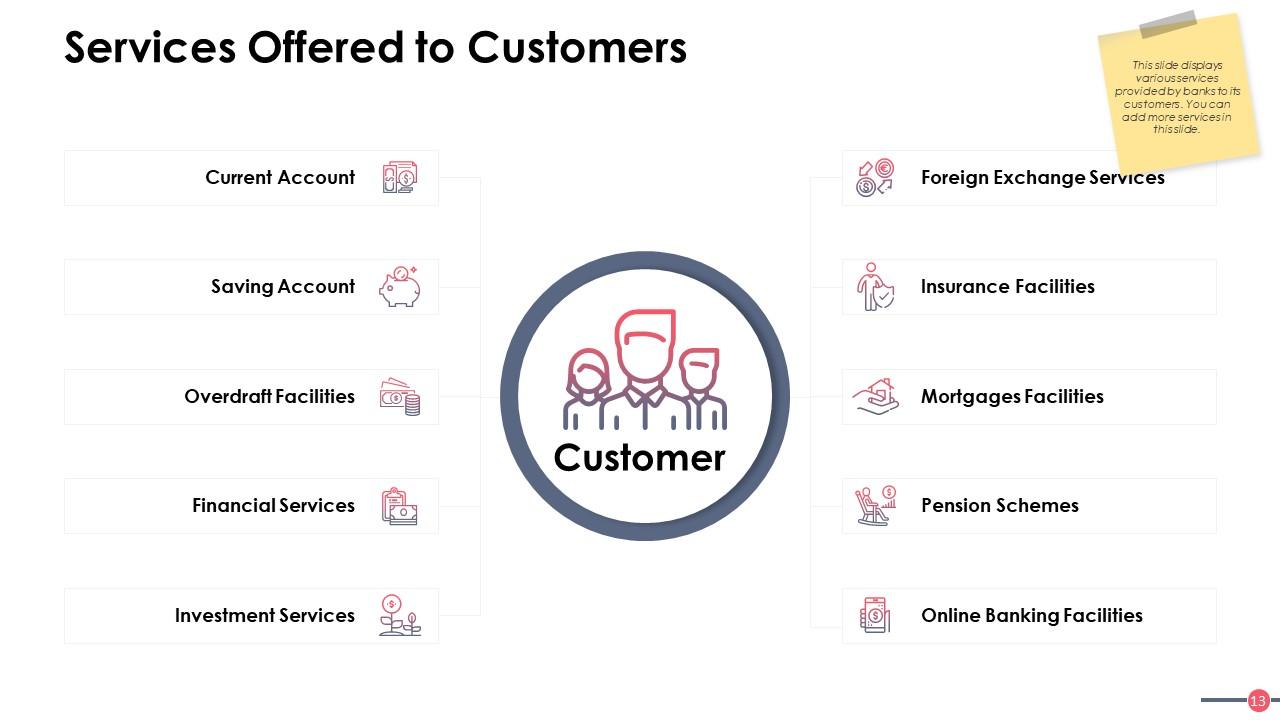
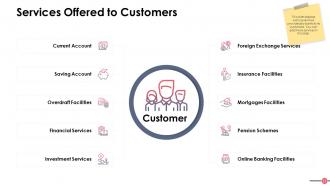
This template is all about the services that the commercial bank provides to its customers. It includes establishing the current account, savings account, overdraft facilities, investment services, insurance facilities, and other financial services as well.
Template 9: Loan Categories

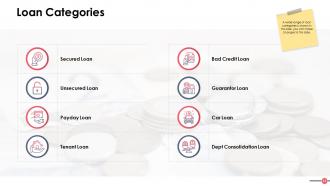
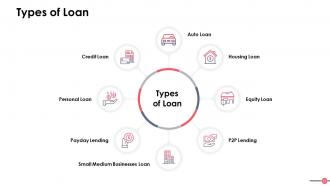
This template outlines loan categories along with their banking symbols. Some of them are secured and unsecured loans, payday loan, bad credit loan, tenant loan, car loan and guarantor loan. These loans are sanctioned up to the customers against specific borrowing terms for a particular time period.
Template 10: Revenue Projections

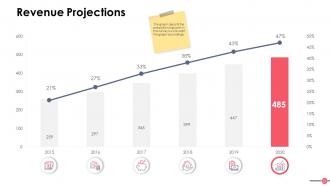
This template displays the future revenue projections predicted by the financial advisors for the upcoming years.
As shown in the graph, the current account is projected at 21% for 2015 and the savings account is at 33% for 2017. You can edit this template and enter the latest and future estimations based on the current performance of the financial entities.
Also, to observe the status of the pending cases, you can go through this Service Level Management Dashboard For Commercial Banks.
YOU CAN BANK ON OUR TRUSTED, WELL-CIRCULATED TEMPLATES
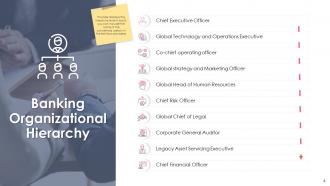
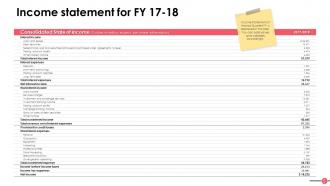
We have covered all major aspects of banking in our Commercial Bank PowerPoint Presentation Slides, so that you can explore aspects of it. Here, we have mentioned the banking structure, hierarchy, income statement, growth and revenue parameters and the additional services the bank offers.
Commercial Bank Powerpoint Presentation Slides with all 44 slides:
Enable fruitful interactions with our Commercial Bank Powerpoint Presentation Slides. Allow folks to benefit from an exchange of ideas.













FAQs for Commercial Bank
Start with the big financial numbers - ROA, ROE, net interest margin, plus how your loan portfolio breaks down by sector. Executive summary goes first, then market position and competitive stuff. Regulators eat up compliance status and risk management frameworks, so put those early too. Customer acquisition trends matter, along with any digital initiatives you're running. Strategic priorities should get their own section. The whole thing needs to flow like a story about what's driving profits and where growth is headed. Oh, and definitely keep a backup slide with extra data - someone always asks random questions about loan loss provisions or whatever.
Dude, visual design is huge for bank presentations. You build instant credibility when everything looks clean and professional - banking is all about trust, right? Consistent colors and sharp charts prove you're not sloppy with details. Good visuals also help translate those brutal financial numbers into something people can actually digest. I've watched so many presentations crash because they looked thrown together last minute (honestly painful to sit through). Stick to your brand colors, use quality graphics, make charts readable. Your audience will respect you way more from the first slide.
ROE, ROA, and net interest margin are your big three here. Start with ROE since that's what all the executives obsess over. NIM shows how well you're squeezing profit from that spread between deposits and loans - super important for banks obviously. Efficiency ratio matters too (lower's better). Credit quality stuff like NPL ratios work if yours don't suck. Honestly, trending charts over 3-5 years beat static numbers every time. Build your whole story around these metrics and you'll be solid.
Look, compliance is gonna control pretty much everything you put in those slides. Risk disclosures are mandatory - no getting around that. All your financial data has to hit reporting standards, plus you'll be stuck adding footnote disclaimers that nobody actually reads but legal insists on anyway. Capital ratios and stress test results usually need prominent placement too. The whole thing gets pretty heavy with legal jargon, honestly. Oh, and don't forget AML stuff if that applies. My advice? Loop in your compliance people way early - like, before you even start designing. Trust me, you don't want them tearing apart your presentation two days before the big meeting.
Start with the big picture - show them the current risk landscape first, then dive into your specific fixes with real examples. Executives eat up those visual risk matrices and heat maps, trust me. Put actual numbers on everything - dollar amounts, percentages, timelines. I'd avoid the mistake I see constantly where people just dump a bunch of policies without any context. Break it up with bullet points instead of walls of text. Oh, and definitely end each section with who's responsible for what next steps, otherwise nothing actually gets done.
Dude, just build your slides around actual customer stories - like follow "Sarah" from applying for her business loan all the way to opening her second location. People zone out on financial data, but they'll listen when you tell them how your lending saved some local restaurant during COVID. Start each section with something your audience deals with. Real case studies should be your foundation, then attach your product stuff to those stories. Oh and make each slide move the story forward instead of just info-dumping everywhere. Trust me, they'll remember stories way better than boring bullet points. Way better.
Honestly, case studies are game-changers for banking presentations. People's brains just connect better with actual stories than random stats. Like instead of saying "we boosted efficiency 30%" – tell them about that retail client you helped restructure their debt so they could actually grow. Real problem-solving beats generic claims every time. I mean, everyone says they're experts, right? But showing how you walked a struggling business through solutions? That's proof. Grab 2-3 solid client stories that highlight different services you offer. Way more compelling than another slide full of numbers.
Honestly, skip the bullet points and go straight for clean charts and graphs - they're way better for showing trends. Pick 3-4 solid metrics like lending growth or deposit changes over the last couple years. Your data sources need to be bulletproof because executives will 100% grill you on that stuff. Use colors that actually contrast so the trends jump out. Less text is your friend here - let the numbers do the talking. Oh, and don't forget a "so what" slide after your data that connects those market movements directly to what it means for your bank's strategy. That's usually where the real conversation starts anyway.
For banking stuff, PowerPoint's still king - executives expect it and the financial charting is solid. Google Slides is clutch if you're working with a team since everyone can edit simultaneously. Canva makes things look sleek fast, which is nice. Honestly though? I've watched people bomb with Prezi because they got too animated and lost their audience. Banking presentations need to feel trustworthy, not flashy. Clean visuals that don't compete with your data. PowerPoint handles complex charts way better than the alternatives anyway, so unless you have a specific reason to switch, just stick with what works.
Skip the boring mission statement stuff and go straight for real numbers with faces behind them. Before/after photos are money for community projects. Get some employee volunteers to share quick stories - way better than corporate fluff. Charts showing actual environmental wins or lives changed? Perfect. Most CSR presentations suck because they're just walls of text pretending to care. Focus on specifics like "we funded 50 small business loans" then show actual business owners. Keep it visual and real. People connect with genuine stories, not that generic "giving back" nonsense everyone spouts.
Oh man, the worst thing you can do is dump a wall of financial jargon on people without explaining what it means. I've sat through way too many of those - everyone just stares at their phones. Make your fonts big enough that people can actually read them (especially compliance stuff). Those cheesy stock photos of business handshakes? Skip them entirely. You don't need every single metric you have access to either. Pick maybe 3-4 numbers that actually matter for your story. And seriously, test your charts beforehand - if someone in the back row can't read it, it's useless.
Dude, international banking presentations are tricky as hell. Some cultures want all the nitty-gritty data upfront, others need the big picture story first. Colors are weirdly important too - red screams "danger" in some places but means good fortune elsewhere. Religious stuff around interest rates can totally flip how you pitch certain products. Even basic things like handshake photos might fall flat depending on where you're presenting. I learned this the hard way once in Singapore. Research your audience's cultural background before you go in. Trust me, spending that extra prep time will save you from looking clueless.
Skip the boring tables - execs won't even look at them. Try tiered pyramids or those circle diagrams to show your best customers right away. Heat maps are solid for geographic stuff too. I'd go with clean infographics that highlight wallet share and retention rates for each group. Makes it super obvious which segments actually make you money vs the ones bleeding cash. Oh, and definitely include next steps for each segment on one slide - saves everyone the "so what do we do now?" conversation later.
For interactive stuff, I'd throw in some clickable navigation and maybe an embedded loan calculator - people always mess around with those for way too long, which is perfect. Animated charts that build up piece by piece look pretty slick too. You could do a quick poll about banking habits or toss in some hyperlinked case studies. Oh, and interactive timelines showing company milestones work well. But seriously, don't overdo it. Pick like 2-3 things max or it'll feel chaotic. I'd start with just one calculator and see how people respond.
Honestly, stick to the classics first - net interest margin, ROE, ROA, and loan growth. Those show if your bank's actually making money doing bank stuff. Cost-to-income ratio is huge too because investors get excited about efficiency gains. Non-performing loan ratios are critical for asset quality - nobody likes nasty surprises hiding in the loan portfolio. Customer deposit growth and fee income trends help complete the story. Oh, and definitely show 3-5 years of historical data so people can see real trends instead of just random quarterly noise. Makes a huge difference in credibility.
No Reviews