Compliance management dashboard with open issues and risk assessment

Rating:
96%
Compliance management dashboard with open issues and risk assessment
Slide 1 of 2
Favourites Favourites

Try Before you Buy Download Free Sample Product

Audience Impress Your
Audience
Editable 100%
Editable
Time Save Hours
of Time
The Biggest Sale is ending soon in
0
0
:
0
0
:
0
0
Rating:
96%
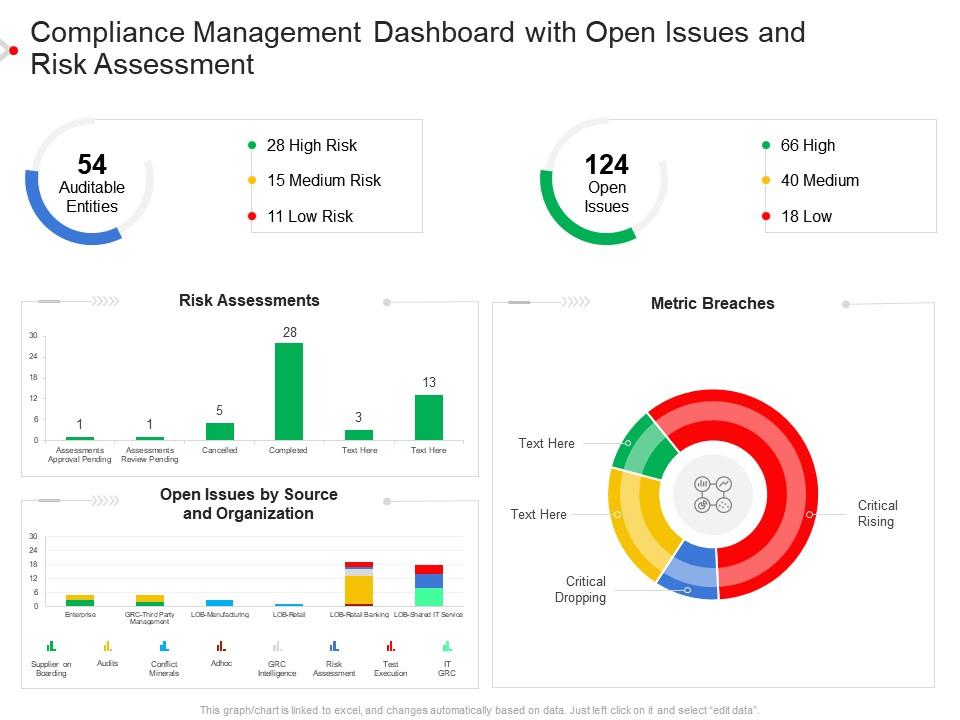
Presenting our well structured Compliance Management Dashboard With Open Issues And Risk Assessment. The topics discussed in this slide are Risk Assessments, Organization, Metric Breaches. This is an instantly available PowerPoint presentation that can be edited conveniently. Download it right away and captivate your audience.

People who downloaded this PowerPoint presentation also viewed the following :

FAQs for Compliance management dashboard with open issues

Focus on compliance rates, overdue violations, and upcoming regulatory deadlines first. Training completion is huge too - honestly that's where most companies mess up. Track your incident response times and flag which departments are your biggest headaches. Red/yellow/green lights work great for exec dashboards since nobody wants to read paragraphs. Audit trend data helps spot patterns before they bite you. Oh, and don't go crazy with metrics right away. Start simple with what you'll actually look at, then build from there once you know what matters.

Honestly, charts and graphs are game-changers for compliance stuff. Raw spreadsheets make my eyes glaze over, but visual data? You can spot problems instantly. Heat maps show which departments are having issues, bar charts track your scores over time - it's so much clearer. Plus your boss will actually pay attention during presentations instead of zoning out at rows of numbers. I'd start simple with basic charts first. The difference is honestly night and day once you make the switch. Way less headache trying to find patterns buried in endless data.

SOX, GDPR, HIPAA, and SOC 2 are the big ones you'll bump into most - they handle financial stuff, data privacy, healthcare data, and security controls. ISO 27001 is another major player for info security. There's literally a new acronym popping up every other week, I swear. But those five are what most dashboards track automatically. Figure out which ones actually apply to your business first though. No point monitoring everything when half of it doesn't even matter for your industry. Then just set up automated tracking for your specific ones.

Honestly? Daily updates are the bare minimum, but real-time is way better if your system can swing it. Most regulatory stuff is fine with daily refreshes, though risky areas might need hourly ones. I'd probably shoot for morning updates before everyone gets in - that way your team isn't working with yesterday's numbers. Real-time sounds fancy but isn't always practical (trust me on this one). The worst thing is when your data goes stale right before an audit. Set up alerts so you'll know if updates crash. It's all about balancing accuracy with what your system can actually handle without dying.

Honestly, automation is what saves your sanity with compliance dashboards. It grabs data from all your systems automatically and updates everything in real-time. Trust me, you don't want to be manually pulling reports from 20 different sources every week - I've been there and it's brutal. Plus it catches issues early instead of you finding out during audit crunch time. The consistency is huge too since you're not dealing with copy-paste errors or missed updates. Set up alerts for your critical stuff and you'll actually sleep better knowing problems get flagged right away.

Yeah so basically you want different dashboard views for different people. C-suite gets the big picture stuff - trends, high-level risk summaries, that sort of thing. Your compliance folks need all the nitty-gritty details about violations and whether things got fixed. Legal cares about deadlines and audit trails mostly. The key is setting up filters and permissions so people only see what matters to them. Nobody wants to scroll through irrelevant data - it's just annoying. Most tools will let you automate reports too, which is honestly a lifesaver because then stakeholders get exactly what they want in their inbox without bugging you for it.

Look at what tools your team actually uses every day first - don't waste time connecting random stuff. API integrations with your main security platforms and ticketing systems should be priority one. Real-time data beats batch imports when you can swing it. Way too many teams go crazy trying to connect everything and it becomes a nightmare honestly. Get your authentication sorted properly, then set up alerts that ping your usual communication channels. Oh and definitely test with a small group first - learned that one the hard way. You'll save yourself major headaches later.

So compliance dashboards are pretty clutch - they show you all your risk stuff in real time instead of hunting through endless spreadsheets (which is honestly the worst). You can spot policy violations, audit issues, regulatory gaps, all that fun stuff in one spot. The alerts help you figure out what to tackle first based on how bad it could get. I'd definitely set up automated notifications for the high-risk areas so you're not sitting there refreshing it every five minutes like it's Instagram. Plus you can actually see if your fixes are working over time, which is nice for once.

Honestly, data quality is gonna be your biggest headache - compliance info is usually spread across like 5 different systems. Getting people to actually use the dashboard consistently? Good luck with that. Focus on the metrics that actually matter to your stakeholders first, not just pretty charts that look impressive but tell you nothing. Training is critical because confused users become non-users real quick. Oh, and don't get caught up in fancy visualizations right away. Start simple with your most critical compliance stuff, then build from there. Trust me on this one.

Honestly, user feedback is everything when you're building compliance dashboards. People will straight up tell you which metrics they actually care about and where they're hitting roadblocks. I can't tell you how many "beautiful" dashboards I've seen that just collect dust because nobody wants to use them. Surveys and user interviews are your best bet here. Usage analytics help too. Ask what's driving them crazy right now - that's usually where you'll find the biggest wins. Then you can fix the confusing charts, add missing features, and focus on stuff that actually matters for their day-to-day work.

So AI and machine learning are totally changing the compliance dashboard game right now. You're getting real-time risk scoring and automated anomaly detection that catches problems before they blow up. The predictive analytics stuff is pretty solid too. What's really cool though is how natural language processing can now read through all that regulatory text and actually make sense of it for you - saves so much time. Oh, and everything's moving to cloud-native which makes integration way easier. I'd definitely look at vendors who've already built AI features into their platforms rather than waiting around.

Honestly, compliance dashboards are a game-changer for executives who need to stay on top of things. Real-time visibility across your whole organization means you're not waiting around for those boring quarterly reports anymore. Spot problems before they blow up into expensive headaches. The visual setup makes board presentations way less painful too - way better than drowning people in spreadsheets. Plus you can set alerts so the really critical stuff lands in your inbox right away. It's basically like having a health monitor for your compliance program, which sounds nerdy but actually works.

Bad compliance data is honestly a nightmare waiting to happen. Regulators will hit you with fines for misreporting. Audits fail. Shareholders can sue if they make decisions based on your bogus numbers. SOX, GDPR - all those rules become weapons against you when your data's wrong. The scary part? Executives get personally liable too, not just the company. I've seen people lose sleep over this stuff. Set up solid validation processes now and audit your dashboard sources regularly. Trust me, it's way less painful than explaining to lawyers later why your numbers were garbage.

Start with just 3-5 metrics that actually matter for your specific situation - don't get overwhelmed. Track audit pass rates, how often incidents happen, training completion, and how fast you fix violations. The key thing is watching trends over time, not just random snapshots. I've honestly seen way too many teams obsess over numbers that look good but don't tell you if your compliance is actually working. Mix leading indicators (like policy acknowledgments) with lagging ones (actual violations). Set up alerts when things drop below where they should be. Oh, and definitely focus on proactive stuff like risk assessments - that's where you'll catch problems before they bite you.

So basically it's about timing and who's using them. Operational ones are for daily stuff - violations happening right now, tasks due today, fires you gotta put out immediately. Tactical dashboards look at weeks or months, showing you patterns in how compliance is actually going. Strategic ones are the executive view - quarterly numbers, big regulatory shifts, long-term risks. Most places honestly need all three, but where you start depends on your role. If you're drowning in daily issues, go operational first. Want to convince the C-suite? Start strategic.

Ratings and Reviews

96% of 100
Write a review
Most Relevant Reviews
  1. 100%

    by Don Hansen

    I discovered this website through a google search, the services matched my needs perfectly and the pricing was very reasonable. I was thrilled with the product and the customer service. I will definitely use their slides again for my presentations and recommend them to other colleagues.
  2. 100%

    by Clay Castillo

    Colors used are bright and distinctive.
  3. 100%

    by Denis Rose

    Design layout is very impressive.
  4. 80%

    by Cyrus Ellis

    Excellent products for quick understanding.
  5. 100%

    by Dylan Richards

    Great product with effective design. Helped a lot in our corporate presentations. Easy to edit and stunning visuals.

5 Item(s)

per page: