

Corporate Compliance Risk And KPIs Dashboard Snapshot




Try Before you Buy Download Free Sample Product
 Impress Your
 Audience
 100%
100% Editable
 Save Hours
 of Time


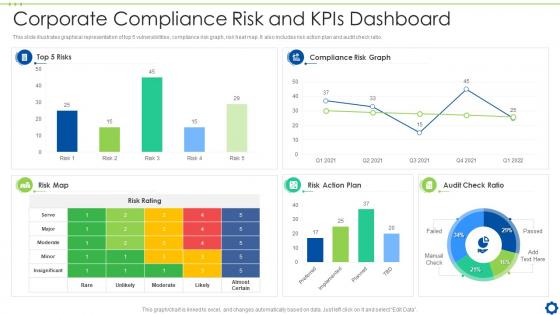
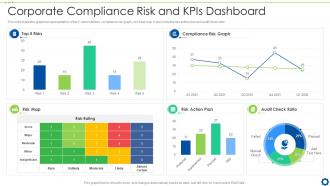
This slide illustrates graphical representation of top 5 vulnerabilities, compliance risk graph, risk heat map. It also includes risk action plan and audit check ratio.
People who downloaded this PowerPoint presentation also viewed the following :
Corporate Compliance Risk And KPIs Dashboard Snapshot with all 7 slides:
Use our Corporate Compliance Risk And KPIs Dashboard Snapshot to effectively help you save your valuable time. They are readymade to fit into any presentation structure.





FAQs for Corporate Compliance Risk And
Track completion rates for training and policy acknowledgments first - those are your bread and butter. Audit findings, incident reports, and risk scores should be next on the list. Oh, and don't forget vendor compliance and exception approvals since they're easy to miss. My advice? Start simple because these dashboards can turn into absolute monsters if you're not careful. Better to focus on stuff that'll actually make your team take action rather than just impressing the C-suite. Once everyone's comfortable with the basics, then you can add fancier metrics.
Seriously, visualizations are a game-changer for compliance stuff. You can spot problems instantly instead of drowning in spreadsheets. Heat maps show which departments are falling behind, and trend lines tell you if things are actually getting better. Bar charts work great for tracking violations by team - honestly, you'll kick yourself for not doing this sooner. The patterns just jump out at you. Plus, your boss will way prefer looking at colorful charts over raw data dumps (learned that one the hard way). Start simple and build from there.
Dude, real-time data is what separates the good compliance dashboards from the trash ones. You can't wait around for last week's reports when issues are blowing up right now. Catching violations early vs. finding out after everything's already gone sideways? No contest. It's like checking your bank balance before dropping cash on something expensive - you need current info, not old statements. I'd honestly set up alerts for your riskiest stuff first, then work from there. The whole point is preventing fires instead of just writing reports about the ashes later.
Ask each team what metrics actually stress them out first - that's your starting point. HR probably wants training completion rates and who hasn't signed off on policies yet. Finance cares more about audit stuff and regulatory deadlines. Most platforms let you filter everything by department and set up different access levels (which is honestly pretty cool). Short sentences work better for dashboards anyway. You can tweak the KPIs and set up custom alerts so people only see what matters to their day-to-day work. Oh, and don't forget about reporting schedules - some teams want daily updates, others just need weekly summaries.
Map out where all your compliance data lives first. Honestly, just pick one or two systems for a pilot - going big right away is a nightmare. Real-time feeds beat batch uploads every time if you can swing it. Your compliance team's gonna be weird about permissions, so nail down who owns what data upfront. Get IT security looped in early or they'll torpedo your plans later (trust me on this one). Oh, and document your APIs properly. Sounds boring but you'll thank yourself when things inevitably break at 2am.
Okay so first thing - get your data governance sorted with verified sources and clear ownership. Automated validation rules will catch the obvious stuff, but honestly manual spot-checks are still clutch. I'd set up regular audits and let users flag weird stuff they notice. The whole point is building redundancy so one bad source doesn't wreck your dashboard's credibility. Oh, and document your current data flow first - sounds boring but you'll spot the weak points right away. Trust me on this one.
Honestly, start with whatever BI tool your IT folks already know - Tableau or Power BI are both great for dashboards that executives will actually use. The real work is on the backend though. Most people use cloud tools like Alteryx or build custom APIs to pull data from HR, finance, legal systems, all that stuff. But here's the thing - doesn't matter how fancy your tool is if your data's a mess. Map out your key compliance metrics first, then figure out where that data lives. Oh, and standardize everything before you even think about dashboards. Trust me on that one.
Just stick rating buttons and comment boxes right in the dashboard so people can complain without going anywhere else. Pop-up surveys work too, but honestly don't spam them or everyone'll just X out immediately. Make a separate inbox for all this feedback - trust me, you'll start seeing patterns pretty quick. Oh, and add those "report an issue" links on each section. The whole point is making it stupid easy to give input. Once your compliance team can actually use the thing without pulling their hair out, they'll love you for it.
Think of it as your radar for catching problems early. Instead of drowning in spreadsheets, you get visual heat maps showing weird spikes in violations or departments slacking on training. Honestly, the trend lines are pretty clutch - they make it obvious where trouble's brewing. You can spot audit issues clustering in certain areas before they explode into bigger headaches. Set up alerts for your main risk stuff so you're not constantly monitoring. It's like having that bird's eye view but actually useful, you know?
Look, your compliance team has to actually use this thing when they're stressed and under tight deadlines. Clunky interfaces are the last thing anyone needs during an audit. Make sure the navigation is super clear, fonts are readable, colors have good contrast - basically design it so anyone can jump in and find stuff quickly. This includes people with disabilities too, obviously. I learned this the hard way when our old dashboard was a nightmare to navigate. You want something clean enough that you could pull it up in front of your CEO without having to give them a tour first.
Honestly, pull up your compliance dashboard in team meetings instead of those death-by-PowerPoint sessions everyone hates. Show the actual numbers - where you're killing it, where things went sideways recently. Way more engaging than slides, trust me. When alerts pop up, don't just fix them quietly. Turn those moments into mini teaching sessions about why this stuff actually protects everyone's paychecks. The data becomes this whole story about keeping the company (and your jobs) safe. Even works great for onboarding new people since they can see the real picture instead of just reading policy manuals.
Focus on how fast you're resolving issues and spotting problems before they blow up. Training completion rates matter, but honestly the real test is whether people actually use your dashboard - if it's clunky, nobody will. Track your detection rates against industry benchmarks and see how much manual work you've cut out. The big question though? Are you preventing violations or just documenting disasters after they happen. Set quarterly goals but don't be afraid to pivot if something isn't working for your specific risk situation.
Daily updates are usually your best bet for compliance dashboards. Real-time is even better if you can swing it - compliance issues have zero chill and show up whenever they feel like it. Most companies do fine with daily refreshes since it catches trends and problems before they blow up. High-risk industries though? You'll probably want hourly updates or live data. I'd honestly just start with daily and see how it goes. If you're constantly missing stuff that matters, then bump up the frequency. Match it to how much risk you're actually dealing with - no point overdoing it if you don't need to.
Honestly, the worst thing companies do is try tracking everything right away - total dashboard overload. Start with maybe 3-5 metrics that actually matter for your biggest compliance headaches. Also, seriously involve the people who'll use this thing daily from the beginning. I've seen so many gorgeous systems that nobody touches because they don't fit how people actually work. Data quality is another mess waiting to happen if you don't clean up your sources first. Oh and get buy-in early or you'll build something beautiful that just sits there collecting digital dust.
Honestly, a compliance dashboard is like having everything in one spot so you're not digging through random files when auditors knock. It tracks all your metrics automatically and catches violations before they blow up. The reporting feature is pretty solid too - generates exactly what regulators want without you doing the work. Historical data gets saved (thank god) because auditors always ask about weird stuff from forever ago. You can see real-time updates which makes you look like you actually have your act together. Set up those automated reports ASAP - trust me, you don't want to be scrambling last minute.
-
The design is clean-cut, modern, and sleek, keeping the users' needs in mind. The multiple uses make this product worth every penny!
-
Kudos to SlideTeam for achieving the high success rate in delivering the top-notch slides.