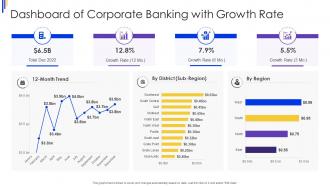
Dashboard Snapshot Of Corporate Banking With Growth Rate
Try Before you Buy Download Free Sample Product
Audience
Editable
of Time
This graph or chart is linked to excel, and changes automatically based on data. Just left click on it and select edit data.
People who downloaded this PowerPoint presentation also viewed the following :
Dashboard Snapshot Of Corporate Banking With Growth Rate with all 7 slides:
Use our Dashboard Snapshot Of Corporate Banking With Growth Rate to effectively help you save your valuable time. They are readymade to fit into any presentation structure.
FAQs for Dashboard Snapshot Of Corporate Banking
Honestly, start with the basics that'll actually tell you how you're doing. Loan portfolio performance and deposit growth are your bread and butter. Net interest margins too - that's where the money is. Keep an eye on non-performing loan ratios because nobody wants those surprises later. Customer acquisition costs matter, but relationship profitability per client is huge since one corporate client can totally change your quarterly numbers. Cost-to-income ratios help with the operational side. Once you've got these dialed in, you can add whatever fancy metrics your executives are obsessing over this quarter. But seriously, nail the fundamentals first.
Okay so basically instead of drowning in boring spreadsheets, data viz turns all those banking numbers into something you can actually understand quickly. Charts and heat maps show you which segments are crushing it, while trend lines tell you if your lending's going up or down. I mean, it's way easier to spot problems when you can literally see them as patterns and outliers - beats staring at rows of data for hours. The trick is picking the right type of chart for whatever you're measuring. Your team will thank you because they can make decisions faster without getting lost in all those numbers.
Dude, you NEED real-time data or you're basically flying blind. Cash flow problems? Weird transactions? You'll catch them instantly instead of finding out when it's too late. It's like the difference between getting a text vs waiting for a letter in the mail - one's useful, the other's just... not. I learned this the hard way actually. Managing corporate funds without live updates is sketchy as hell. Your vendor better promise data refreshes under a minute for the important stuff, or find someone else.
So basically you'd want to set up different views for each type of user. CFOs just need the big picture financial stuff and risk alerts. Treasury managers are gonna want all the detailed cash flow data - they're pretty obsessed with liquidity numbers. Relationship managers? They're all about client portfolios and transaction volumes, that's their bread and butter. Oh and definitely set permission levels so sensitive info doesn't show up for everyone. The trick is figuring out what each role actually needs to make decisions, then you can build focused widgets that show just that stuff. Saves everyone from drowning in irrelevant data.
Dude, financial data is no joke - you need to stack your defenses. Multi-factor auth is non-negotiable, plus end-to-end encryption for everything moving around. Set up role-based access so people can't snoop where they shouldn't. Session timeouts are huge because trust me, bankers are terrible at logging out. Real-time monitoring catches the sketchy stuff, and you'll need regular audits too. Oh, and if you're doing API integrations, lock those endpoints down tight. Seriously though, get your security folks in from day one - trying to add this stuff later is a nightmare.
Honestly, start small - pick like one or two external data sources that actually matter for your decisions. Most banking platforms handle REST APIs pretty well, so pulling in market data or credit ratings isn't too bad. The annoying part is always getting everything to map correctly so your dashboards don't look like garbage. Real-time feeds are cool but batch imports work fine too. I'd figure out which external metrics you actually need first, then work backwards. Oh and set up proper data governance from the start - trust me on that one. Don't go integration-crazy right away.
Put the most important stuff right at the top - cash flow, any alerts, things waiting for approval. Bank people need to see that immediately. Navigation should feel familiar, nothing fancy that'll confuse them. Honestly, robust search is huge because they're always digging into specific transactions. I'd probably test it with actual relationship managers pretty early - they'll spot problems you won't even think of. Oh, and stick with banking terms they already know. Don't get creative with language when money's involved. Keep everything consistent across screens too.
Honestly, just start with embedding one or two predictive models into your dashboard - cash flow forecasting is usually the easiest win. You can show stuff like "expected defaults next quarter" right next to your current loan portfolio health. Pretty wild how much clearer everything becomes once you get the hang of reading those patterns. Credit risk and churn prediction work great too. The real trick? Set up alerts when certain thresholds get hit. Otherwise you'll just be staring at even more numbers all day, which... yeah, nobody wants that. I'd focus on the models that actually tell you when to act rather than just showing more data.
So most banking dashboards can pump out cash flow reports, transaction summaries, account reconciliation stuff - the usual. Monthly and quarterly statements too. The fraud alerts are clutch though, seriously saved my butt multiple times. You can set most of these to auto-send to your team weekly or whatever works. Transaction reports you can filter by date or category which is handy. Oh and compliance reports if you're into that kind of fun. I'd probably start with basic cash flow and transaction stuff first, then see what else your team actually wants to look at regularly.
Honestly, these dashboards are lifesavers for compliance stuff. Everything's in one place instead of jumping between like five different systems. You can pull audit trails super quick, track weird transactions, and get alerts before you hit those regulatory limits. The automated AML flags alone make it worth it - saves hours every week, no joke. Most come with CTR and SAR templates already built in, which is clutch. Oh and definitely put your main compliance metrics right on the home screen. Trust me, you'll catch problems way earlier that way instead of scrambling later.
Dude, go with Power BI or Tableau for your corporate banking dashboard - both handle complex financial stuff really well. Power BI's probably your winner though since it meshes perfectly with whatever Microsoft setup your bank's already running. Tableau's great too if you need something up fast and aren't tied to Office 365. There's also Qlik Sense but honestly? The learning curve's brutal and might not be worth it unless you really need those advanced analytics features. I'd just stick with Power BI if you're already in Microsoft land.
Honestly, user feedback is what separates dashboards that actually get used from those expensive digital paperweights. I'd start with surveys and user interviews, but the real gold comes from watching people navigate it live - you'll catch workflow issues you never saw coming. Track which features get completely ignored too. Listen for complaints like "where the hell is the cash flow data" or "this thing loads slower than my grandma's computer." Monthly check-ins with your main users work well. Then just tackle whatever's screwing up people's daily routine first. Pretty charts mean nothing if nobody can find what they need.
So predictive analytics is absolutely taking over corporate banking dashboards right now. You'll get alerts about cash flow problems weeks before they actually happen - it's wild. Everything's mobile-first too since we're all working from random places now. Remember when mobile banking was just for regular people? Anyway, API integrations let you see all your banking relationships in one spot instead of logging into five different portals. The customization options are getting crazy good too. These dashboards aren't just nice charts anymore - they're legit helping people make faster decisions and catch risks early.
Honestly, these dashboards are game-changers for corporate banking. You get everything in one spot - cash flow, credit usage, transaction history, profitability numbers. No more digging through different systems when you're prepping for client calls. What I love most is catching problems early, like when a client's spending patterns shift or their credit utilization spikes. The interaction tracking saves you too - remembering what you talked about months ago is impossible otherwise. Cross-selling becomes way easier when you can actually see the full picture. Oh, and definitely set up alerts for the metrics that matter most to your clients.
Data silos are gonna be your worst enemy - banking systems are notorious for not playing nice together. Legacy stuff makes integration a total pain. Compliance requirements will slow you down too, plus everyone argues about which metrics actually matter (classic, right?). My advice? Start small with your most critical data sources. API connections and solid data governance upfront will save you headaches later. But honestly, the biggest thing is involving actual users from the start. Otherwise you'll build something beautiful that nobody wants to use. Trust me, I've seen it happen way too many times.
-
Innovative and Colorful designs.
-
Great product with effective design. Helped a lot in our corporate presentations. Easy to edit and stunning visuals.