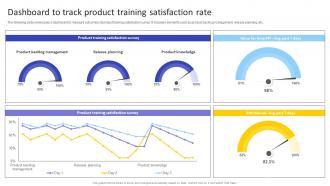
Dashboard To Track Product Training Satisfaction Rate Agile Product Owner Training Manual DTE SS
Try Before you Buy Download Free Sample Product
Audience
Editable
of Time
The following slide showcases a dashboard to measure outcomes of product training satisfaction survey. It includes elements such as product backlog management, release planning, etc.
People who downloaded this PowerPoint presentation also viewed the following :
Dashboard To Track Product Training Satisfaction Rate Agile Product Owner Training Manual DTE SS with all 10 slides:
Use our Dashboard To Track Product Training Satisfaction Rate Agile Product Owner Training Manual DTE SS to effectively help you save your valuable time. They are readymade to fit into any presentation structure.
FAQs for Dashboard To Track Product Training Satisfaction Rate Agile Product Owner Training
Start with what decisions people actually need to make - that's everything. Clean charts beat messy tables every time, and honestly, white space saves lives (dashboards get so cluttered otherwise). Make your navigation dead simple and pick KPIs that users genuinely care about. Responsive design matters since half your team will check this on their phones. Filtering options are clutch for drilling down. Keep your styling consistent throughout. Oh, and match how people actually work - if your dashboard fights their workflow, they won't use it.
Dude, real-time data integration is a game changer. Your dashboard stops being this stale snapshot and becomes actually useful – you're seeing what's happening NOW instead of yesterday's old news. Honestly, I can't believe companies still make decisions off day-old data sometimes. You'll catch problems before they blow up and spot trends right as they're starting. Set up alerts for your important stuff so you don't have to babysit the dashboard constantly. It's like watching live coverage vs reading about it later – way more actionable.
Start with what matters most - make the important stuff visually pop so users spot it fast. White space is your friend here, don't cram everything together like you're running out of room. Simple color palette works way better than those awful rainbow disasters (ugh, why do people still do that?). Group similar metrics so it makes sense, keep formatting consistent throughout. Your users should get the main insights in like 5 seconds max. Design for how they actually work, not what looks pretty in your portfolio. Definitely test with real people early - they'll spot weird stuff you missed.
Yeah so different industries basically build their dashboards around whatever keeps them up at night, you know? Like healthcare tracks patient stuff and bed counts. Retail's all about sales and inventory - makes sense. Manufacturing is probably the most intense though, they monitor everything from production speed to when machines break down. Financial companies obsess over risk metrics and regulatory stuff (obviously). The trick is figuring out what data actually matters for making decisions in your specific field first. Then you can build something useful instead of just pretty charts that don't help anyone.
Okay so basically data viz is what makes your dashboard actually readable instead of just rows of boring numbers. Your brain picks up on charts and graphs way quicker than trying to scan through spreadsheets - I swear it's like night and day. Heat maps, bar charts, whatever works for your data. You'll spot trends and weird outliers instantly. But don't just throw any random chart at it though. Wrong visualization? You've made things worse, not better. Figure out what story you're trying to tell first, then pick the chart that actually shows it. Nobody wants to squint at tables all day anyway.
Honestly, dashboards are lifesavers when you're drowning in data. You get all your key metrics in one spot instead of hunting through endless spreadsheets - which I still do way too often, but whatever. They're perfect for spotting trends quickly and catching problems before they blow up. Your team can actually see what's happening with KPIs and bottlenecks without playing detective. The cool part? You can click into specific numbers to figure out what's really driving changes. Just set it to auto-refresh so you're not making decisions with last week's info.
Honestly, Tableau and Power BI are your best bets here. Tableau's drag-and-drop thing is weirdly satisfying once you figure it out. Power BI makes sense if you're already using Microsoft stuff. Got some coding skills? Plotly Dash or Streamlit are solid Python options. D3.js gives you total control but it's a pain to learn - speaking from experience lol. Google Data Studio works fine for quick stuff too. I'd probably start with Tableau's free version just to mess around with it first, then see if you need something fancier.
First thing - check your data sources are actually reliable and set up some automated quality checks. I learned this when our dashboard claimed we sold negative widgets lol. Real-time monitoring catches weird stuff fast. Always timestamp everything so people know if they're looking at fresh data or something from last week. You'll want to document where all your data comes from too - makes troubleshooting way easier. Oh and definitely loop in the data owners regularly to review accuracy. Business rules change and someone needs to update the dashboards when they do.
Don't try to cram everything onto one screen - that's the killer mistake right there. Figure out what your users actually care about first. Those misleading charts with chopped off y-axes? Yeah, people notice and it looks sketchy. Keep your colors consistent too or you'll just confuse everyone. Here's the thing though - what seems obvious to you might be complete nonsense to them. So test it out before you go live. Focus on your main KPIs, keep the design clean, and honestly just listen to real feedback instead of guessing what works. You'll save yourself so much headache later.
Dude, just try using your dashboard on your phone and you'll immediately see what's broken. Mobile optimization lets people use touch gestures, voice commands, and screen readers that actually function properly. When you design responsive, text and buttons automatically resize for users with vision issues or motor problems. Field workers especially love this since they can check critical data without being stuck at a desk. Honestly? Mobile-first design forces you to cut the fluff anyway - you only show what matters most. Everyone benefits when dashboards aren't cluttered with random widgets. The accessibility improvements alone make it worth doing.
Honestly, just stick to what actually moves the needle for your business. Revenue, customer acquisition cost, conversion rates - those are your bread and butter. Pick maybe 3-5 KPIs that your team can actually do something about day-to-day. I've worked with so many dashboards that were basically just eye candy with zero actionable insights. Total waste of time. Start simple with what matters to your specific role, then build from there if you really need more. Don't throw everything at the wall - that's how you end up with analysis paralysis instead of useful data.
User feedback is like your GPS for building dashboards people actually want to use. Collect it through surveys, user sessions, analytics - whatever works. I've seen too many "pretty" dashboards that just sit there collecting digital dust because nobody finds them helpful. Each round of feedback = chance to fix what's broken. Maybe they want different charts, better filters, or some widget is just confusing as hell. Tackle the biggest complaints first and iterate fast. Oh, and start small - you can always add more later if something's working well.
Dashboards are like having a command center where everyone can see what's happening in real-time. No more hunting down spreadsheets or wondering if Jake actually finished that report. You'll spot problems early, track if you're hitting goals, and honestly? Meetings become way less painful when the data's right there. The best part is you can comment directly on stuff and tag people when something needs attention. My advice - figure out the 3-4 metrics that actually matter to your team first. Don't go overboard trying to track everything or you'll end up with dashboard chaos.
Think of your dashboard like telling a story - start big picture, then zoom into details. I always organize mine so it flows: "here's what happened, why it matters, what we do next." Random layouts are the worst honestly, nobody can follow them. Guide people through step by step instead. Drop in short notes between your charts explaining the "so what" - why should anyone care about this number? Always wrap up with concrete next steps. Otherwise you'll have confused people staring at pretty graphs with zero clue what to actually do about it.
Honestly, the coolest stuff happening right now is AI analytics that just tell you what's important instead of making you dig through endless charts. Real-time data is pretty much expected now - waiting until tomorrow for updates feels ancient. Voice controls are actually getting decent, though I still feel like a weirdo talking to my laptop. The big game-changer? Analytics built right into the apps you're already using. No more jumping between tools constantly. Oh, and think about replacing some dashboards with smart alerts that only bug you when something actually matters.
-
A beautiful, professional design paired with high-quality images and content that is sure to impress. It is a must-use PPT template in my opinion.Â
-
One word for SlideTeam–Versatile!