

Dashboards To Measure Performance Of Distribution Channels Criteria For Selecting Distribution Channel




Try Before you Buy Download Free Sample Product
 Impress Your
 Audience
 100%
100% Editable
 Save Hours
 of Time


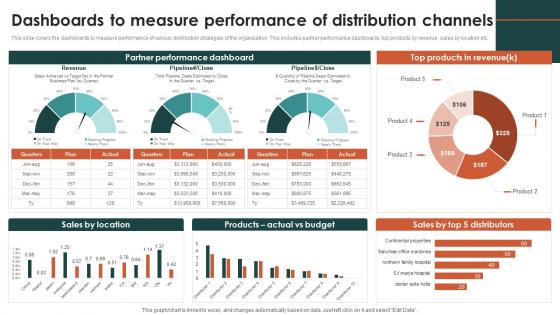
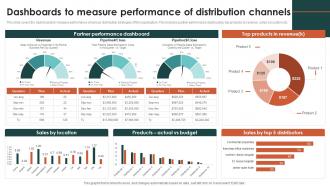
This slide covers the dashboards to measure performance of various distribution strategies of the organization. This includes partner performance dashboards, top products by revenue, sales by location etc.
People who downloaded this PowerPoint presentation also viewed the following :
Dashboards To Measure Performance Of Distribution Channels Criteria For Selecting Distribution Channel with all 7 slides:
Use our Dashboards To Measure Performance Of Distribution Channels Criteria For Selecting Distribution Channel to effectively help you save your valuable time. They are readymade to fit into any presentation structure.





FAQs for Dashboards To Measure Performance Of Distribution Channels Criteria For
Look, start with the basics - revenue per channel, conversion rates, and what it costs to get customers. Sales velocity and deal size are game changers though, seriously underrated metrics. Partner stuff matters too: how long onboarding takes, training completions, support tickets. Oh and satisfaction scores from your channel partners (nobody tracks this enough). Territory coverage is solid if you're doing geographic splits. I'd say pick maybe 6-8 metrics tops at first. Financial performance is great but you gotta balance it with relationship health. Once your team gets the hang of checking dashboards regularly, then add more.
Honestly, just make the important stuff pop visually. Color-coding is your friend—red/green for performance metrics so you don't have to think about it. Simple bar charts beat those fancy graphics that look impressive but are actually useless when you're in a hurry. I'd set up alerts for when things tank so you're not staring at screens all day. Your brain needs to process this stuff instantly, not dig through layers of data. Keep maybe 3-4 key metrics right up front. Everything else can live behind buttons you click when needed. Oh, and skip the complicated charts—they're honestly just visual clutter most of the time.
Tableau and Power BI are your best bets - they handle sales data really well and the visualizations are super interactive. Google's Looker is decent too if you're already using their stuff. Excel can actually work for smaller datasets, though it gets ugly fast with tons of data. There's also specialized tools like ChannelAdvisor or Crossbeam that have analytics baked in for partner management specifically. My take? Go with whatever your team already knows how to use. No point making everyone learn Tableau from scratch if they're already comfortable in Power BI, you know?
Honestly, I'd go with weekly updates as your baseline - daily's even better if you're not swamped. Channel performance shifts fast, especially in retail where you've got promos and seasonal stuff happening. Weekly gives you enough detail to catch trends before they blow up into real problems. Obviously some metrics like partner satisfaction don't need daily attention (that'd be overkill). Start weekly for your main KPIs. Then tweak from there based on how crazy your channels actually get. Mine used to be super volatile during holiday seasons, so I learned the hard way that waiting too long between updates just creates headaches later.
Honestly, dashboards are a game changer for this stuff. You'll see conversion rates, revenue per lead, cost per acquisition - all that data laid out so you can instantly spot which channels are tanking. Like if Channel A suddenly drops 30% while everyone else stays normal, boom - there's your problem. The visual side makes it super obvious who's not carrying their weight. You can dig deeper too - maybe it's timing, wrong product mix, or they just suck at their job. Oh, and definitely set up alerts so you're not scrambling when things go sideways.
You need real-time data because spotting issues as they happen beats finding out weeks later when you can't do anything about it. Like, you'll see which channels are actually converting vs. which ones are burning money, then shift budget instantly. Without it? You're basically guessing with stale info - not fun. I'd set up alerts for your top 3-4 metrics instead of watching dashboards all day (trust me on this one). Pick the KPIs that actually matter when they move, build monitoring around those. Way more efficient than drowning in data you don't need.
Track satisfaction scores, complaint volumes, and delivery ratings for each channel. Post-purchase surveys are your friend here - automate them and feed that data straight into your dashboard. Sales numbers don't tell the whole story, honestly. The real gold is seeing which channels actually make customers happy vs just pushing inventory. Tie feedback to specific partners so you know who's crushing it and who needs work. That way you can shuffle resources around based on what's actually working. Way better than flying blind on performance.
Ugh, data inconsistency is gonna be your worst enemy - every partner tracks stuff differently and uses totally different systems. Plus you're stuck waiting for updates since external channels don't sync in real-time like your own systems. Partners also have garbage data quality sometimes, with incomplete records or they define "sales" completely different than you do. Some channels are honestly just awful at sharing data consistently (looking at you, certain platforms I won't name). Set clear data requirements from day one and build validation checks to catch the mess early before it tanks your dashboard.
Build separate dashboards for each team - sales wants pipeline stuff and conversion rates, execs need the big picture revenue trends. Marketing will obsess over lead quality (they always do), while finance cares about costs and profit margins. Interview each team first about what decisions they're actually making every day. Then set up filtering so people only see their relevant metrics - nobody wants to dig through everyone else's data. Sales doesn't need to see marketing's click-through rates, you know? Focus on what directly helps them do their job better.
Start with your most important stuff at the top - sounds obvious but you'd be surprised. Group related metrics together and don't go crazy with colors (2-3 max or it'll look like a rainbow threw up). Charts work great, just avoid the flashy ones that confuse everyone. I made that mistake once and got roasted in the meeting. Focus on trends instead of dumping raw numbers everywhere. Always add context like benchmarks so people know if 47% is good or terrible. Oh, and test it with real users first - they'll spot the confusing parts you totally missed.
Look at your distribution data over time - it'll show you what's actually working vs what's tanking. Seasonal patterns become super obvious, plus you can see which channels are growing momentum and which ones are just... not. Customer behavior changes constantly too. Why would you keep pouring money into something that's been sliding downhill for months? Check conversion rates and acquisition costs across different timeframes. Oh, and revenue trends obviously. This stuff helps you predict what's coming next so you're not scrambling to catch up later. Way better than guessing and hoping for the best.
Pick 3-4 metrics first - cost-per-acquisition, conversion rates, that kind of stuff. Compare them against industry benchmarks or your past performance. Cohort analysis is honestly where the magic happens though, shows you how different channels actually behave over time. Rank your channels monthly against each other too. Just remember to account for seasonality and how long each channel's been running - new ones obviously won't perform like established ones. Oh, and don't go crazy expanding metrics right away. Get consistent with the basics first, then you can get fancier with your tracking.
Yeah, so external market stuff can totally mess with your dashboard even when you're crushing it. Like if the economy tanks or competitors drop prices, your conversion rates and acquisition costs will tank across every channel. Super frustrating because it looks like you're failing when really it's just market conditions being brutal. I'd compare your numbers to industry benchmarks so you know if it's actually you or just the market being weird. Also maybe adjust your KPI targets - honestly, sticking to pre-recession goals when everything's gone sideways is kinda pointless. Set up some alerts for when things look really off.
Start with margin per channel - that's what actually matters. Track your cost-to-serve ratios and ROI for each distribution path, plus customer acquisition costs. Revenue per partner is huge too (seriously, so many companies just ignore this). Inventory turnover rates will show you which channels move product fast vs. slow. Days sales outstanding varies like crazy between channels, so watch your cash flow there. Oh and channel conflict costs - when your partners start competing against each other, it gets messy fast. These five metrics will show you who's making money and who's bleeding it.
Honestly, predictive analytics is a game-changer for dashboards. Instead of just seeing what already happened, you're actually getting a heads-up on what's coming. Spot underperforming channels before they crash, see demand spikes early so you can warn your partners, catch relationship issues while there's still time to fix them. The algorithms dig through your historical data and seasonal patterns to give you solid 30-90 day forecasts. I'd start with your top 3 channels first - way easier than trying to do everything at once, and you'll see results faster.
-
Best way of representation of the topic.
-
A library of engaging, customizable and content-ready templates.