Employee Record Management Dashboard For Corporate

Rating:
90%
Employee Record Management Dashboard For Corporate
Slide 1 of 10
Favourites Favourites

Try Before you Buy Download Free Sample Product

Audience Impress Your
Audience
Editable 100%
Editable
Time Save Hours
of Time
The Biggest Sale is ending soon in
0
0
:
0
0
:
0
0
Rating:
90%
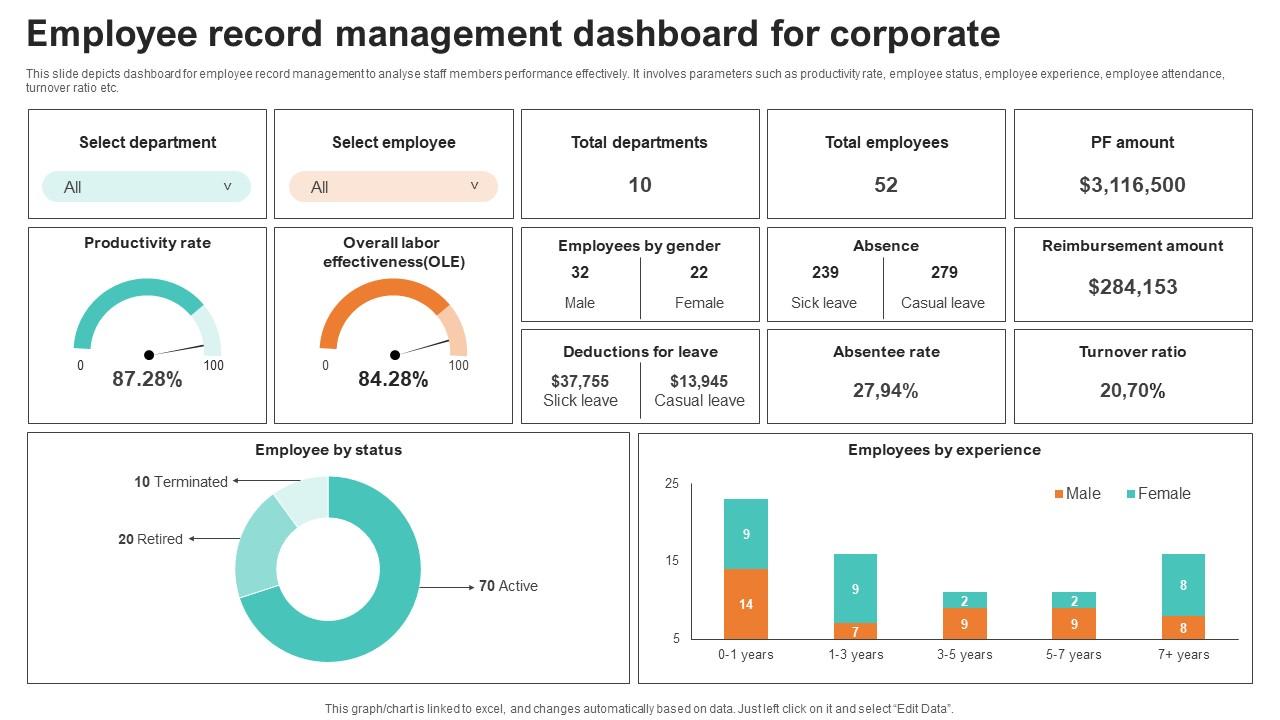
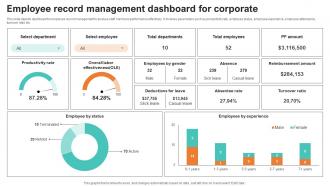
This slide depicts dashboard for employee record management to analyse staff members performance effectively. It involves parameters such as productivity rate, employee status, employee experience, employee attendance, turnover ratio etc. Introducing our Employee Record Management Dashboard For Corporate set of slides. The topics discussed in these slides are Management, Corporate, Employees. This is an immediately available PowerPoint presentation that can be conveniently customized. Download it and convince your audience.

FAQs for Employee Record Management

Focus on stuff your employees actually check daily - goal progress, project deadlines, time-off balances. PTO is huge because nobody wants to hunt through HR portals just to see their vacation days. Learning progress and team updates are solid additions too. Oh, and recognition/feedback - people love seeing that stuff. The tricky part is not cramming everything in there because it gets messy quick. Keep it role-specific so they're not scrolling through irrelevant junk. Bottom line: they should glance at it and immediately know what needs their attention.

Honestly, dashboards are game-changers for keeping people engaged. Your team gets to see their goals and progress in real-time, which is way more motivating than working blind. Plus they can actually connect their daily work to the bigger picture - sounds cheesy but it works. Everything's in one spot too, so no more digging through five different systems just to find basic info. The self-service thing is clutch - people can check their performance, request PTO, update their details without bothering you or HR constantly. Just make sure you pick one that's not clunky and shows metrics that actually matter. Nobody cares about flashy numbers that don't mean anything.

Keep it stupid simple - put the stuff people actually need right up front. Key metrics, notifications, whatever they check daily. Don't make them dig around for basic things because that's annoying as hell. Too many companies think cramming everything onto one page is helpful but it just creates a mess. Mobile matters since everyone's always on their phones anyway. Skip the corporate buzzwords and use labels that actually make sense. Here's the thing though - ask your team first what they'd want to see when logging in. Test it before you launch or you'll just end up rebuilding the whole thing later.

So basically real-time data means no more waiting around for updates - your dashboard shows what's happening right now instead of yesterday's old info. Way better for making decisions when you're not second-guessing if the numbers are fresh. Plus it saves you from those super awkward situations where you think you've got PTO days left but then HR's like "nah, you're out." Everyone stays on the same page with current info. Honestly, it just makes tracking deadlines and approvals so much less stressful when you know you're seeing the actual situation.

Honestly, visualization just makes your data way less painful to deal with. Color-coded dashboards beat scrolling through endless spreadsheets any day - like, would you rather hunt through 50 rows of numbers or just glance at a chart that shows you're crushing your targets? Heat maps and progress bars help you catch problems super fast. I used to waste so much time digging through raw data before I figured this out. Look for the metrics that actually matter to your daily stuff first. Then build dashboards around those instead of trying to visualize everything at once.

Dude, those employee dashboards are seriously clutch for performance reviews. Instead of trying to remember what you did months ago, you've got actual numbers right there. Track your goals, spot where you're killing it, see what needs work - way better than those weird "so...what have you been up to?" conversations with your boss. Honestly, I wish I'd started paying attention to mine sooner. The cool part is you can use all that data to figure out what skills to focus on next. Before your review, just scroll through and find 2-3 things the numbers show you could improve on.

Honestly, dashboards work because people want to see where they stand. Your team gets to track their own growth and hit milestones in real-time instead of waiting for some annual review. It's like having a scoreboard for your career - way more motivating than flying blind. Managers love them too since they can catch problems early. Someone's participation dropping? Goals getting missed? You'll spot it before they're mentally checked out. The transparency thing is huge - nobody wants to wonder if they're actually up for that promotion or just spinning their wheels. Focus on tracking stuff that actually helps employees grow, not just whatever makes the C-suite happy.

Honestly? Most people just use Tableau or Power BI since that's what they're made for. Grafana's solid too if you want something web-based. Already have BambooHR or Workday? Their built-in dashboards might be your easiest bet - why reinvent the wheel, right? Custom React stuff works if your dev team's into that sort of thing. I'd figure out what metrics you actually need first though. Then just pick whatever connects to your current systems without making you want to pull your hair out.

Honestly, just ask each department what their top 3-5 daily metrics are first. Sales wants pipeline stuff and conversion rates obviously. HR needs headcount and onboarding progress. Engineering's all about sprint tracking and bug counts - you know how they are. Most platforms let you customize everything by role anyway. Marketing doesn't need to see finance data cluttering up their view. Set up different dashboard views so everyone sees what actually matters to them. You can control who sees what with permissions too. Way easier than trying to make one dashboard work for everyone.

Honestly, the biggest trap is cramming too many metrics onto one screen. People just shut down when they see a wall of data. Make sure your info actually refreshes regularly too - stale dashboards are basically useless. Mobile's huge since everyone checks these on their phones now. Put your key stuff at the top and skip the corporate buzzwords for simple labels. I'd definitely test it with a few employees first because what makes sense to you might be confusing to them. Oh, and start basic - you can always add more bells and whistles later based on what people actually want.

Surveys and focus groups are obvious starting points for feedback, but honestly the coffee machine conversations tell you way more. Watch what features people actually click on vs. what sits there collecting dust. Slow loading times? They'll definitely let you know about that. Usage patterns don't lie either - sometimes people say they love something but never touch it. I'd set up regular check-ins so you can fix stuff quickly. Oh, and pay attention to layout complaints too since navigation issues kill productivity fast.

Look, if your dashboard doesn't work on phones, you're basically dead in the water. People live on their devices - they're not gonna fire up a laptop just to check their schedule or whatever. I learned this the hard way at my last job actually. When employees can't easily pull up metrics or submit requests from mobile, they just... don't. Then you get managers bombarded with questions that should've been self-service. Your team will abandon it faster than a bad Netflix series. Make it responsive and easy to tap around on. Trust me, mobile-first isn't just trendy advice anymore.

So first thing - set up role-based access so people only see data relevant to their job. Passwords are basically useless now, so definitely go with multi-factor authentication. Encrypt everything, both stored data and stuff moving between systems. Oh and run security audits regularly - I learned that one the hard way at my last company. Start with the access controls and MFA though. Those two changes alone will fix like 90% of your problems right away.

So these dashboards are basically like having a direct line between you and your boss - no more drowning in email threads (thank god). You'll see live updates on company stuff and project status, while they can track what you're working on and where you're stuck. The best part? Everyone's looking at the same info, so there's actual transparency for once. Most have chat features or feedback tools too. My biggest tip - don't just scroll through the data like it's Instagram. Actually use those comment sections and engage with it. Makes a huge difference in how useful it actually is.

Honestly, AI-powered insights are pretty clutch for giving people personalized career and wellness recommendations. Mobile-first design isn't optional anymore - everyone's glued to their phones anyway. Real-time collaboration tools are clutch too, especially since hybrid work isn't going anywhere (and thank god, those endless email threads were brutal). Voice interfaces and chatbots help with quick questions. Oh, and don't try to overhaul everything at once - that's a nightmare. Just audit your dashboard every few months and add these features gradually. Way less stressful.

Ratings and Reviews

90% of 100
Review Form
Write a review
Most Relevant Reviews
  1. 80%

    by Clarence Mendoza

    What a stunning collection of customizable templates! Really a time-saver.. 
  2. 100%

    by Roberts Roberts

    Qualitative and comprehensive slides.

2 Item(s)

per page: