category-banner

Microsoft dynamics and crm dashboard with current performance powerpoint template

Rating:
85%
Microsoft dynamics and crm dashboard with current performance powerpoint template
Slide 1 of 2
Favourites Favourites

Try Before you Buy Download Free Sample Product

Audience Impress Your
Audience
Editable 100%
Editable
Time Save Hours
of Time
The Biggest Sale is ending soon in
0
0
:
0
0
:
0
0
Rating:
85%
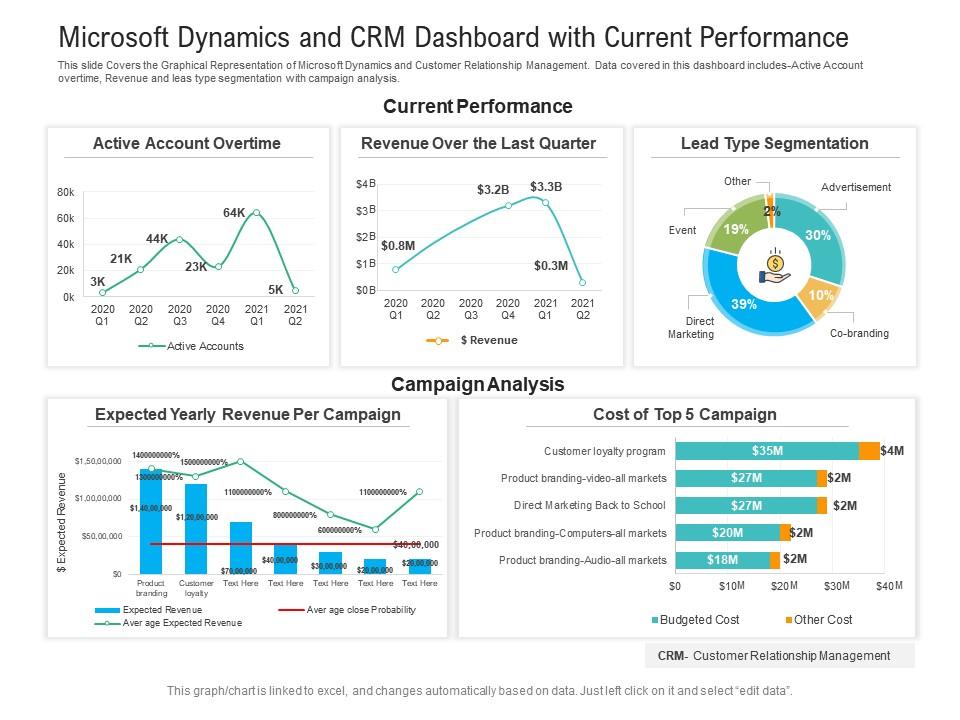
This slide Covers the Graphical Representation of Microsoft Dynamics and Customer Relationship Management. Data covered in this dashboard includes Active Account overtime, Revenue and leas type segmentation with campaign analysis. This is a Microsoft Dynamics And CRM Dashboard With Current Performance Powerpoint Template drafted with a diverse set of graphics, that can be reformulated and edited as per your needs and requirements. Just download it in your system and make use of it in PowerPoint or Google Slides, depending upon your presentation preferences.

People who downloaded this PowerPoint presentation also viewed the following :

FAQs for Microsoft dynamics and crm dashboard with current

Key components of a Microsoft Dynamics CRM Dashboard Template include interactive charts, performance metrics widgets, lead pipeline visualizations, sales forecasting tools, and customizable KPI indicators. These elements streamline data analysis by consolidating customer interactions, revenue tracking, and team performance metrics, with many sales organizations finding that integrated dashboards enhance decision-making speed and ultimately deliver improved sales outcomes.

A CRM Dashboard Template improves data visualization for sales teams by consolidating key metrics, streamlining performance tracking, and presenting complex data through intuitive charts and graphs. These templates enable sales managers to monitor pipeline health, identify bottlenecks, and track individual performance efficiently, while team members gain real-time visibility into targets and achievements, ultimately enhancing decision-making and driving revenue growth.

Effective Microsoft Dynamics CRM dashboards should include lead conversion rates, sales pipeline velocity, customer acquisition costs, revenue forecasts, and activity completion rates. These metrics enable sales teams to track performance trends, identify bottlenecks in the sales process, and optimize resource allocation, with many organizations finding that comprehensive dashboard visibility ultimately delivers faster decision-making and improved sales outcomes.

Customizing a CRM Dashboard Template enhances user experience by providing personalized data views, streamlined navigation, and role-specific information displays that match individual workflows and priorities. Through tailored layouts and relevant metrics, sales teams, managers, and support staff can access critical insights faster, reduce time spent searching for information, and make data-driven decisions more efficiently, ultimately delivering improved productivity and better customer relationship management across organizations.

Microsoft Dynamics CRM Dashboard Templates serve diverse industries including healthcare for patient relationship management, financial services for client portfolio tracking, retail for customer behavior analysis, manufacturing for lead pipeline monitoring, and real estate for prospect management. These templates streamline data visualization, enhance decision-making through real-time insights, and accelerate reporting processes, with many organizations finding that customized dashboards ultimately deliver improved customer experiences and operational efficiency.

Microsoft Dynamics CRM Dashboard Templates enable small businesses to streamline customer relationship management, track sales performance, monitor lead conversion rates, and analyze customer interactions without extensive technical expertise. These pre-built templates deliver cost-effective CRM solutions by reducing implementation time, minimizing training requirements, and providing actionable insights, ultimately enhancing customer retention and accelerating revenue growth for resource-constrained organizations.

Creating effective CRM dashboard templates requires focusing on user-centric design, visual hierarchy, data relevance, mobile responsiveness, and intuitive navigation structures. These principles streamline information access by prioritizing key metrics, minimizing cognitive load, and ensuring consistent branding, with many sales teams finding that well-designed dashboards ultimately enhance decision-making speed and improve customer relationship management outcomes.

CRM Dashboard Templates facilitate better decision-making by consolidating sales metrics, customer insights, performance indicators, and pipeline data into unified visual formats that eliminate information silos. These templates enable managers to identify trends, track team performance, and assess customer satisfaction in real-time, while streamlining reporting processes and reducing analysis time, ultimately delivering faster strategic responses and improved operational efficiency.

Microsoft Dynamics CRM Dashboard Templates support integrations with Office 365, SharePoint, Power BI, Exchange, and third-party applications through APIs and connectors. These integrations streamline data flow by consolidating customer information, automating workflows, and enhancing reporting capabilities, with many organizations finding that seamless connectivity ultimately delivers improved operational efficiency and comprehensive customer insights.

Microsoft Dynamics CRM Dashboard Templates enable real-time reporting by providing pre-configured visual displays, automated data refresh capabilities, customizable charts and graphs, and integrated analytics tools. These templates streamline performance monitoring across sales, marketing, and customer service operations, with many organizations finding that real-time visibility enhances decision-making speed, improves response times, and ultimately delivers competitive advantage through data-driven insights.

Best practices for reviewing CRM dashboard templates include conducting regular performance assessments, gathering user feedback, monitoring key metrics alignment, validating data accuracy, and ensuring mobile responsiveness. Organizations should schedule quarterly reviews to assess dashboard effectiveness, update visualizations based on evolving business needs, and streamline user interfaces, with many finding that consistent optimization ultimately delivers improved decision-making capabilities and enhanced operational efficiency.

Organizations ensure data accuracy in Microsoft Dynamics CRM Dashboards through regular data validation, automated cleansing tools, standardized entry protocols, and real-time synchronization processes. These strategies streamline information quality by eliminating duplicates, enforcing consistent formatting, and establishing clear governance frameworks, with many companies finding that systematic data audits and user training ultimately deliver more reliable insights and enhanced decision-making capabilities.

Visuals in Microsoft Dynamics CRM Dashboard Templates enhance data comprehension, accelerate decision-making, and improve user engagement by transforming complex datasets into intuitive charts, graphs, and heat maps. These visual elements enable sales teams, managers, and executives to quickly identify trends, spot performance gaps, and track key metrics, ultimately delivering faster insights and more strategic responses to market opportunities.

Microsoft Dynamics CRM Dashboard Templates enable comprehensive customer engagement tracking by consolidating interaction data, communication history, touchpoint analysis, behavioral metrics, and engagement scoring into unified visual displays. These templates streamline monitoring across sales calls, email campaigns, social media interactions, and support tickets, with organizations finding they can identify engagement patterns, optimize outreach strategies, and ultimately deliver more personalized customer experiences while improving retention rates.

Mobile accessibility significantly enhances CRM Dashboard Templates by enabling real-time data access, improving field team productivity, and facilitating instant decision-making from any location. This mobility empowers sales representatives to update customer information during client visits, allows managers to monitor performance metrics while traveling, and enables support teams to access critical data remotely, ultimately delivering faster response times and enhanced customer experiences.

Ratings and Reviews

85% of 100
Write a review
Most Relevant Reviews
  1. 100%

    by James Rodriguez

    Great product with effective design. Helped a lot in our corporate presentations. Easy to edit and stunning visuals.
  2. 80%

    by Earnest Carpenter

    Innovative and attractive designs.
  3. 80%

    by Clemente Myers

    Unique design & color.
  4. 80%

    by Ed Lawrence

    Design layout is very impressive.

4 Item(s)

per page: