


On Page SEO Fundamentals Metadata Tags And More Edu Ppt





Try Before you Buy Download Free Sample Product
 Impress Your
 Audience
 100%
100% Editable
 Save Hours
 of Time


This set of slides covers the techniques to perform on-page SEO effectively. These slides include information about multiple on-page SEO tags such as meta tags, title tags, meta descriptions, ALT text or tag, and header tags. Further, these PPT slides contain details of XML sitemaps, robots.txt, domain names, URLs, canonicalization, RSS feed, internal link building, and breadcrumb optimization. Also, multiple dos and donts pertaining to on-page SEO are listed in the deck of slides.
People who downloaded this PowerPoint presentation also viewed the following :
Content of this Powerpoint Presentation
Slide 1
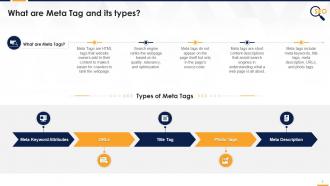
This slide covers details on meta tags. It also depicts that Meta Tags are HTML tags that website owners add to their content to make it easier for crawlers to rank the webpage.
Slide 2
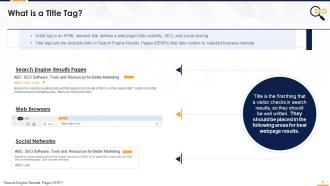
This slide covers details on title tag. It also depicts that a title tag is an HTML element that defines a webpage title usability, SEO, and social sharing.
Instructor's Notes:
Search Engine Result Pages
- With a few exceptions, the title tag defines its display title in SERPs and is a search visitor's initial impression of any site
- Even if the website doesn’t rank on the top, a strong title can ensure better CTR (Click Through Rate)
Web Browsers
- The title tag is also shown at the top of the web browser and works as a placeholder, which is especially useful for those who have many browser tabs open
- Titles that are Unique and easy to identify, with relevant keywords at the top, help the readers not to lose sight of the content
Social networks
- When users share a page, some external websites, particularly social networks, will utilize the title tag to determine what to display
- Certain social networks (such as Facebook and Twitter) have specific meta tags that allow users to specify titles that differ from their primary title tag
- This allows users to optimize for each network and give lengthier titles when and where they are helpful
Optimal title length for title tag
- Google typically displays the first 50–60 characters of a title tag
- Keep titles under 60 characters this is how 90% of the titles will display properly
- There is no specific character limit because characters can vary in width, and Google's display titles are currently limited to 600 pixels
Slide 3
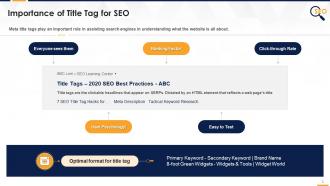
This slide covers importance of Title Tag for SEO. It also depicts that Meta title tags play an important role in assisting search engines for understanding what website is all about.
Instructor's Notes:
It is the first thing someone sees while searching:
- People may overlook the content, or skip the meta description. However, when people conduct a Google search, they check the title tag to decide if they want to click or not
Title tags are a ranking factor: The title tag signals correlate with rankings
- The title tag impacts the results more than any other element that appears in the SERPs
- Title tags continue to have an impact on click-through rate
A mix of science and psychology:
- It is a crucial touchpoint to attract visitors to click
- Title tags, with the proper Keywords, can spark a user’s interest in visiting your webpage
Title tags are easy to test:
- Changing the title tag and testing it for effectiveness is easy, quick and reversible
- Just modify the title tag, go to Google Search Console, recrawl, and reindex the URL, and you will see the changes in Google search results in minutes
- SEOs can evaluate the performance of these changes over the next several days
- If you are not satisfied with the results, you can undo the changes quickly and revert back to the old version
Slide 4
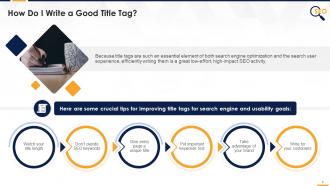
This slide covers some crucial tips for improving title tags for search engine and usability goals such as length of the title, SEO keywords, unique title, brand name, and customer- oriented writing.
Instructor's Notes:
Watch title length
- If the title is too long, search engines may chop it off with an ellipsis ("...") and omit essential terms. Titles should be no more than 60 characters long. The exact limit is a little more complex and is dependent on a 600-pixel container
- Some characters naturally take up more space than others. Uppercase "W" characters are broader than lowercase I or "t" characters
- Titles in ALL CAPS should be avoided. They may be challenging to read for the visitors and limit the number of characters Google will display
- In some situations, especially social sharing, longer titles may perform better. While it's essential to know how website titles appear in search results, there are no penalties for having a lengthy title
Don't overdo SEO keywords
- While there is no penalty built into Google's algorithm for long titles, it can cause issues if the user starts stuffing the title with keywords in a way that causes a poor user experience
- Example of a poor title tag: Buy Widgets, Best Widgets, Cheap Widgets, Widgets for Sale
- Avoid titles that are merely a bunch of keywords or repeatedly use variations of the exact phrase
- These titles are unsuitable for users and may get de-ranked by the search engines
- Search engines recognize keyword variations, so stuffing every variant into a title is both useless and harmful
Give every page a unique title
- Unique titles indicate search engines that the material is unique and exciting, and they also increase click-through rates
- On a site with hundreds or thousands of pages, it may appear challenging to generate a unique title for each one. Still, current CMS and code-based templates should allow developers to at least build data-driven, unique titles for the key pages
- Avoid using default names such as "Home" or "New Page" - these titles may lead Google to believe that users have duplicate content on their site (or even across other sites on the web)
- These names nearly always harm click-through rates. Consider how likely you are to click on a page labeled "Untitled" versus "Product Page"
Put important keywords first
- Keywords at the start of a title tag may have a more significant influence on search rankings
- People will scan only the first two words of a headline and decide whether they want to visit the webpage or not
Take advantage of your brand
- If you have a well-known brand, including it in the headlines may increase click-through rates
- Google may also automatically add the brand to the display titles, so be aware of how the search results are displayed
Write for your customers
- While title tags are crucial for SEO, keep in mind that the primary goal is to attract clicks from well-targeted visitors who are likely to find the content helpful
- While writing title tags, it's critical to consider the overall user experience
- The title tag is the first touchpoint that a new visitor makes with your brand. Make sure that the messaging is accurate and positive
Slide 5
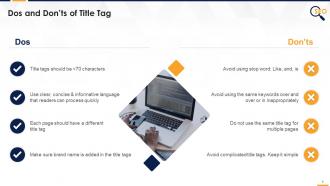
This slide covers dos and don'ts of the title tag such as Use clear, concise & informative language that readers can quickly process and avoid using same keywords over and over or inappropriately etc.
Slide 6
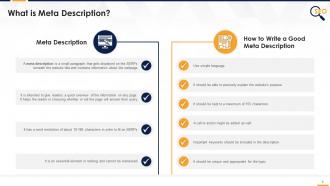
This slide covers details on meta descriptions such as it is a small paragraph that gets displays on the SERPs beneath the website title and contains information about the webpage etc.
Slide 7
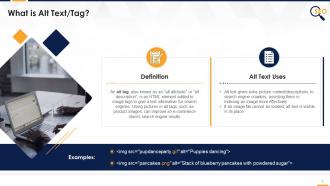
This slide covers details on ALT tags. It also depicts that Alt text gives extra picture context/descriptions to search engine crawlers, assisting them in indexing an image more effectively.
Instructor's Notes:
Screen readers will read the alt property to visually challenged visitors to help them comprehend an on-page picture.
Slide 8
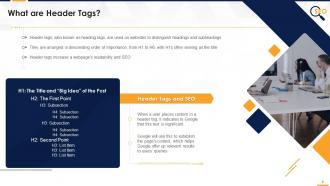
This slide covers details on Header tags. It also depicts that Google will use header tags to establish the page's context, which helps Google offer up relevant results to user’s' queries.
Instructor's Notes:
- H1 - The title of a post. They are generally keyword-focused, centered on the "main concept" of a page or article, and written to pique a reader's interest
- H2 - These are sub headers that categorize the significant ideas of the paragraphs and divide them into parts. You can consider utilizing semantic keywords linked to the "main concept" of the page. This will make it easy for the reader to discover the portions they want to read
- H3 — These are subsections that expand on the ideas made in H2. They can also be used to format lists and bullet points
- H4 —These are subsections that expand on the ideas stated in H3. They can also be used to format lists and bullet points
Header tags can assist in structuring a piece of text by drawing attention to the essential concepts, topics, and (in effect) keywords. As a result, header tags are essential for keyword relevance and readability.
Slide 9
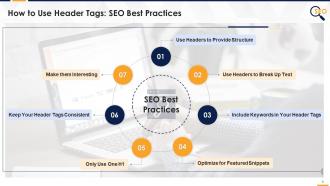
This slide covers how to write SEO-friendly header tags. It also depicts that Header tags provide structure and context for the articles
Instructor's Notes:
Header tags provide structure and context for the articles:
- H1 introduces the page's topic, much like a title tells a reader what a book is all about
- The H2s are similar to a book’s ‘Table of content’ in that they describe the key themes it will cover in different portions of the content
- Subsequent headers, H3s through H6, serve as extra sub-headings inside each section, just as a book chapter might be divided into several sub-topics
Use Headers to Break Up Text
- A scannable article is readable, and a readable article is more likely to rank well in search engines
- Scanability is critical to the success of an article because just 16% of internet users read an article word for word. The others are scanning
- A scannable content is 58% more likely to do well with readers
Include Keywords in Header Tags
- Headers have a significant influence on SEO since Google uses them to acquire context for the pages
- The page should be first and foremost understandable, with keywords used organically
Optimize for Featured Snippets
What is feature snippets and how it help in SEO?
- Featured snippets are short extracts from a website that shows in Google search results to answer a user's query rapidly. Google automatically pulls featured snippet content from pages that have been indexed
- Definitions, lists, steps, and tables are the most typical types of highlighted snippets
Only Use One H1
- Google has said that utilizing numerous H1s is not an issue. Using numerous H1s on a page, however, is not an SEO-recommended practice
- Multiple H1s can be utilized as long as they are not overused to the point of spamming and fit contextually within the page layout
Keep the Header Tags Consistent
- A basic rule of thumb for UX is to provide users with a consistent experience
- To utilize title case format, apply it consistently across all pages (and vice versa if you choose sentence case). Also, keep the headers as brief as possible
Make Them Interesting
- This guideline applies to all the copywriting, not just the headers
- The first copy may have dull headers utilized to construct the outline, but one should always examine and modify them before posting to make them more appealing to visitors
Slide 10
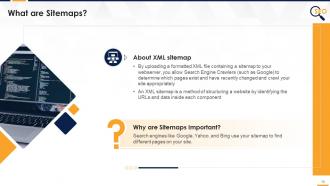
This slide covers details on XML sitemaps. It also depicts that a XML sitemap is a method of structuring a website by identifying the URLs and data inside each component.
Slide 11
This slide covers sitemap updating best practices and factors that are considered while updating sitemap.
Instructor's Notes:
How regularly updating sitemaps helps in SEO
Efficient indexing:
- The indexing process is sped up when your sitemaps are updated frequently
Increases the scope of visibility:
- When many pages are indexed, it increases the scope of online visibility. More content implies more keyword utilization, resulting in a keyword-rich website that is excellent for higher ranking
Influence crawling frequency
- Search engines prefer dynamic websites. This is determined by the regularity with which the site's material is updated
Sitemap updating Best practices
How frequently should it be done?
- The sitemap should be updated as often as your content is
Update all the sitemaps
- Because they serve distinct purposes, both the HTML and XML sitemaps must be updated regularly
Slide 12
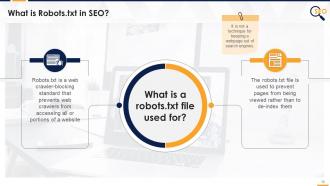
This slide covers a brief description about robots.txt file. It depicts that the robots.txt file is a web crawler-blocking standard that prevents web crawlers from accessing all or portions of a website.
Instructor’s Notes:
The limitations of a robots.txt file
- Robots.txt directives may not be supported by all search engines
- Different crawlers interpret syntax differently
- A robotted page can still be indexed if linked to from other sites
- If a robots.txt file bans your website, its URL will still display in search results, but the description will be missing
Slide 13
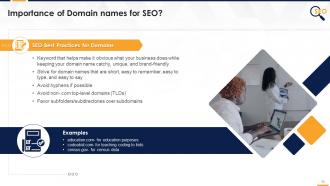
This slide covers importance and best practices of domain names for SEO. It also depicts that domain names should be catchy, unique, and brand-friendly.
Slide 14
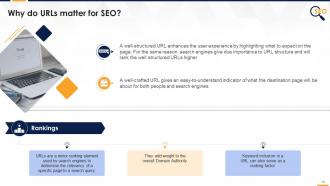
This slide covers reasons why URLs are important for SEO, such as to enhance user experience by highlighting what to expect on the page and a well-crafted URL gives a easy-to-understand indicator etc.
Instructor's Notes:
Definition:
- A URL is a text string that is created to replace the numbers (IP addresses) that computers use to interact with servers
- URLs also recognize the file structure of the provided webpage
- A URL is made up of a protocol, a domain name, and a path (which includes the specific subfolder structure where a page is located)
Optimal Format:
http://www.example.com/category-keyword/subcategory-keyword/primary-keyword.html
Links
- When copied and pasted as links in forums, blogs, social media networks, or other online arenas, well-written URLs can act as their anchor text
Slide 15
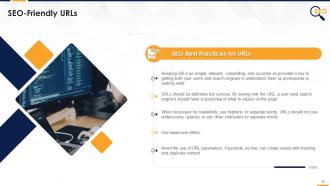
This slide covers SEO best practices for URLs. It depicts that URLs should be definitive but concise. By seeing only the URL, a user (and search engine) should have a good idea of what to expect on the page.
Slide 16
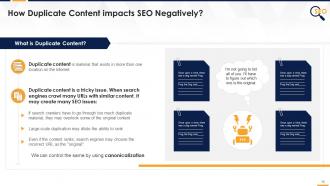
This slide covers the details about duplicate content and how it impacts SEO negatively. It also illustrates that large-scale duplication may dilute the ability of the website to rank on top of search engines.
Instructor's Notes:
How Do Duplicate Content Issues Happen?
- URL parameters, such as click tracking and analytics code, might result in duplicate content problems
- If a site has distinct versions at "www.site.com" and "site.com". and the identical content exists on both, then they will be treated as duplicated content by search engine
- Scrapers who republish the blog content on their sites are a more common source of duplicate content
Slide 18
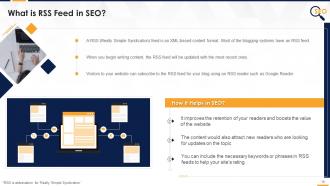
This slide covers RSS feed such as it is an XML based content format, and it helps in SEO by improving the retention of the readers and boosts the value of websites.
Instructor’s Notes:
Best Practices:
- The new material or information reaches the interested users promptly. It aids in the retention of your readers and boosts the reputation of your website
- The material would also attract new readers who are looking for updates on your topic
- You may include your major keywords or phrases in RSS feeds to help your site's rating
- Your site gains more popularity if you keep providing fresh and relevant content by submitting RSS feeds
Slide 19
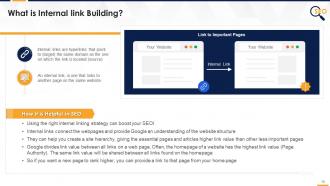
This slide explains the Internal links that are hyperlinks that point to (target) the same domain as the one on which the link is located. It helps in SEO because using the right internal linking strategy can boost the traffic.
Instructor's Notes:
Optimal Format
In anchor text, use descriptive keywords that provide a sense of the topic or keywords that the source website is seeking to target.
Internal linking Best Practices
- Use anchor text
- The deeper your links go, the better
- Use links that are relevant for the reader
- Use relevant links
- Use follow links
- Use a reasonable number of internal links. Don’t overdo internal linking
Slide 20
This slide covers details about a breadcrumb which is a small text path, often located at the top of a page indicating where the user is on the site. Every step of that path is clickable, all the way back to the homepage.
Slide 21
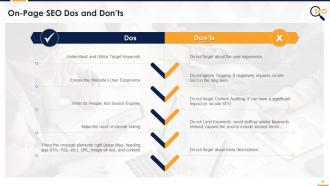
This slide covers on site SEO dos such as ensure the website’s user experience and don’ts such as do not limit keywords: avoid stuffing similar keywords instead; expand the pool to include various terms.
Additional Slide 1
This slide contains icons related to Search Engine Optimization (SEO). The slide uses the same color theme and similar design elements as the main deck.
Additional Slide 2
This slide can be edited to provide information about one's organization. The slide uses the same color theme and similar design elements as the main deck.
Additional Slide 3
This editable slide can be used to share the organization's vision, mission, and goals. The slide uses the same color theme and similar design elements as the main deck.
Additional Slide 4
This slide can be edited to provide information about the organization's core team. The slide uses the same color theme and similar design elements as the main deck.
Additional Slide 5
This slide can be used to present multiple discussion ideas to the stakeholders concerned.
Additional Slide 6
This slide contains an editable 30-60-90-day plan to suit the presenter's needs.
Additional Slide 7
This slide contains a timeline to showcase multiple milestones of the organization.
Additional Slide 8
This slide contains a roadmap template for effective strategic planning. The slide uses the same color theme and similar design elements as the main deck.
Additional Slide 9
This fully editable training certificate template can be presented to attendees post the successful completion of training.
On Page SEO Fundamentals Metadata Tags And More Edu Ppt with all 36 slides:
Use our On Page SEO Fundamentals Metadata Tags And More Edu Ppt to effectively help you save your valuable time. They are readymade to fit into any presentation structure.










FAQs for On Page SEO Fundamentals Metadata Tags And
Effective on-page SEO for presentation template websites includes optimized title tags with target keywords, compelling meta descriptions, structured header hierarchies, descriptive alt text for template previews, and strategic internal linking. These elements work together by improving search visibility, enhancing user experience, and increasing click-through rates, with many template sites finding that keyword-rich product descriptions and category pages ultimately deliver higher organic traffic and better conversion rates.
Well-structured headings enhance SEO performance by creating clear content hierarchy, incorporating target keywords naturally, and improving user experience through scannable content organization. Search engines use H1-H6 tags to understand topic relevance and content structure, while visitors can quickly navigate to sections about specific template categories, design tips, or industry applications, ultimately increasing dwell time and reducing bounce rates for better search rankings.
Meta descriptions serve as compelling sales pitches in search results, directly influencing click-through rates by summarizing your template offerings with targeted keywords and clear value propositions. For presentation template sites, well-crafted descriptions highlighting specific categories, design quality, and professional benefits can significantly increase organic traffic, with many businesses finding that strategic meta descriptions improve visibility and user engagement across competitive template markets.
Image optimization enhances visual-heavy content by reducing file sizes, implementing descriptive alt text, using relevant filenames, and choosing appropriate formats like WebP or JPEG. These techniques significantly improve page load speeds and accessibility while boosting search rankings, with many presentation template sites finding that optimized images deliver better user engagement and higher search visibility.
**INPUT**: What are the best practices for incorporating keywords naturally in a blog post related to presentation templates? **OUTPUT**: Best practices include strategic keyword placement in titles, headers, meta descriptions, opening paragraphs, and throughout body content while maintaining natural readability and flow. These techniques enhance search visibility by focusing on user intent, incorporating semantic variations, and creating valuable content around presentation design, template customization, and business applications, ultimately delivering improved organic rankings and reader engagement.
Internal linking strategies enhance SEO for presentation template pages by distributing page authority, improving crawlability, and creating topical relevance through strategic anchor text placement. These connections guide search engines through related template categories, seasonal offerings, and industry-specific collections, while encouraging longer user sessions and deeper engagement, ultimately delivering improved search rankings and increased organic visibility for template businesses.
Page load speed significantly impacts user experience by reducing bounce rates, increasing conversion rates, and enhancing customer satisfaction, while simultaneously affecting SEO through search engine rankings and crawl efficiency. For template-selling websites, faster loading times enable seamless preview experiences, quicker checkout processes, and better mobile performance, with many e-commerce platforms finding that even one-second improvements deliver higher sales and improved search visibility.
User engagement metrics significantly influence on-page SEO rankings through dwell time, bounce rate, click-through rates, and social sharing signals. Search engines increasingly prioritize content that demonstrates value, with presentation template blogs finding that interactive elements, downloadable samples, and tutorial content enhance user retention, ultimately improving search visibility and organic traffic growth.
Mobile optimization ensures seamless access to presentation templates across devices, which is essential since professionals increasingly create and download presentations on smartphones and tablets during travel, meetings, and remote work. With mobile users expecting fast loading times, responsive design, and easy navigation, optimized sites deliver better user experiences, higher search rankings, and increased conversions, ultimately capturing the growing mobile-first professional audience.
Schema markup enhances presentation template website visibility by providing search engines with structured data about templates, categories, pricing, and user reviews, enabling rich snippets and enhanced SERP displays. This structured approach helps search engines better understand and categorize template content, ultimately delivering improved click-through rates and higher rankings, with many design platforms finding that schema implementation significantly boosts organic traffic and user engagement.
**INPUT**: What strategies can be employed to ensure URLs are SEO-friendly for a website offering presentation templates? **OUTPUT**: SEO-friendly URL strategies include using descriptive keywords, maintaining short structures, incorporating hyphens as separators, avoiding special characters, and creating logical hierarchies. These approaches enhance search visibility by improving crawlability, user experience, and click-through rates, with many presentation template sites finding that clear, keyword-rich URLs significantly boost organic traffic and template discoverability.
Alt text enhances accessibility by enabling screen readers to describe images to visually impaired users, while simultaneously boosting SEO through keyword-rich descriptions that help search engines understand visual content. Strategic alt text implementation allows presentation template blogs to improve search rankings, increase organic traffic, and ensure compliance with accessibility standards, with many content creators finding that descriptive, keyword-optimized alt text delivers both inclusive user experiences and enhanced search visibility.
Keyword research reveals search volume patterns, user intent behind template searches, competitive content gaps, seasonal demand fluctuations, and emerging design trends. Through tools like SEMrush or Ahrefs, template sites can identify high-converting phrases like "business pitch deck templates" or "marketing presentation layouts," while discovering untapped niches in specific industries, ultimately enabling strategic content creation that matches actual user needs and drives organic traffic growth.
Content freshness significantly impacts SEO strategy by signaling search engines that your presentation template blog remains relevant, current, and valuable to users seeking updated design trends and business solutions. Regular updates through new template releases, seasonal design guides, and industry-specific presentation tips enhance search rankings, increase organic traffic, and improve user engagement metrics, with many successful blogs finding that consistent content refreshes ultimately deliver sustained visibility and competitive advantage in the crowded design marketplace.
**INPUT**: What tools can be recommended for analyzing and improving on-page SEO for websites that sell templates? **OUTPUT**: Effective on-page SEO tools for template-selling websites include SEMrush, Ahrefs, Screaming Frog, Google Search Console, and Yoast SEO. These platforms enhance digital marketplace performance by analyzing keyword density, optimizing meta descriptions, and tracking page load speeds, with many template retailers finding that strategic SEO implementation significantly increases organic visibility and customer acquisition rates.
-
Content of slide is easy to understand and edit.
-
Excellent template with unique design.