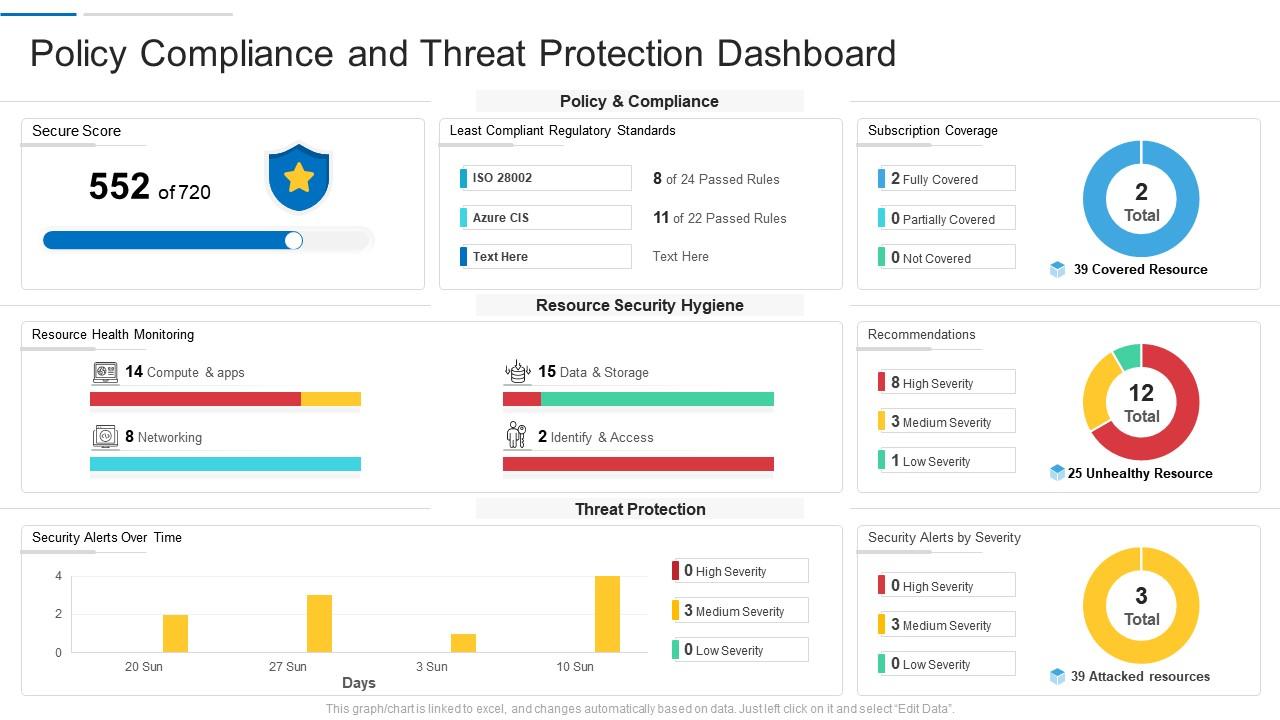
Policy compliance and threat protection dashboard

Rating:
92%
Policy compliance and threat protection dashboard
Slide 1 of 2
Favourites Favourites

Try Before you Buy Download Free Sample Product

Audience Impress Your
Audience
Editable 100%
Editable
Time Save Hours
of Time
The Biggest Sale is ending soon in
0
0
:
0
0
:
0
0
Rating:
92%
Introducing our Policy Compliance And Threat Protection Dashboard set of slides. The topics discussed in these slides are Resource Security, Networking, Dashboard. This is an immediately available PowerPoint presentation that can be conveniently customized. Download it and convince your audience.

People who downloaded this PowerPoint presentation also viewed the following :

FAQs for Policy compliance and

Start with compliance rates and policy violation counts - those are your bread and butter. Time-to-resolution matters too, especially if leadership gets antsy about lingering issues. I'd definitely track which departments are the worst offenders since that's where you'll be spending most of your time anyway. Trend data's clutch for showing progress (or lack thereof). Risk scoring helps if some policies are way more critical than others. Oh, and make sure you can drill down into specific areas - stakeholders love being able to click around and explore. Honestly, begin simple and build from there.

Honestly, heat maps are where it's at for compliance stuff. You'll spot problem departments instantly instead of drowning in spreadsheets. Bar charts work great too - just show compliance rates by team and boom, everyone gets it. The visual thing makes presenting to bosses so much easier since they can see the story right away. Plus you catch patterns you'd totally miss otherwise, like which policies keep getting violated or trends over time. Way better than scanning endless rows of pass/fail data (though I still end up doing that sometimes anyway).

Dude, real-time reporting is like having a smoke detector for policy stuff. You catch violations right when they happen instead of finding out weeks later when it's a total mess. The dashboard shows you patterns developing, so you can spot repeat offenders fast. Honestly, auditors love seeing that you're actually watching things instead of just hoping for the best. Start with alerts for your biggest risk areas - that's where you'll see results quickest. Way better than playing catch-up after everything's already gone sideways.

Think of compliance dashboards as your radar system - they pull data from everywhere so you catch issues before they blow up. You'll spot departments with repeat violations or new risk areas popping up. Way better than drowning in individual incident reports, honestly. The visual stuff makes it obvious where problems cluster - correlations you'd totally miss in boring spreadsheets. I'd definitely set up alerts for your key metrics. That way when something goes sideways, you know immediately instead of finding out weeks later.

Start with color coding - red/yellow/green is your friend here. The whole point is answering "what's broken?" in under 5 seconds. I swear, half the dashboards I see are gorgeous but totally useless! Group similar stuff together and throw in some trend arrows so people can actually spot patterns. Oh, and make sure they can click through for details when needed. Honestly? Skip the fancy pie charts if a simple percentage gets the job done. Test it with real users first - they'll catch things you'd never think of.

Start by nailing down who owns what data and setting up validation rules. Automated checks are your best friend - they'll catch inconsistencies before they mess up your compliance reports. You'll still need manual spot-checks though (yeah, I know, tedious as hell but they work). Pull everything from your main source systems and map out where data comes from so you can track down problems fast. Oh, and create a way for compliance teams to ping dashboard owners directly when something looks off. Trust me, quick fixes beat letting issues pile up.

So for compliance dashboards, I'd honestly just go with Tableau, Power BI, or Qlik Sense. They're boring but they work. Power BI's your best bet if you're already using Microsoft stuff. You'll need something like Apache Airflow or Azure Data Factory to actually pull data from all your systems - that part's kind of a pain but necessary. I've watched way too many teams waste months building custom dashboards that break constantly. These established tools have governance features already baked in and they'll scale when your compliance stuff gets more complex. Pick things that play nice together.

Honestly, start with something dead simple - like a thumbs up/down button on each dashboard section. Users won't skip it since it's quick, and you'll get decent sentiment data right away. After that, try quarterly focus groups where people actually walk you through how they use the dashboard. You'd be surprised what trips them up that seems obvious to you. The biggest thing though? Actually make changes based on what they tell you, then circle back to let them know their feedback mattered. I've seen too many companies collect feedback and then... nothing. Start with one method first - don't overwhelm yourself trying to do surveys AND interviews AND widgets all at once.

Don't cram everything onto one screen - people just shut down when there's too much info. Test with actual users first! I've seen gorgeous dashboards that nobody could figure out how to use, which is honestly painful to watch. Your data needs to be current and reliable, otherwise trust goes out the window real quick. Outdated metrics are worse than no metrics. Start with maybe 3-5 key things people check daily, get their feedback, then build from there. Way better than launching some monster dashboard that overwhelms everyone from day one.

Dude, compliance dashboards are actually pretty slick for training stuff. Instead of those awful PowerPoint death marches, you can build interactive modules right into the dashboard. Real-time completion tracking is clutch, and honestly? People get weirdly competitive about progress bars and badges - I don't get it but it works. You can target specific teams based on what they're missing, plus managers finally have visibility into who's current on certs. Oh, and automated reminders for renewals so people don't let things expire. Way better than the old spreadsheet nightmare.

So basically, when you connect compliance dashboards to your current systems, you don't have to constantly switch between a million different tools anymore. Real-time alerts pop up when something's wrong, and honestly, the automated reporting alone makes it worth it. Everything syncs up automatically so your data's actually accurate for once. Your team won't hate you for making them learn another platform either. The best part? Compliance becomes part of your regular decisions instead of that thing you remember to check once a month. Oh, and figure out which systems you're already using that have the compliance data you need - start there.

So basically, a compliance dashboard shows you what's actually happening with your policies in real time. No more guessing games. You can spot problem areas and trends before they blow up into bigger issues. Think of it like a health check for your whole operation - honestly, once you have one set up, you wonder how you managed without it. The trick is figuring out which alerts actually matter for your job (there's always too many at first) and then checking them consistently. Makes it way easier to show your boss what's working and what needs fixing.

Start with role-based access - people should only see what they need for their specific job. Multi-factor authentication is non-negotiable since hackers love compliance data. Encrypt everything, both stored and moving around. Audit logs are your friend so you'll know who looked at what and when. Auto-logout saves you from that one person who never closes their browser. For really sensitive stuff like account numbers, use data masking to show partial info only. Honestly, I'd start by checking who has access right now - you'll probably be shocked. Then cut that list way down.

Yeah so you can set up different views for each department based on what they actually need to see. HR gets training completion rates and policy stuff, IT sees security metrics - you know, whatever matters to them. The drag-and-drop interface is pretty straightforward once you mess with it for a bit. Different alert settings too since finance freaking out over something doesn't mean marketing needs to care. Oh and definitely test it with just one department first - way easier to fix issues before you roll it out to everyone and deal with complaints from all sides.

Yeah so automation is basically a game changer - it grabs data from all your different systems and updates the compliance dashboard automatically. No more manual entry hell! You can set it to refresh daily or weekly, whatever works. The alerts are clutch too - they'll ping you when scores dip below your thresholds. Honestly wish more people knew about this feature because I see teams still doing everything by hand. Once you configure it initially, you're golden. Real-time data means you're actually making decisions with current info instead of last month's numbers.

Ratings and Reviews

92% of 100
Review Form
Write a review
Most Relevant Reviews
  1. 100%

    by Chester Kim

    Wonderful templates design to use in business meetings.
  2. 80%

    by Delmar Wagner

    Use of icon with content is very relateable, informative and appealing.
  3. 80%

    by Dominique Vazquez

    Great designs, really helpful.
  4. 100%

    by Clyde Sullivan

    Helpful product design for delivering presentation.
  5. 100%

    by Damian Stevens

    Presentation Design is very nice, good work with the content as well.

5 Item(s)

per page: