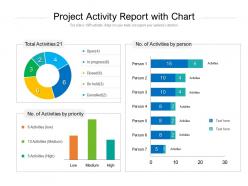
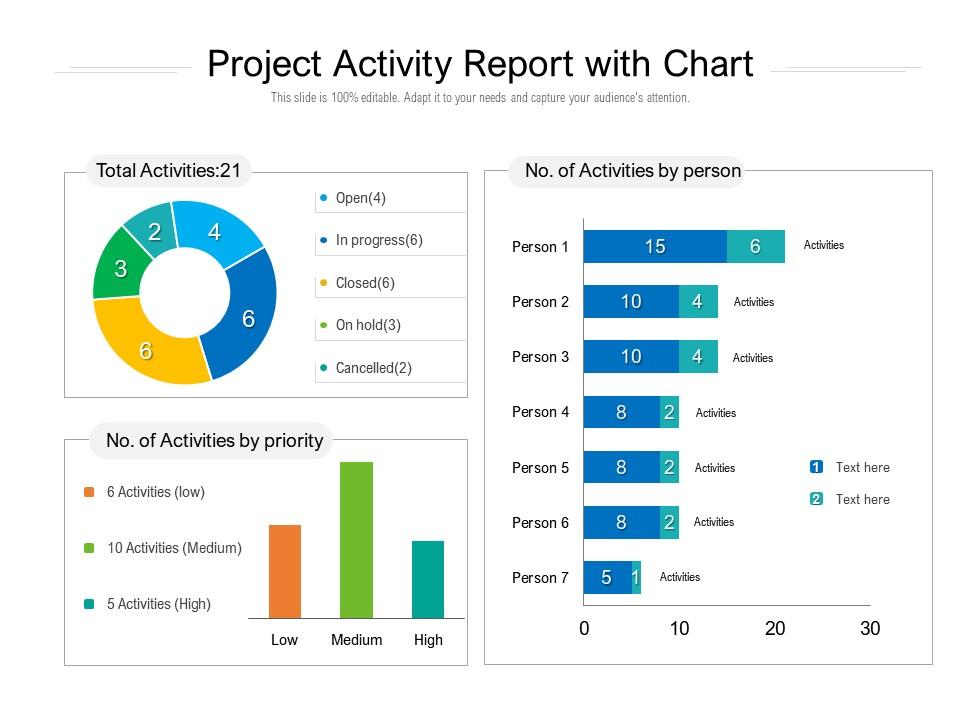
Project activity report with chart
Try Before you Buy Download Free Sample Product
Audience
Editable
of Time
Be cool and calm in any crisis with our Project Activity Report With Chart. They allow you to keep your head.
People who downloaded this PowerPoint presentation also viewed the following :
Project activity report with chart with all 2 slides:
Have the better of the deal with our Project Activity Report With Chart. They extract that extra bit.
FAQs for Project activity
So here's what you need: project status, what got done since last time, upcoming stuff with deadlines, and any roadblocks. Budget updates too - I know, boring but execs eat that up. Always call out your wins and milestones because honestly people have short memories about progress. Keep each part short though, nobody wants to read a novel. Oh and format it the same way every time so people can just jump to whatever they care about. The whole point is making it scannable, not comprehensive.
Honestly, these reports are total game-changers for avoiding that "wait, who's doing what?" chaos. You get one place where everyone can see what's done, what's stuck, and who owns what. Way better than digging through a million emails later (ugh). Once your team gets in the habit of updating them weekly, you'll skip like half your status meetings. The trick is making it routine - otherwise people forget and you're back to square one. Trust me, it sounds boring but it makes everything so much smoother. Just pick a day and stick to it.
Put an executive summary at the top - honestly, most people won't read past that anyway. Then break it down by project phases instead of just dumping random updates everywhere. Bullet points work great for accomplishments, roadblocks, and what's coming next. Stakeholders get annoyed by vague updates, so throw in real numbers and dates whenever you can. Each section should be short but actually useful. Oh, and if you need decisions or resources from them, add a "what we need" section at the end. Saves you from a million follow-up emails later.
Weekly reports work well for most stuff. Fast-moving or critical projects? Maybe twice a week. For those long-term initiatives that barely change, monthly is totally fine. Daily reports will kill your team's soul - learned that one the hard way. Only do it if everything's on fire. Match your reporting to how quickly things actually move and what your stakeholders need. Here's the test: if people keep bugging you about status between reports, you're not sharing enough. I'd start weekly and see how it feels. You can always dial it up or down based on what people tell you.
Dude, charts and graphs are game-changers for project reports. Nobody wants to read through walls of text anymore. I swear, I've watched execs completely skip over dense paragraphs but then spend forever analyzing a clean dashboard. Visuals help people spot problems and trends instantly - way better than making them dig through status updates. Plus different stakeholders can actually understand what's happening without needing a translator. Start small though, maybe just progress bars or timeline stuff. You'll notice people suddenly start paying attention in meetings. It's kinda wild how much difference it makes.
You gotta tailor your updates to what each person actually needs. Executives just want the big picture - budget, timeline, major risks. Don't bore them with task details. Your team needs all the specifics about deliverables and dependencies though. Clients? They care about milestones and how delays might hit their launch dates. I made this mistake for ages - sent everyone the same massive report and got crickets. Now I create different versions for each group. Honestly, just ask people what info they actually use. Their answers will shock you - everyone wants totally different things.
Dude, check if your current PM tool already has reporting built in - most people don't even realize it's there. Asana and Monday.com can auto-pull reports from your task data, which is honestly a game changer. Trello works too but it's more basic. If you need something beefier, Smartsheet's pretty solid. For time tracking specifically? Toggl or Harvest are your best bet for actual vs planned hours. Though if budget's tight, you can totally just set up a Google Sheets template with some formulas - I've done that before and it saved me tons of time. Start with what you've got first though.
Honestly, project activity reports are a lifesaver for this stuff. Check them regularly to see if you're actually hitting milestones or falling behind. They'll show you budget burn rates, task completion percentages, resource allocation - all that good stuff. The milestone tracking is clutch because it's so easy to get buried in daily tasks and lose the bigger picture. Plus they catch bottlenecks before they totally derail you. Set up weekly team reviews to go over them together. Trust me, catching problems early beats scrambling later when you're already behind schedule.
Honestly, just grab whatever went sideways in your last project and use that intel for planning the next one. I'm big on making a quick "lessons learned" doc after wrapping up - sounds nerdy but it's saved my butt countless times. Check for patterns too, like where you always seem to hit roadblocks or what actually worked smoothly. Then tweak your timelines and resource planning based on that stuff. Oh, and get your team to start dropping their takeaways in a shared folder after each project. Makes everyone smarter for next time.
Honestly, the worst thing you can do is bury the important stuff in paragraphs of fluff. Lead with your key wins and roadblocks right at the top. Don't make people dig for what actually matters. Also - and I've seen this so many times - skip the laundry list of tiny tasks. No one cares you went to three meetings this week. What did you actually deliver? Focus on real progress instead. Oh, and always include next steps with who's doing what by when. Otherwise it's just a diary entry that won't help anyone plan.
Honestly, start with automated checks wherever you can and have at least two people verify the big numbers before anything goes live. I almost died when I caught a huge mistake literally minutes before presenting to stakeholders - never again! Pull everything from one source instead of random spreadsheets that different people keep messing with. Write down where your data comes from and how you calculated stuff so someone else can follow your work later. Oh, and definitely have someone who didn't touch the report do a final sanity check. Fresh eyes catch the weirdest things you'll miss.
Track budget variance and resource utilization for sure. Risk indicators matter too. Quality stuff like defect rates? Don't skip those - I've watched projects that seemed fine completely blow up because nobody paid attention to quality. Team velocity, stakeholder engagement, milestone percentages... all good additions. Your leadership needs that full picture to make decent calls. Honestly, weekly dashboards work way better than those massive status reports nobody reads anyway. Keep it simple but comprehensive.
Honestly, activity reports are like your project's heartbeat - they tell you what's actually happening vs what you think is happening. Your methodology depends on them, whether you're doing Agile sprints or old-school Waterfall phases. Agile uses them for retrospectives, Waterfall for hitting those milestone gates. I've seen too many projects look perfect on paper but crash because nobody was tracking the real stuff. Short ones work fine, but make sure they match up with when your team actually reviews things. Otherwise you're just guessing.
Look, action items are what keep your project actually moving instead of just existing on paper. Without them, people read your update, nod thoughtfully, then go back to whatever they were doing before. Pretty useless, right? Good action items assign owners and deadlines - suddenly everyone knows who's doing what and when. They also give stakeholders a heads up about what's coming down the pipeline. Honestly, it's the difference between a status report that just sits there versus one that actually gets stuff done. End with 2-3 solid action items and you'll see the difference immediately.
Honestly, these reports are like your safety net with stakeholders. They show exactly where money's going and what you've actually accomplished - no fluff needed. When roadblocks pop up, you're not scrambling to explain later. Everyone stays on the same page instead of guessing what's happening. The paper trail thing is huge too, proves you're not just winging it. Here's what I learned the hard way - send updates before people ask for them. Builds way more trust than waiting until someone's wondering where their investment went. Makes you look proactive instead of reactive.
No Reviews