


Project Management Controlling And Monitoring Powerpoint Presentation Slides





Try Before you Buy Download Free Sample Product
 Impress Your
 Audience
 100%
100% Editable
 Save Hours
 of Time


In order to help you summarize all the aspects of your project, we have come up with content-ready project management controlling and monitoring PowerPoint presentation slides. Project management is the foundation block on which any task is executed successfully. The project planning PPT designs provide iterative processes and techniques so you can easily manage the people and the tasks involved. Here we have included slides on project charter, schedule, resource, budget, quality, risk, communication, project lifecycle phase, work breakdown structure, team management, and activity planning chart. Other related topics such as project implementation, project execution, documentation, portfolio management, and project governance have also been covered. Not having a process to manage your projects can result in wastage of time, money and resources. So, download project management controlling and monitoring presentation and communicate various stages of the project to your entire team. Fulfill your destiny with our project management ppt Slides. They will make your dreams come true.
People who downloaded this PowerPoint presentation also viewed the following :
Content of this Powerpoint Presentation
Slide 1: This is an introductory slide for Project Management Controlling and Monitoring. State your company name and begin.
Slide 2: This is Our Agenda slide. State your company agendas here.
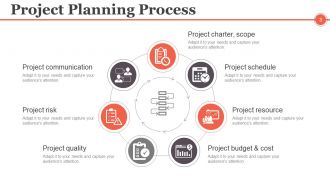
Slide 3: This slide presents Project Planning Process displaying- Project charter, scope, Project schedule, Project communication, Project resource, Project risk, Project budget & cost, Project quality.
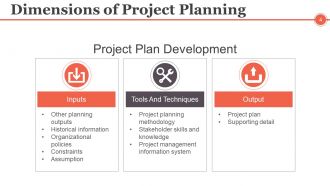
Slide 4: This slide presents Dimensions of Project Planning with- Inputs: (Other planning outputs, Historical information, Organizational policies, Constraints, Assumption) Tools And Techniques: (Project planning methodology, Stakeholder skills and knowledge, Project management information system) Output: (Project plan, Supporting detail).
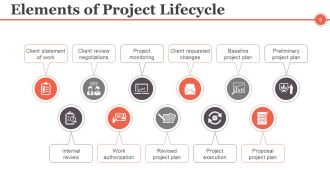
Slide 5: This slide shows Elements of Project Lifecycle. The listed ones are- Internal review, Work authorization, Revised project plan, Project execution, Proposal project plan, Client statement of work, Client review negotiations, Project monitoring, Client requested changes, Baseline project plan, Preliminary project plan.
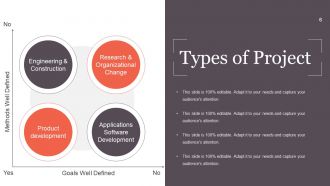
Slide 6: This slide shows Types of Project with the following content- Methods Well Defined, Goals Well Defined, Engineering & Construction, Product development, Research & Organizational Change, Applications Software Development.
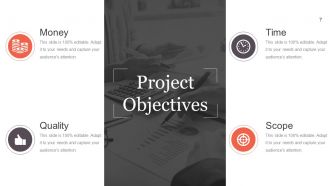
Slide 7: This slide showcases Project Objectives with the following points- Scope, Time, Money, Quality.
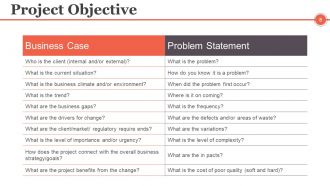
Slide 8: This is a Project Objective slide with Business case and Problem Statement.
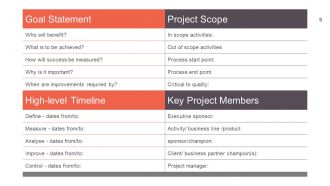
Slide 9: This slide showcases Goal statement, Project Scope, Timeline and Key members.
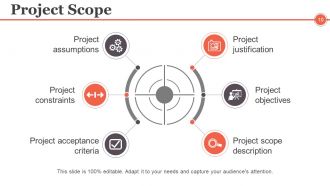
Slide 10: This slide displays Project Scope consisting of- Project objectives, Project scope description, Project assumptions, Project constraints, Project acceptance criteria.
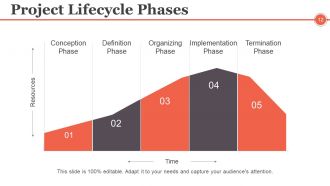
Slide 11: This slide showcases Project Lifecycle Phases in graph form.
Slide 12: This slide showcases Project Lifecycle Phases in graph form with the following points- Conception Phase, Definition Phase, Organizing Phase, Implementation Phase, Termination Phase.
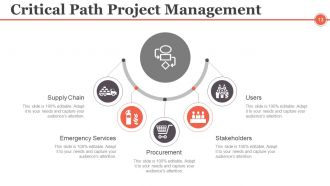
Slide 13: This slide shows Critical Path Project Management with- Procurement, Emergency Services, Stakeholders, Supply Chain, Users.
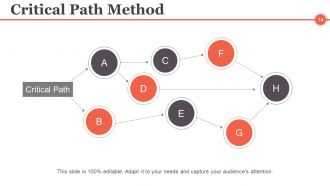
Slide 14: This slide shows a Critical Path Method diagram.
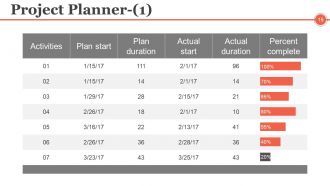
Slide 15: This is the first slide on Project Planner in tabular form.
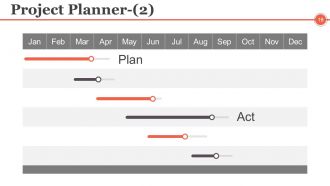
Slide 16: This is the second slide on Project Planner in gantt chart form.
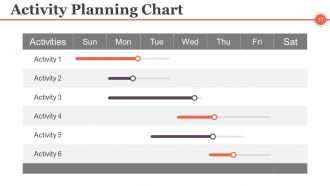
Slide 17: This slide presents an Activity Planning Chart.
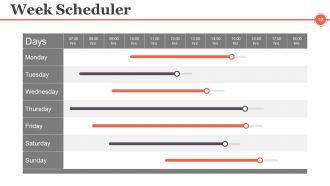
Slide 18: This slide displays Week Scheduler. Schedule, manage or arrange work load accordingly with it.
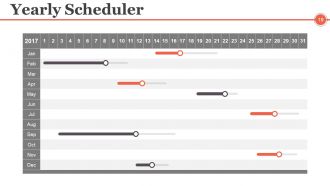
Slide 19: This slide displays Yearly Scheduler. Schedule, manage or plan work accordingly with it.
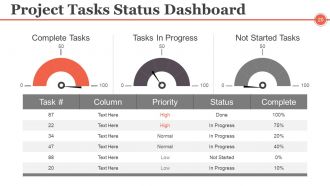
Slide 20: This slide showcases a Project Tasks Status Dashboard showing- Complete Tasks, Tasks In Progress, Not Started Tasks. State them here.
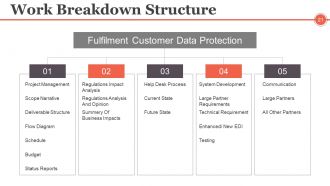
Slide 21: This slide presents a Work Breakdown Structure with the following content- Fulfilment Customer Data Protection: Project Management, Scope Narrative, Deliverable Structure, Flow Diagram, Schedule, Budget, Status Reports, Regulations Impact Analysis, Regulations Analysis And Opinion, Summery Of Business Impacts, Help Desk Process, Current State, Future State, System Development, Large Partner Requirements, Technical Requirement, Enhanced/ New EDI, Testing, Communication, Large Partners, All Other Partners.
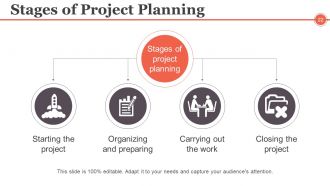
Slide 22: This slide shows Stages of Project Planning. The stages listed are- Starting the project, Organizing and preparing, Carrying out the work, Closing the project.
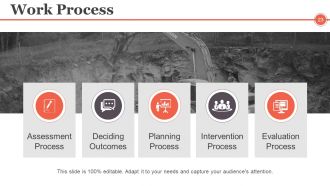
Slide 23: This slide shows Work Process with the following subheadings- Assessment Process, Deciding Outcomes, Planning Process, Intervention Process, Evaluation Process.
Slide 24: This slide shows Project Team Management. Showcase it's aspects etc. here.
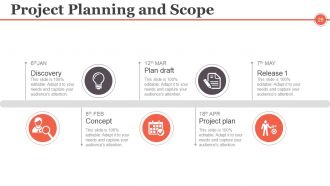
Slide 25: This slide showcases Project Planning and Scope with the following points- Discovery, Concept, Plan draft, Project plan, Release.
Slide 26: This is a Coffee Break slide to halt. You may change the slide content as per need.
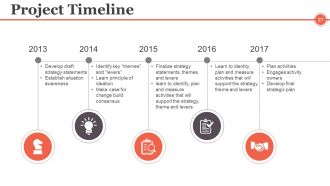
Slide 27: This slide presents a Project Timeline displaying- Develop draft strategy statements, Establish situation awareness, Plan activities, Engages activity owners, Develop final strategic plan, Identify key “themes” and “levers”, Learn principle of ideation, Make case for change build consensus, Finalize strategy statements, themes and levers, Learn to identify, plan and measure activities that will support the strategy, theme and levers.
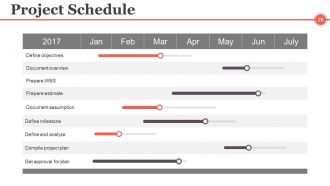
Slide 28: This slide presents a Project Schedule. State scheduling, planning aspects here.
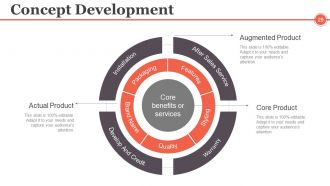
Slide 29: This slide displays Concept Development with the following subheadings- Augmented Product, Core Product, Actual Product.
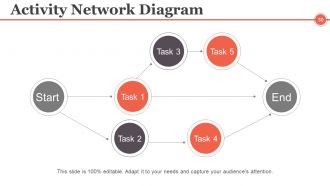
Slide 30: This is an Activity Network Diagram slide. State activities, plans etc. here.
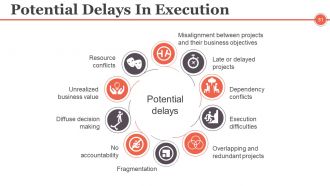
Slide 31: This slide shows Potential Delays In Execution with the following points- Execution difficulties, Misalignment between projects and their business objectives, Late or delayed projects, Dependency conflicts, Overlapping and redundant projects, Fragmentation, No accountability, Diffuse decision making, Unrealized business value, Resource conflicts.
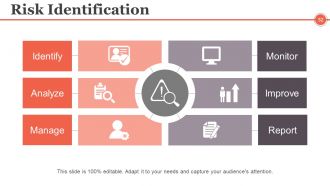
Slide 32: This slide shows Risk Identification with the following points- Identify, Analyze, Manage, Monitor, Improve, Report.
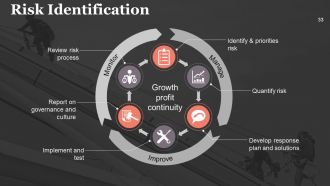
Slide 33: This slide shows Risk Identification with the following points- Quantify risk, Develop response plan and solutions, Report on governance and culture, Implement and test, Review risk process, Identify & priorities risk, Growth profit continuity under the subheadings- Monitor, Manage, Improve.
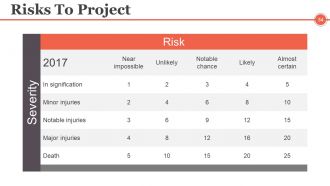
Slide 34: This slide presents Risks To Project table with risks and severity parameter.
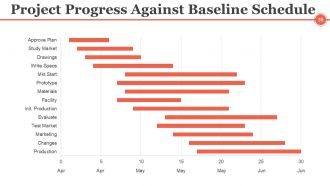
Slide 35: This slide shows Project Progress Against Baseline Schedule in gantt chart form.
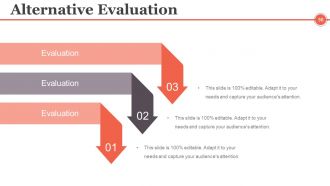
Slide 36: This slide presents Alternative Evaluation. State alternative aspects here.
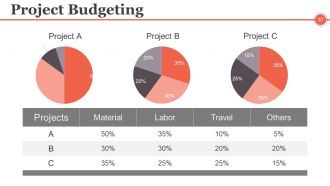
Slide 37: This slide showcases Project Budgeting for proejct management in pie chart form.
Slide 38: This is Project Management Controlling and Monitoring Icons slide. Use the icons as per need.
Slide 39: This slide is titled Additional Slides to move forward. You may change the slide content as per need.
Slide 40: This is an About Our Company slide. State company specifications here.
Slide 41: This is an Our Mission slide. State your company mission here.
Slide 42: This is an Our Goal slide. State goals etc. here.
Slide 43: This is Meet Our Team slide with names, designation and image boxes to fill information for.
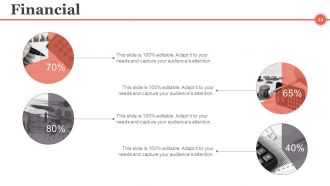
Slide 44: This is a Financial score slide. State financial aspects, information etc. here.
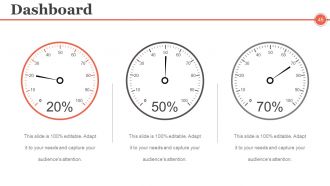
Slide 45: This slide presents Dashboard to present Kpis, metrics etc.
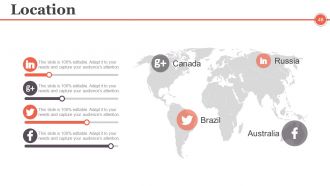
Slide 46: This is a Location slide of world map image to show global presence, growth etc.
Slide 47: This is a Timeline slide. State milestones, highlights etc. here.
Slide 48: This is a pie chart and gear imagery slide. State specifications, highlights etc. here.
Slide 49: This is a magnifying glass and handshake imagery slide. State specifications, highlights etc. here.
Slide 50: This slide showcases Important Notes. State specifications, highlights, events, etc. here.
Slide 51: This slide showcases Newspaper image slide. State specifications, highlights, events, etc. here. You may change the slide content as per need.
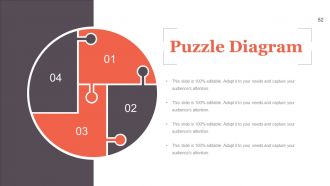
Slide 52: This is a Puzzle image slide. State information, specifications etc. here.
Slide 53: This is a Target image slide. State targets, information, specifications etc. here.
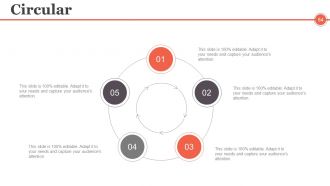
Slide 54: This is a Circular image slide. State information, specifications etc. here.
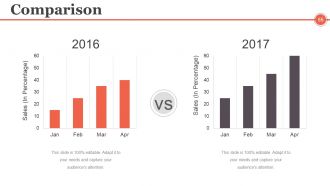
Slide 55: This is a Comparison slide to compare two entities etc. in graph form.
Slide 56: This is a Mind map image slide. State information, specifications etc. here.
Slide 57: This is a Venn diagram image slide. State information, specifications etc. here.
Slide 58: This is a Lego image slide. State information, specifications etc. here.
Slide 59: This is a Silhouettes image slide. State people related information, specifications etc. here.
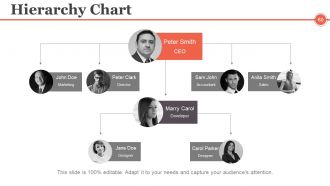
Slide 60: This slide presents a Hierarchy Chart. State management helm, team specifications etc. here.
Slide 61: This is a Generate Idea slide in bulb image. State information, innovative aspects, specifications etc. here
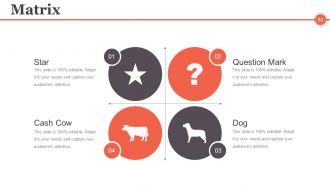
Slide 62: This is a Matrix slide in BCG form. State information, specifications etc. here.
Slide 63: This is a Magnifying Glass image slide. State information, specifications etc. here.
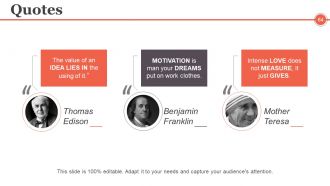
Slide 64: This is a Quotes slide to convey company/organization message, beliefs etc. You may change the slide content as per need.
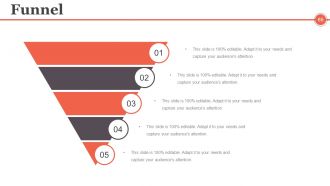
Slide 65: This is a Funnel image slide. State funneling aspects, information, specifications etc. here.
Slide 66: This slide is titled Our Charts to move forward. You can change the slide content as per need.
Slide 67: This is a Column Chart slide to show product/entity growth, comparison etc.
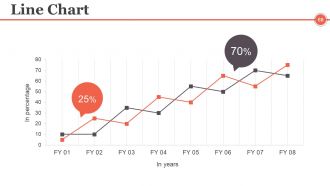
Slide 68: This is a Line Chart slide to show product/entity growth, comparison etc.
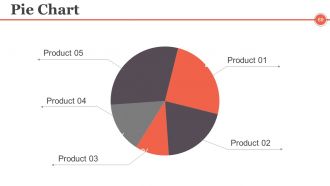
Slide 69: This is a Pie Chart slide to show product/entity growth, comparison etc.
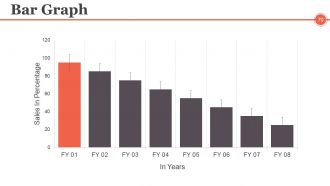
Slide 70: This is a Bar graph Chart slide to show product/entity growth, comparison etc.
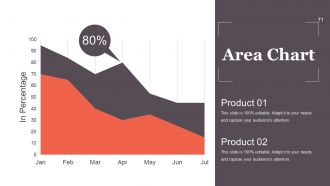
Slide 71: This is an Area Chart slide to show product/entity growth, comparison etc.
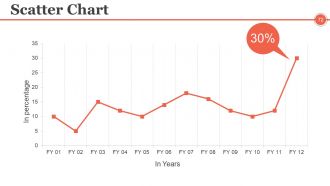
Slide 72: This is a Scatter Chart slide to show product/entity growth, comparison etc.
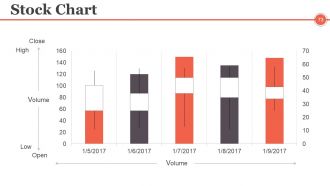
Slide 73: This is a Stock Chart slide to show product/entity growth, comparison etc. in terms of high and low.
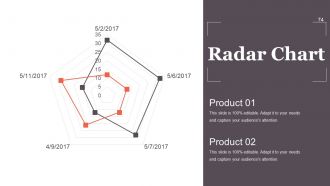
Slide 74: This is a Radar Chart slide to show product/entity growth, comparison etc.
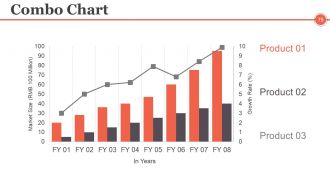
Slide 75: This is a Combo Chart slide to show product/entity growth, comparison etc.
Slide 76: This is a Contact Us slide with Email, Address# street number, city, state and Contact Numbers.
Slide 77: This is a Thank You slide for acknowledgement. You can change the slide content as per need.
Project Management Controlling And Monitoring Powerpoint Presentation Slides with all 77 slides:
Increase your capital with our Project Management Controlling And Monitoring Powerpoint Presentation Slides. Get your bank balance to grow even further.









FAQs for Project Management Controlling And Monitoring
So there's five main phases: initiation, planning, execution, monitoring, and closure. They're supposed to flow in order but honestly you'll be jumping around between them constantly. First you define what you're actually trying to accomplish, make your detailed plans, start the work, then track how it's going. Monitoring is huge - that's where most projects either succeed or completely fall apart because you catch problems before they snowball. Each phase builds off the last one, but whenever changes come up (and they will), you'll find yourself going back to earlier steps. Don't get too rigid about it though - think of them more like guidelines to keep you organized.
Honestly, the biggest thing is figuring out what each stakeholder actually wants - and trust me, it's probably not what you think. I'd start with regular check-ins so nobody gets blindsided later. Document everything too, because people forget what they agreed to (learned that one the hard way lol). When stuff goes wrong - delays, scope creep, whatever - tell them immediately. Don't wait for the next meeting. Being proactive about bad news is way better than scrambling to explain later. Maybe throw together a quick communication plan so you know who needs what updates and when.
Look, risk management is like having a crystal ball for your project - except it actually works. You'll want to spot problems before they blow up in your face. Things WILL go wrong (Murphy's Law and all that), but if you're ready for it, you won't be running around like a headless chicken. I always start projects by making a simple list of what could tank everything, then rank them by how likely they are and how badly they'd mess things up. Honestly, stakeholders love it when you seem prepared instead of constantly putting out fires. Game changer.
Dude, agile is honestly a game changer. You get feedback constantly instead of waiting forever to find out you built something nobody wants. Been burned by that before lol. Small deliveries every sprint mean you can pivot quickly when things go sideways. Your team actually stays motivated because they see real progress, plus stakeholders aren't left wondering what's happening for months. Yeah, it feels chaotic at first - that's normal. Start messy with your MVP, listen to users, then fix what sucks. Way better than those rigid waterfall plans that fall apart anyway.
Honestly, just pick one main tool and stick with it - I've seen people drive themselves crazy trying to use five different apps. Asana or Trello are solid for basic project tracking. If you need heavy-duty scheduling, Microsoft Project is the real deal (though pricey). Google Sheets actually works great too if you're broke lol. TeamGantt makes those timeline charts way easier to read. Oh, and definitely get Toggl or something for time tracking - you'll be shocked where your hours actually disappear to. The key is consistency over having the "perfect" setup.
Honestly, good communication is what separates functional teams from total disasters. You'll want regular check-ins and clear channels so everyone stays on the same page. Without that? People end up doing the same work twice, missing deadlines, working in their own little bubbles - it's a mess. Daily standups work great, or maybe a shared dashboard where people can see what's actually happening. The trick is figuring out what fits your specific team instead of just copying what other companies do. Oh, and transparent updates are huge for catching problems before they blow up.
Track the obvious stuff first - scope, budget, timeline. Did you actually deliver what you promised without going broke or missing deadlines? Quality matters too though, like how many bugs you're dealing with or if customers are happy. I always check team morale because miserable people don't do great work, honestly. Business impact is key - ROI, adoption rates, whatever your company cares about. Don't go overboard with metrics though. Pick maybe 4 that actually matter to your goals and stick with tracking those consistently. More than that gets messy fast.
Dude, cultural stuff can totally mess with international projects if you're not careful. People from different places handle deadlines completely differently - what looks like someone being lazy might actually be them being super thorough. Communication styles are huge too. Some cultures are blunt as hell, others beat around the bush forever. Plus attitudes about hierarchy and taking risks? All over the map. I learned this the hard way on a project last year. Do some research on your team's backgrounds beforehand and figure out communication rules that actually work for everyone. Trust me, it'll save you so many headaches.
Okay so first thing - get your project scope written down and actually signed off before you do anything else. Set up some kind of formal process for changes where people can't just randomly add stuff without thinking it through. I swear, I've watched so many projects completely fall apart because someone's like "oh just this one tiny thing" and suddenly you're three months behind. Keep talking to everyone about what's actually included vs what isn't. Push back when you need to - most people don't realize how one small change affects everything else. And if something does get approved? Make sure the timeline and budget change too.
Honestly, team dynamics can totally make or break your project - I've seen this happen so many times. You need people with the right skills, obviously, but personality fit matters just as much. Maybe even more? Bad team chemistry will kill a project faster than a tight budget will. Spend time upfront figuring out who actually works well together. Don't just hire based on technical stuff - you want people who'll actually communicate and not throw each other under the bus when things get stressful. Trust me on this one.
Honestly, deliverables are just fancy project checkpoints that keep you sane. You'll want to set them up front so you can actually measure if things are going well instead of just crossing your fingers. Think of them as stepping stones to your big goal - each one should connect to what you're trying to achieve overall. Oh, and here's something that saved me last project: break the huge deliverables into tiny ones. Sounds obvious but trust me on this. Your team gets those little victory moments, plus everything feels way less overwhelming. Much better than staring at one massive deadline for months.
Honestly, don't wait until the end to test everything - that's a recipe for disaster. Set up your quality standards with stakeholders right from the start. Then build in checkpoints along the way. I made this mistake once and it was brutal catching huge problems at the last minute! Use checklists for your deliverables. Get people doing peer reviews. Those tiny details? They pile up faster than you think. Also make sure clients sign off at key milestones - saves you so much headache later. Short version: fix problems early when they're easy and cheap, not when you're panicking before deadline.
Ugh, scope creep and bad time estimates will absolutely wreck you - learned that the hard way. Also watch out for all those random costs nobody thinks about upfront, like software licenses or some compliance requirement that suddenly pops up (there's always something, I swear). Best-case scenarios are basically fantasy land. Everything takes longer and costs more than you expect. Build in 15-20% extra as a buffer, track your spending weekly, and make stakeholders actually sign off before any changes happen. Trust me on this one.
Honestly, you've gotta bake change management right into your project from the start. During planning, figure out how changes will hit people. Throughout execution, keep communicating and training folks. Then at the end, make sure the new stuff actually sticks - I've watched so many "successful" projects completely bomb because teams forgot about the human element. Budget real time and money for change activities too. Don't just tack it on later like some kind of afterthought. People are usually the hardest part anyway, way harder than the technical stuff.
Honestly? Adaptability and communication are everything right now. Things change so damn fast you've gotta roll with constant pivots and shifting priorities. Remote teams make stakeholder management way trickier too - you're always trying to get people aligned when they're scattered everywhere. Digital literacy is non-negotiable since you'll bounce between like 10 different tools daily. Risk management helps, plus basic data skills will make you stand out. But here's the thing - start with emotional intelligence. You can pick up technical stuff later, but reading the room? That's what actually gets projects done. Most PMs miss this completely.
-
Excellent work done on template design and graphics.
-
Unique and attractive product design.