Recruitment Process In HRM Dashboard To Track Recruitment Process Activities
Try Before you Buy Download Free Sample Product
Audience
Editable
of Time
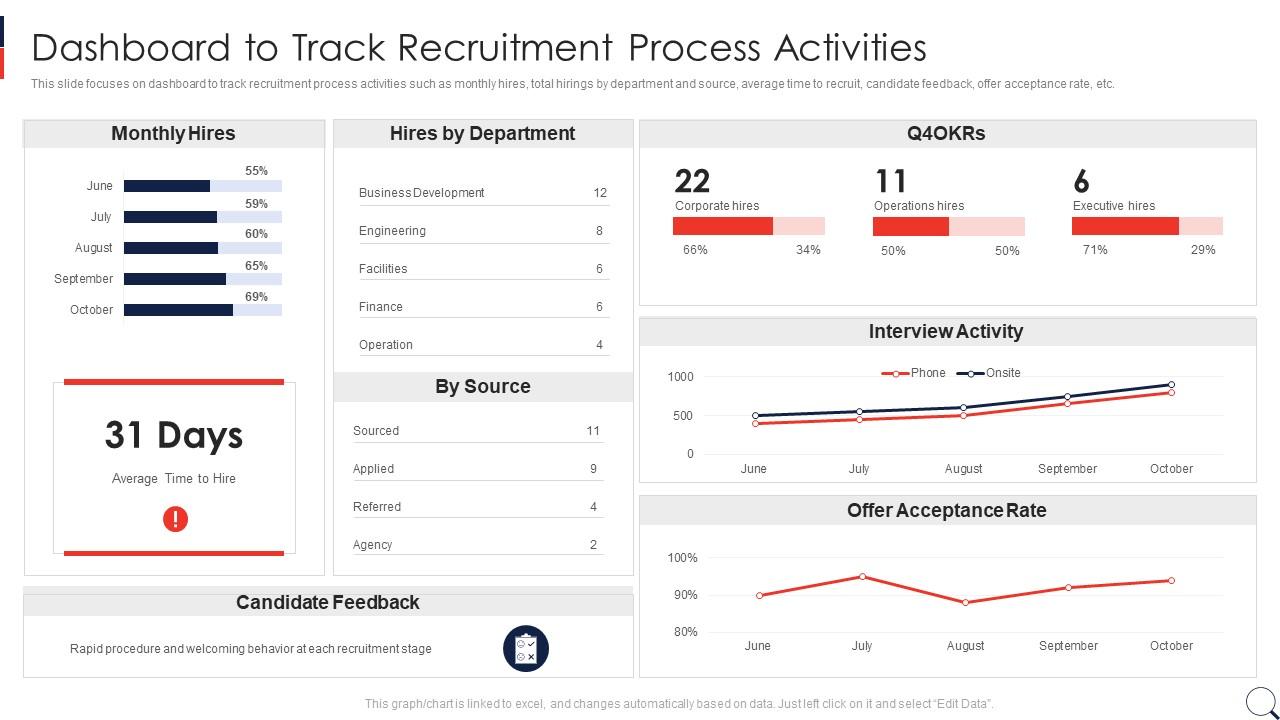
This slide focuses on dashboard to track recruitment process activities such as monthly hires, total hirings by department and source, average time to recruit, candidate feedback, offer acceptance rate, etc.
People who downloaded this PowerPoint presentation also viewed the following :
Recruitment Process In HRM Dashboard To Track Recruitment Process Activities with all 7 slides:
Use our Recruitment Process In HRM Dashboard To Track Recruitment Process Activities to effectively help you save your valuable time. They are readymade to fit into any presentation structure.
FAQs for Recruitment Process In HRM Dashboard To Track
Start with the obvious stuff - time to fill, cost per hire, and which channels actually work (not just send you tons of terrible resumes). Offer acceptance rates matter too. Candidate satisfaction is smart to track since nobody wants a reputation for having a nightmare interview process. Quality of hire is probably the most important but honestly it's a pain to measure well. Oh and diversity metrics if that's a priority for your company. Hiring manager happiness can be useful data too. Don't overthink it though - nail these basics first, then you can get into the fancy analytics later.
Oh man, visual data is a game changer for recruiting. You can actually see what's happening instead of digging through endless spreadsheets. Like, you'll notice patterns immediately - maybe everyone bails after the second interview or one job board is giving you total duds. Dashboards show you where candidates come from and which sources are worth your budget. I sound like such a nerd but it really does feel like having superpowers compared to tracking everything manually. Start with time-to-hire and source performance - that's where you'll probably find the biggest wins.
Dude, real-time data is a game changer for recruiting. Instead of waiting weeks to figure out what's working, you can pivot immediately. See a job posting bombing after two days? Fix the description or move your budget somewhere else. I learned this the hard way tbh - used to wait months before realizing entire campaigns were duds. Now you can catch bottlenecks fast, figure out which job boards actually bring good people, and tweak your screening on the spot. Check your dashboard daily. Small tweaks beat those massive quarterly strategy sessions every time.
So basically you and your hiring managers can finally see what's actually happening with open positions without the endless email chains. Real-time updates on applications, interviews, all that stuff. Honestly, it cuts down on so many "what's the status?" conversations - which is reason enough to set one up. You can automate notifications when new people apply or when managers need to review resumes. Everyone sees where things get stuck too, which helps with trust. Oh, and definitely figure out what metrics your managers actually care about first. Don't just throw everything at them.
Dude, AI tools are honestly such a lifesaver for recruiting. They'll automatically screen resumes and rank candidates based on what you're actually looking for. No more drowning in hundreds of applications every week. The scheduling stuff is pretty sweet too - handles interviews and follow-ups without you having to babysit everything. What's really cool is how it learns from your past hires and gets better at spotting good fits. I'd start with basic resume screening first - that alone will save you like 10+ hours weekly. Trust me, your time-to-hire will drop big time.
So basically, industry benchmarks tell you what metrics to track and what good performance looks like. Everyone measures stuff like time-to-hire, cost-per-hire, and source effectiveness - leadership expects these anyway. Benchmarks help you set realistic targets too. Like if industry average is 36 days to hire, flag anything over 45 as problematic. I'd start by looking up benchmarks for your company size and industry (some of these reports are surprisingly detailed). Then just build your dashboard around those key numbers. Makes the whole thing way more useful than guessing what matters.
Honestly, most companies just throw 20+ metrics onto one dashboard and call it a day. Bad move. You'll drown in data and miss what actually matters. Here's what kills recruitment dashboards: no clear definition of success from day one, stale data that nobody updates, and designs so complex that only HR gets it. Your hiring managers need to look at it for like 30 seconds and know if they're winning or losing. My advice? Start with maybe 5-7 metrics that actually tie to your hiring goals. Simple beats fancy every time.
Dashboards basically help you spot hiring bias by slicing your data different ways. Like, you can see where candidates drop off by demographic or track which interviewers have way different pass rates. Pretty wild when you actually see it in numbers. Set up filters for gender, race, age - whatever applies to your company. Also check if you're always rejecting people from certain schools or backgrounds (guilty as charged at my last job). Once patterns emerge, dig into the why behind them. Then tweak your process from there.
Start with your ATS data - it's pure gold for tracking applications, hiring timelines, and where people drop off. Job board APIs come next because they'll show you which sources actually work (trust me, it's never what you expect). Your HRIS system ties everything together from offer to first day, so don't skip that one. Honestly, most people overthink this stuff. Social recruiting metrics and referral data fill in the gaps. Get these five systems talking and you're basically set - way better than flying blind like most companies do.
Honestly? Daily updates are your sweet spot for most recruiting teams. Real-time is amazing if you can swing it - candidates move crazy fast these days and you don't want to be that company working off last week's info. But daily works fine since most hiring decisions aren't happening by the minute anyway. Weekly is way too slow though, you'll be making calls on old data. I'd start with daily automated updates and see how it feels. If you're missing opportunities or things feel sluggish, then push for real-time later. Baby steps, you know?
Honestly, just pick the metrics that actually move the needle for your team - maybe 5-7 max. Time-to-hire, source effectiveness, pipeline conversion, stuff like that. Don't go crazy dumping every data point you can find. Your dashboard should match how your team works. Some places obsess over diversity numbers, others just want speed. The cleanest ones I've used were pretty basic looking but had solid filters so you could dig deeper when needed. Set up alerts for when things get stuck (trust me on this one). Also, check in quarterly to see what people actually click on vs what just sits there looking pretty.
Honestly, mobile accessibility is huge for remote recruiting teams. You can review candidates from anywhere - checking apps on your commute or approving interviews while grabbing coffee. Super helpful when you're working across time zones too. Being able to respond to urgent hiring stuff immediately instead of waiting to get back to your laptop? Total lifesaver. Plus let's be real, we're all on our phones constantly anyway. Just make sure you actually test the mobile dashboard first though - I've seen too many that look terrible on phones but nobody bothered checking.
Start with role-based permissions - recruiters shouldn't see salary info, hiring managers can't peek at candidates outside their roles. Encryption for everything, obviously. MFA too. Data retention is actually huge here since people trust you with their personal stuff. I've seen way too many companies get sloppy with demo data - real names just sitting there in test dashboards, it's embarrassing. Log everything and run security audits regularly. Oh, and don't forget to anonymize that demo data properly from day one.
Honestly, recruitment dashboards are a game-changer for this stuff. They show you real-time diversity data across your whole hiring process. Super helpful for catching where people drop off - like getting diverse candidates but losing them at phone screens (major red flag there). The visual breakdowns make it way easier to spot trends. Plus you can actually set targets and watch if you're hitting them instead of just crossing your fingers. Leadership loves seeing the data too. Just track whatever demographics actually align with what your company's trying to achieve, you know?
Honestly, user feedback is everything when building a recruitment dashboard that people actually use. Your heaviest users will straight up tell you what's broken - like when important filters are buried or the pipeline view makes zero sense. They'll also call out which metrics they actually check versus the stuff that just looks impressive in meetings. I'd start by asking what pisses them off most about their current workflow, then dig into what's missing entirely. Maybe they need better candidate source tracking or want alerts when things get stuck. The goal is making something functional, not just another pretty chart that collects dust.
-
A perfect platform for all your presentation needs. Unlimited products at an affordable price.Â
-
This design is not only aesthetically pleasing but it has many uses making the cost worthwhile. The graphics look stunning, and you can edit them as per your needs.Â