


Robotic Process Automation Use Cases And Benefits Powerpoint Presentation Slides





Try Before you Buy Download Free Sample Product
 Impress Your
 Audience
 100%
100% Editable
 Save Hours
 of Time


Unleash the potential of automation with our insightful Robotic Process Automation template. Our deck delves into the realm of RPA, also known as software robotics, where cutting-edge automation technologies replicate human tasks such as data extraction, document filing, and file transfers. By seamlessly integrating APIs and user interface relations, RPA bridges the gap between enterprise and productivity applications, effectively streamlining repetitive tasks. Through the deployment of human process-simulating scripts, RPA tools drive the autonomous execution of various activities and transactions across diverse software platforms. This comprehensive presentation navigates the adoption of RPA across industries and their processes, spanning customer service, retail, marketing, healthcare, finance, and more. It explores emerging trends and techniques in the automotive sector, diverse RPA types, and the establishment of center-of-excellence teams. Furthermore, it outlines RPA implementation strategies, timelines, impacts on various processes, challenges, organizational repercussions, and performance measurement dashboards. Elevate your understanding of RPA's transformative power by downloading this resourceful presentation now.
People who downloaded this PowerPoint presentation also viewed the following :
Content of this Powerpoint Presentation
Slide 1: This slide displays the title Robotic process automation use cases and benefits.
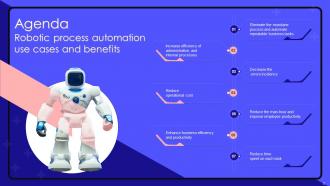
Slide 2: This slide displays the title Agenda.
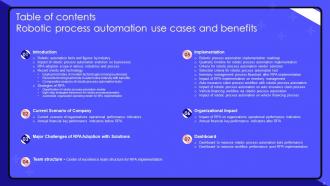
Slide 3: This slide exhibit table of content.
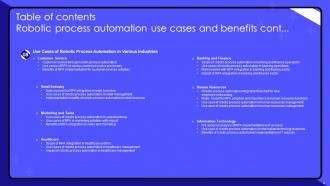
Slide 4: This slide exhibit table of content.
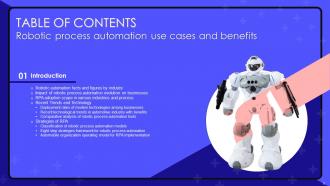
Slide 5: This slide showcase table of content that is to be discuss further.
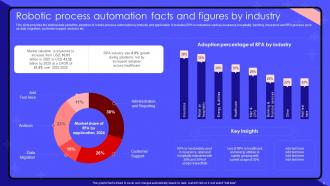
Slide 6: This slide provides the statical data about the adoption of robotic process automation by industry and application.
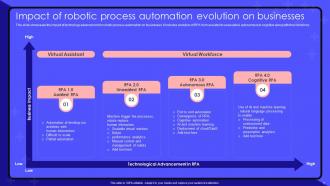
Slide 7: This slide showcases the impact of technology advancement in robotic process automation on businesses.
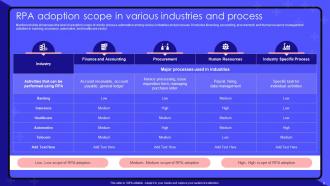
Slide 8: Mentioned slide showcases the level of adoption scope of robotic process automation among various industries and processes.
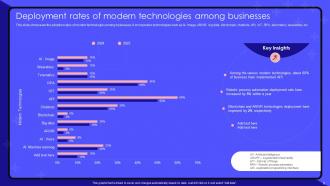
Slide 9: This slide showcases the adoption rates of modern technologies among businesses.
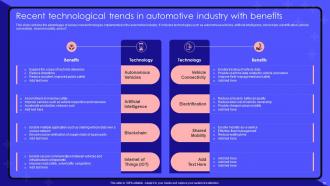
Slide 10: This slide contains the advantages of various new technologies implemented in the automotive industry.
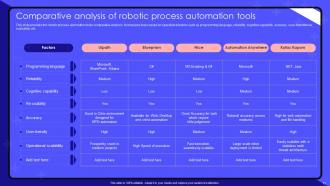
Slide 11: This slide provides the robotic process automation tools comparative analysis.
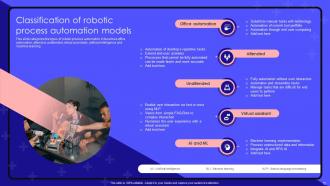
Slide 12: This slide categorize the types of robotic process automation.
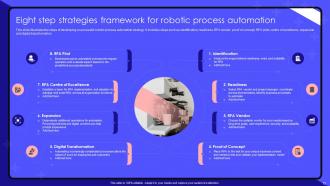
Slide 13: This slide illustrates the steps of developing a successful robotic process automation strategy.
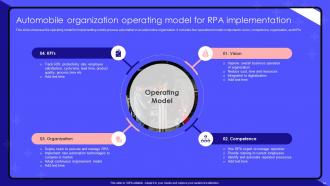
Slide 14: This slide showcase the operating model for implementing robotic process automation in an automotive organization.
Slide 15: This slide showcase table of content that is to be discuss further.
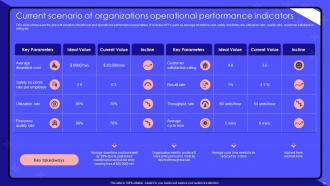
Slide 16: This slide showcases the present situation of technical and operational performance parameters.
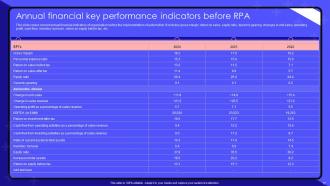
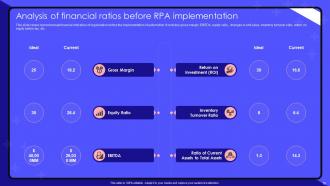
Slide 17: This slide covers current annual financial indicators of organization before the implementation of automation.
Slide 18: This slide covers current annual financial indicators of organization before the implementation of automation.
Slide 19: This slide showcase table of content that is to be discuss further.
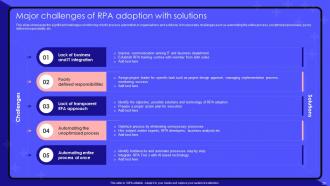
Slide 20: This slide showcases the significant challenges of enforcing robotic process automation in organizations and solutions.
Slide 21: This slide showcase table of content that is to be discuss further.
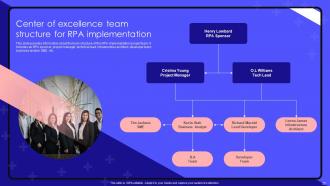
Slide 22: This slide provides information about the team structure of the RPA implementation project team.
Slide 23: This slide showcase table of content that is to be discuss further.
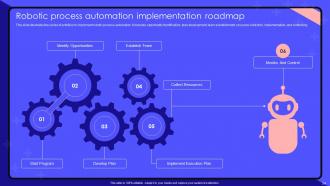
Slide 24: This slide illustrates the series of activities to implement robotic process automation.
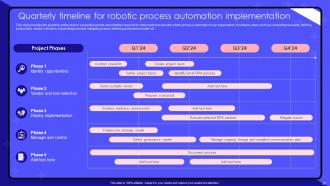
Slide 25: This slide provides the quarterly action plan of sequential events and activities required to implement and execute robotic process automation in an organization.
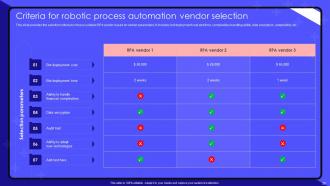
Slide 26: This slide provides the selection criteria to choose suitable RPA vendor based on certain parameters.
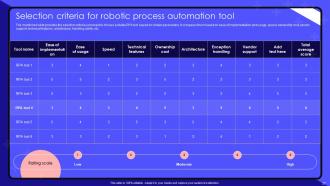
Slide 27: The mentioned slide provides the selection criteria scorecard to choose suitable RPA tool based on certain parameters.
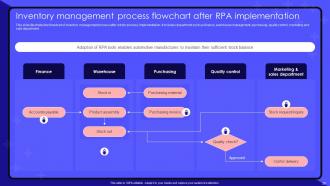
Slide 28: This slide illustrates the flowchart of inventory management process after robotic process implementation.
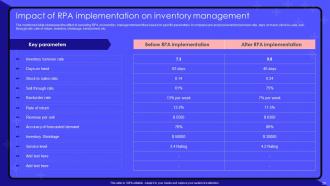
Slide 29: The mentioned slide showcases the effect of executing RPA on inventory management workflow based on specific parameters.
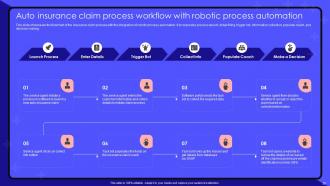
Slide 30: This slide showcases the flowchart of the insurance claim process with the integration of robotic process automation.
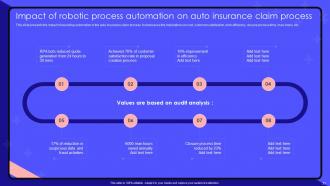
Slide 31: This slide presents the impact of executing automation in the auto insurance claim process.
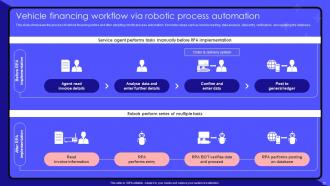
Slide 32: This slide showcases the process of vehicle financing before and after adopting robotic process automation.
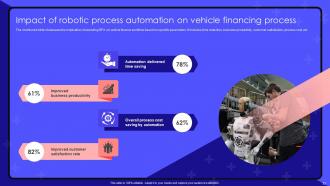
Slide 33: The mentioned slide showcases the implication of executing RPA on vehicle finance workflow based on specific parameters.
Slide 34: This slide showcase table of content that is to be discuss further.
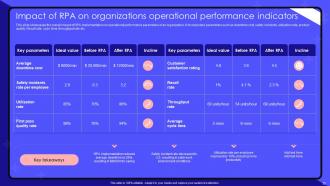
Slide 35: This slide showcases the overall impact of RPA implementation on operational performance parameters of an organization.
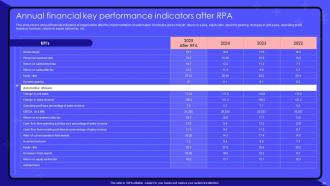
Slide 36: This slide covers annual financial indicators of organization after the implementation of automation.
Slide 37: This slide showcase table of content that is to be discuss further.
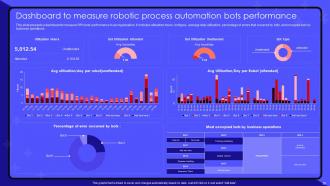
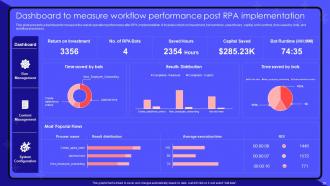
Slide 38: This slide presents a dashboard to measure RPA bots' performance in an organization.
Slide 39: This slide presents a dashboard to measure the overall operation performance after RPA implementation.
Slide 40: This slide showcase table of content that is to be discuss further.
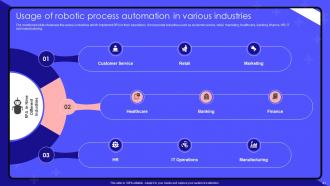
Slide 41: The mentioned slide showcase the various industries which implement RPA in their operations.
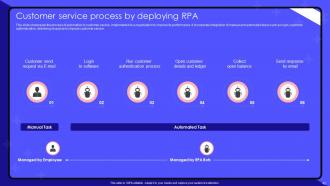
Slide 42: This slide showcases the process of automation in customer service, implemented in a organization to improve its performance.
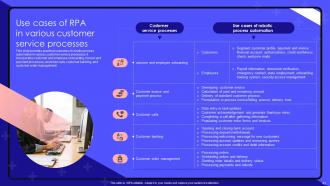
Slide 43: This slide provides practical scenarios of robotic process automation in various customer service processes.
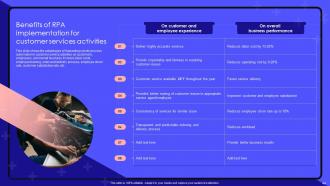
Slide 44: This slide shows the advantages of implanting robotic process automation in customer service activities on customers, employees, and overall business.
Slide 45: This slide showcase table of content that is to be discuss further.
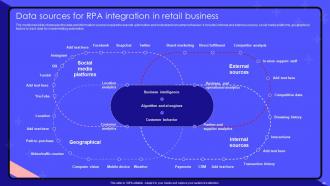
Slide 46: The mentioned slide showcases the data and information sources required to execute automation and understand consumer behaviour.
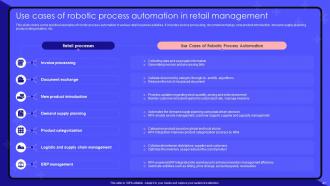
Slide 47: This slide covers some practical examples of robotic process automation in various retail business activities.
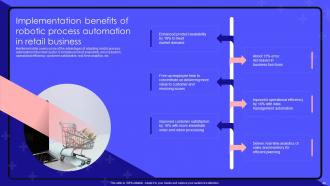
Slide 48: Mentioned slide covers some of the advantages of adopting robotic process automation in the retail sector.
Slide 49: This slide showcase table of content that is to be discuss further.
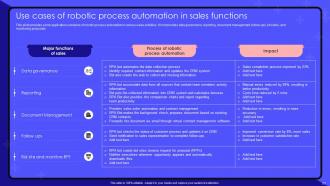
Slide 50: This slide provides some application scenarios of robotic process automation in various sales activities.
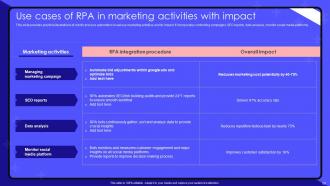
Slide 51: This slide provides practical illustrations of robotic process automation in various marketing activities and its impact.
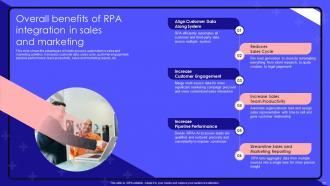
Slide 52: This slide shows the advantages of robotic process automation in sales and marketing activities.
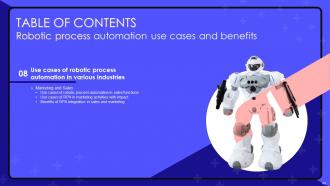
Slide 53: This slide showcase table of content that is to be discuss further.
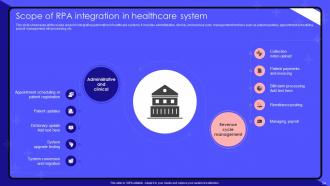
Slide 54: This slide showcases all the scope areas for integrating automation in healthcare systems.
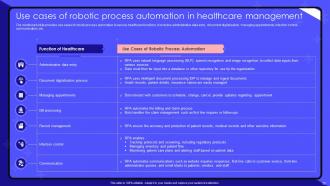
Slide 55: The mentioned slide provides use cases of robotic process automation in various healthcare functions.
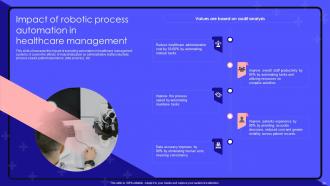
Slide 56: This slide showcases the impact of executing automation in healthcare management systems.
Slide 57: This slide showcase table of content that is to be discuss further.
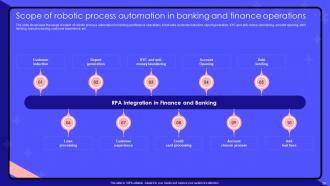
Slide 58: The slide showcases the range of extent of robotic process automation in banking and finance operations.
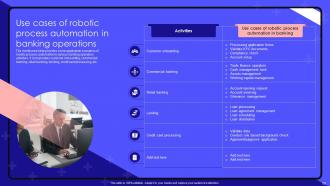
Slide 59: The mentioned slide provides some application scenarios of robotic process automation in various banking operation activities.
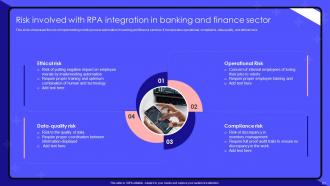
Slide 60: This slide showcases the risk of implementing robotic process automation in banking and finance services.
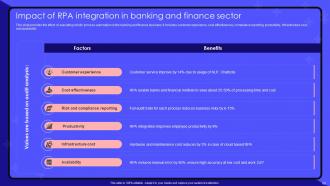
Slide 61: This slide provides the effect of executing robotic process automation in the banking and finance business.
Slide 62: This slide showcase table of content that is to be discuss further.
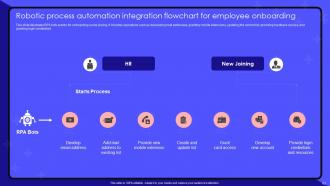
Slide 63: This slide illustrates RPA bots events for onboarding a new joining.
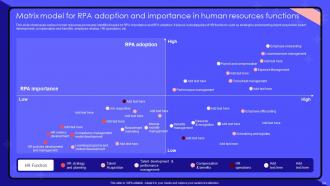
Slide 64: This slide showcases various human resources processes identified based on RPA importance and RPA adoption.
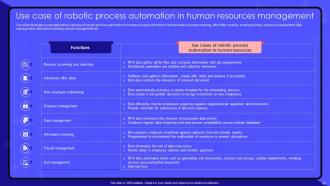
Slide 65: This slide illustrates some application scenarios of robotic process automation in human resources functions.
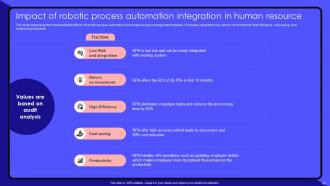
Slide 66: This slide showcases the implementation effects of robotic process automation on human resource management activities.
Slide 67: This slide showcase table of content that is to be discuss further.
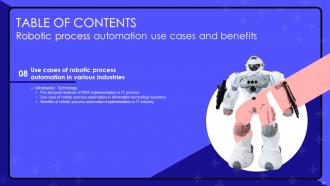
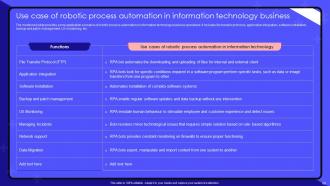
Slide 68: The mentioned slide provides some application scenarios of robotic process automation in information technology business operations.
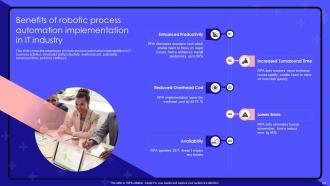
Slide 69: This slide shows the advantages of robotic process automation implementation in IT business activities.
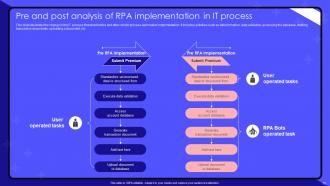
Slide 70: This slide illustrates the change in the IT process flowchart before and after robotic process automation implementation.
Slide 71: This is the icons slide.
Slide 72: This slide presents title for additional slides.
Slide 73: This slide display Pie chart.
Slide 74: This slide exhibit yearly Timeline.
Slide 75: This slide showcase Comparison.
Slide 76: This slide showcase Magnifying glass.
Slide 77: This slide exhibit Idea generation.
Slide 78: This slide depicts posts for past experiences of clients.
Slide 79: This slide display Location.
Slide 80: This is thank you slide & contains contact details of company like office address, phone no., etc.
Robotic Process Automation Use Cases And Benefits Powerpoint Presentation Slides with all 85 slides:
Use our Robotic Process Automation Use Cases And Benefits Powerpoint Presentation Slides to effectively help you save your valuable time. They are readymade to fit into any presentation structure.












FAQs for Robotic Process Automation Use Cases And Benefits
Honestly, the biggest win is just how much time you'll save on boring repetitive stuff. Your team can actually focus on work that matters instead of data entry hell. Bots don't make those stupid human mistakes either - they follow the same steps perfectly every time, which is great for compliance. Processing gets way faster since they work around the clock (wish I could do that sometimes). Costs drop too because you're not paying people to do mind-numbing tasks. Just look for anything super repetitive and rule-based first - that's where you'll see results fast.
So RPA is pretty cool - it just mimics your mouse clicks and typing instead of requiring developers to mess with databases and APIs. You can literally record yourself doing something and it learns from that. Traditional automation? That's months of coding and integration work that costs way too much honestly. RPA works on top of whatever systems you already have, so nothing needs to change underneath. Your IT people will actually like you for once since deployment takes weeks instead of years. It's like having a digital assistant that sits at your computer and does the boring stuff.
Dude, banking and finance are going crazy with RPA - loan processing, compliance reports, all that boring stuff. Healthcare's massive too, especially claims and patient records. Insurance companies can't get enough of it for underwriting. Manufacturing uses it for supply chain management, which makes sense. Telecom was the surprise winner though - they're automating customer onboarding like mad. Honestly thought that industry would be slower to adopt. You should definitely scope out what your competitors are doing first before jumping in.
Yeah, RPA plays really nice with most systems - honestly it's one of the coolest things about it. Works with databases, web apps, APIs, those crusty old legacy systems your company refuses to update... basically anything. The bots just interact through the same interfaces you do, so if you can click around and do it manually, RPA can probably handle it. Pretty wild that it connects ancient mainframes to modern cloud stuff without breaking anything. I'd start by figuring out which systems your boring repetitive tasks actually touch - that'll show you what you're working with integration-wise.
Honestly, the biggest pain points are usually picking the wrong processes to start with and dealing with people freaking out about change. Teams always go for these crazy complex workflows right off the bat - I swear, it's like they want to fail lol. Your employees will probably think you're trying to replace them, plus IT will lose their minds over security stuff. Oh, and everyone expects to see ROI like next month, which is just not realistic. Start simple - find boring, repetitive tasks with clear rules. Spend time explaining why you're doing this before you even touch any automation. Trust me on that one.
Honestly, the math is pretty straightforward - just compare what you're saving against what you spent. Time saved, fewer mistakes, faster processing, that stuff. You'll want to track everything before automation so you have real numbers to work with. Don't forget about ongoing costs though, like licensing fees and maintenance. Most places I've seen hit positive ROI in 6-12 months, but only if they're smart about which processes they pick. The key is documenting your current costs first - time everything manually, then measure the same stuff after. Makes for way better numbers when you're trying to justify the whole thing.
Your employees are everything for RPA - they know the actual workflow better than anyone. Get them mapping processes and spotting which tasks make sense to automate. They'll catch problems before you waste time building the wrong thing. Plus they're way better at testing since they instantly notice when something's weird or missing those random edge cases that always pop up. I've watched so many projects crash because IT just... did their own thing without asking the people actually doing the work. Involve your team early, hear them out, and help them see how this frees them up for less boring stuff.
So you're looking at stuff that's super repetitive and follows the same steps every time. Data entry, invoice processing, moving info between systems - basically anything that makes people want to bang their head against their desk. High volume but not complicated, you know? Like when someone's constantly copying data from emails into spreadsheets or updating five different systems with the same info. Honestly, those tasks are soul-crushing anyway. Map out your most annoying manual processes first. If it's the same click-click-click sequence over and over, that's your goldmine right there.
Honestly, RPA is a game-changer for compliance stuff. Bots create perfect audit trails and never mess up like we do - no more panicking about missed regulatory filings at 11pm. They follow rules exactly and document everything, which auditors love. Your risk goes way down since bots don't get distracted or cut corners when they're tired (unlike yours truly after too much coffee). I'd start by looking at whatever manual compliance tasks make you want to pull your hair out - those repetitive, error-prone ones are perfect for automation.
So the big thing is job displacement - you gotta tell people straight up which roles might get automated. Nobody wants to find out they're being replaced by a bot through office gossip, you know? Then there's the whole mess of who's responsible when your RPA screws up and makes a bad call. Data privacy is huge too since these things touch everything. Oh, and don't fall into that "set it and forget it" trap - I've seen companies do that and it never ends well. You need someone actually watching this stuff and doing regular check-ins.
Honestly, you should set up a Center of Excellence first - sounds fancy but it's just your governance hub. Don't waste time on those weird one-off processes that only happen in random departments. Go for the high-impact stuff that's actually standardized. Train people in the business units so they can build their own bots within your framework - saves you from being the bottleneck later. Build templates and reusable components early on. That way teams aren't reinventing the wheel every damn time. Find 3-5 departments with similar processes and start there, then expand systematically.
So for RPA training, I'd definitely start with whatever platform you're using - UiPath, Automation Anywhere, Blue Prism all have solid certification programs. Coursera and LinkedIn Learning are good too, but honestly? Some of those cheap Udemy courses are way better than you'd expect. YouTube's clutch for quick tutorials when you're stuck. Oh, and don't just do everything online - try to set up some internal workshops where your team can mess around with your actual processes together. That hands-on practice makes a huge difference.
So RPA and AI work really well together now. Basic automation just follows the rules you set, but throw some machine learning on top? Now your bots can actually think - they'll read messy documents, make judgment calls, adapt when things change. Pretty wild honestly. You don't have to babysit them as much or reprogram every time something shifts. This combo lets you automate stuff that used to need human brains, especially processes with weird data or decisions involved. My advice? Find somewhere you're already using RPA and test where AI might make it way smarter.
So RPA's getting way smarter - we're talking AI bots that can actually think through complex stuff instead of just following basic rules. Cloud platforms are taking over, which honestly makes sense since on-premise setups are such a pain. Your business folks will start building their own bots without needing IT approval for everything. Document processing is gonna get crazy good at handling messy, unstructured data. Oh, and the bots won't just crash when they hit something unexpected - they'll actually learn from it. I'd focus on mapping out processes with lots of random documents and emails now.
Honestly, RPA bots are just like any other software - they'll break if you ignore them. Check on your automated stuff regularly because system updates love to mess things up. I can't tell you how many places I've worked where someone built a bot, it worked great for six months, then just... died quietly in the background. Super annoying. Monitor how they're performing and actually ask users if things are still helpful. Maybe do a quarterly cleanup where you figure out what's still worth keeping around. Some bots you'll need to tweak, others you should probably just kill off entirely.
-
If you have visited their site and failed to find the products, try reaching the customer service because it will be the case that you didn't use the search bar well.
-
The templates you provide are great! They have saved me tons of time and made my presentations come alive. Thank you for this awesome product. Keep up the good work!