Telesales Customer Problem Management Dashboard

Rating:
100%
Telesales Customer Problem Management Dashboard
Slide 1 of 7
Favourites Favourites

Try Before you Buy Download Free Sample Product

Audience Impress Your
Audience
Editable 100%
Editable
Time Save Hours
of Time
The Biggest Sale is ending soon in
0
0
:
0
0
:
0
0
Rating:
100%
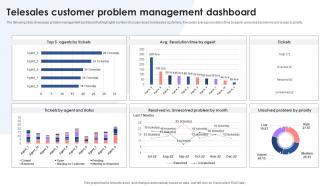
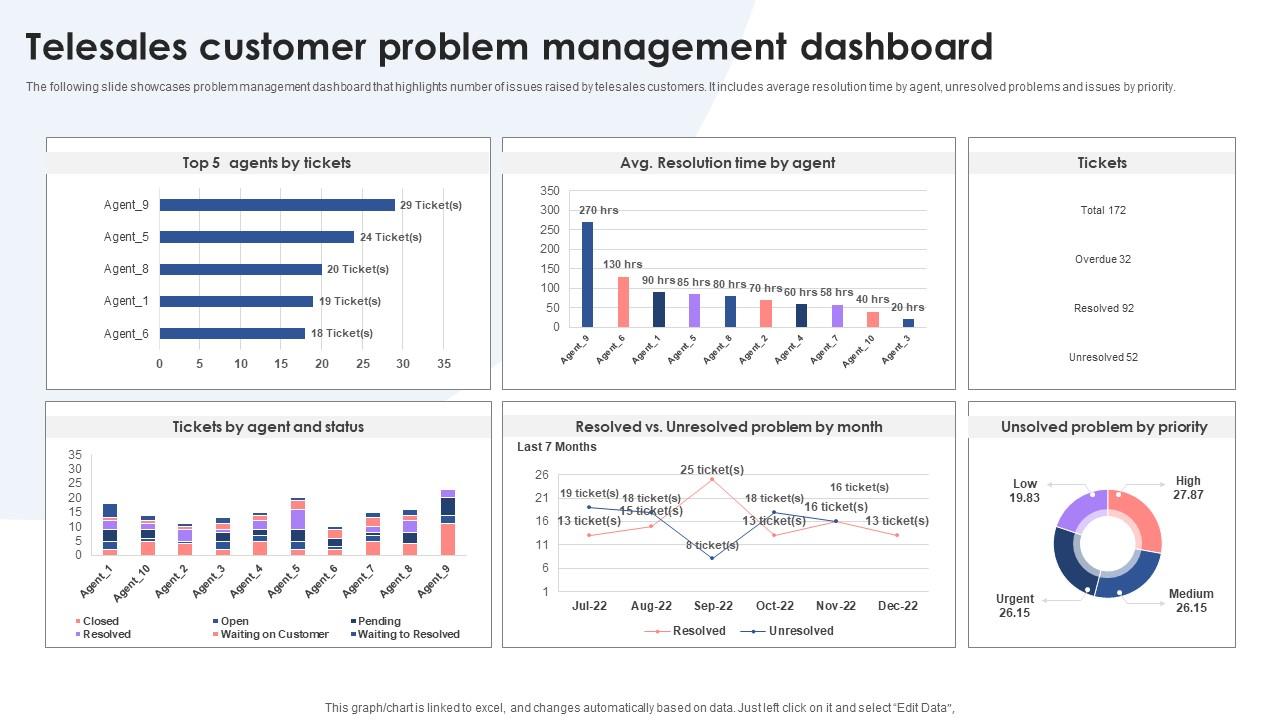
The following slide showcases problem management dashboard that highlights number of issues raised by telesales customers. It includes average resolution time by agent, unresolved problems and issues by priority. Introducing our Telesales Customer Problem Management Dashboard set of slides. The topics discussed in these slides are Telesales, Customer Problem, Management Dashboard. This is an immediately available PowerPoint presentation that can be conveniently customized. Download it and convince your audience.
FAQs for Telesales Customer

Essential telesales KPIs include call volume, conversion rates, average call duration, lead response time, revenue per call, and pipeline velocity. These metrics streamline performance tracking by identifying top performers, optimizing call strategies, and forecasting sales outcomes, with many organizations finding that comprehensive dashboards ultimately enhance team productivity and accelerate revenue growth.

Graphical representations enhance telesales metrics understanding by transforming complex data into visual patterns, trends, and comparisons that enable quick identification of performance gaps, conversion bottlenecks, and opportunity areas. Through interactive charts, heat maps, and progress indicators, sales managers streamline decision-making, accelerate performance reviews, and deliver actionable insights, ultimately enabling faster course corrections and improved team productivity.

User-friendly telesales dashboards include intuitive navigation, real-time call metrics, automated lead prioritization, one-click dialing capabilities, and customizable performance widgets. These features streamline daily workflows by minimizing clicks between tasks, displaying critical customer data instantly, and enabling quick pipeline updates, with many sales teams finding that simplified interfaces ultimately boost call volume and conversion rates.

**INPUT**: How often should data on a telesales dashboard be updated for optimal performance tracking? **OUTPUT**: Telesales dashboard data should be updated in real-time or at minimum hourly intervals to enable immediate performance adjustments, daily target tracking, and responsive coaching interventions. This frequent data refresh allows sales managers to identify conversion trends, monitor call volumes, and address performance gaps quickly, ultimately delivering enhanced team productivity and revenue optimization across competitive sales environments.

Sales call outcome visualization best practices include outcome categorization, conversion funnel displays, time-based trend analysis, rep performance comparisons, and pipeline stage tracking. These approaches streamline sales management by highlighting successful patterns, identifying coaching opportunities, and enabling data-driven decisions, with many sales organizations finding that visual outcome tracking significantly enhances team performance and accelerates deal closure rates.

A telesales dashboard helps identify training needs by tracking key performance metrics like call conversion rates, average handling time, objection handling success, and product knowledge gaps across individual agents. Through real-time analytics and comparative performance data, managers can pinpoint specific skill deficiencies, monitor improvement trends, and customize training programs, ultimately enhancing team productivity and sales outcomes.

Real-time data serves as the foundation of effective telesales dashboards by enabling instant performance tracking, immediate lead prioritization, and dynamic campaign adjustments throughout active sales cycles. This immediate visibility allows sales teams to respond quickly to emerging opportunities, address performance gaps as they occur, and optimize calling strategies based on live conversion rates, ultimately delivering higher close rates and improved revenue outcomes.

CRM integration enhances telesales dashboards by centralizing customer data, automating lead scoring, and providing real-time interaction histories across all touchpoints. This strategic combination enables sales teams to personalize conversations more effectively, prioritize high-value prospects, and track conversion rates seamlessly, with many organizations finding that integrated systems deliver faster response times and significantly improved customer experiences.

Essential telesales lead conversion metrics include call-to-lead ratio, lead-to-opportunity conversion rate, opportunity-to-close percentage, average deal size, and sales cycle duration. These metrics enable sales managers to identify bottlenecks, optimize agent performance, and streamline conversion processes, with many organizations finding that tracking these key indicators delivers faster pipeline visibility and ultimately enhances revenue predictability.

Dashboards aid team management by providing real-time performance visibility, automated goal tracking, individual progress monitoring, and comparative analytics across team members. Through interactive visualizations, managers can identify top performers, address coaching needs, and celebrate achievements instantly, while sales representatives gain transparent feedback on their metrics, ultimately fostering healthy competition and driving consistent motivation.

Telesales dashboard customization strategies include configuring KPI widgets, implementing role-based access controls, integrating CRM systems, creating automated reporting schedules, and designing industry-specific metrics tracking. These approaches enable organizations to streamline sales operations by focusing on relevant performance indicators, enhancing team productivity, and delivering actionable insights, with many businesses finding that tailored dashboards significantly improve conversion rates and strategic decision-making.

Competitor analysis features in comprehensive telesales dashboards through market share tracking, pricing comparisons, win/loss ratios against specific competitors, and competitive positioning metrics. These insights enable sales teams to adjust strategies in real-time, identify market opportunities, and refine value propositions, with many organizations finding that competitive intelligence integration ultimately delivers faster deal cycles and improved conversion rates.

Tracking call duration and frequency reveals customer engagement patterns, sales representative efficiency, optimal calling times, and conversion correlations across different prospect segments. These metrics enable sales managers to identify high-performing call strategies, optimize resource allocation, and improve training programs, with many organizations finding that longer, less frequent calls often yield higher conversion rates than rapid-fire approaches.

Customer feedback can be effectively represented through satisfaction scores, sentiment analysis trends, complaint categories, resolution timeframes, and feedback volume metrics displayed via interactive charts and real-time widgets. These visualizations enable telesales teams to quickly identify service gaps, track improvement initiatives, and prioritize follow-up actions, with many organizations finding that centralized feedback dashboards enhance customer retention rates while streamlining response strategies.

Recommended tools for creating interactive telesales dashboards include Tableau, Power BI, Salesforce Analytics, HubSpot's dashboard features, and Google Data Studio. These platforms streamline sales data visualization by integrating CRM systems, automating performance tracking, and enabling real-time reporting, with many sales organizations finding that interactive dashboards ultimately enhance team productivity and accelerate deal closure rates.

Ratings and Reviews

100% of 100
Review Form
Write a review
Most Relevant Reviews
  1. 100%

    by Michael Clark

    Excellent products for quick understanding.
  2. 100%

    by Smith Flores

    “I always have a wonderful experience with SlideTeam. It's my ""go to"" when I need a template.”

2 Item(s)

per page: