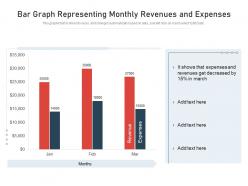
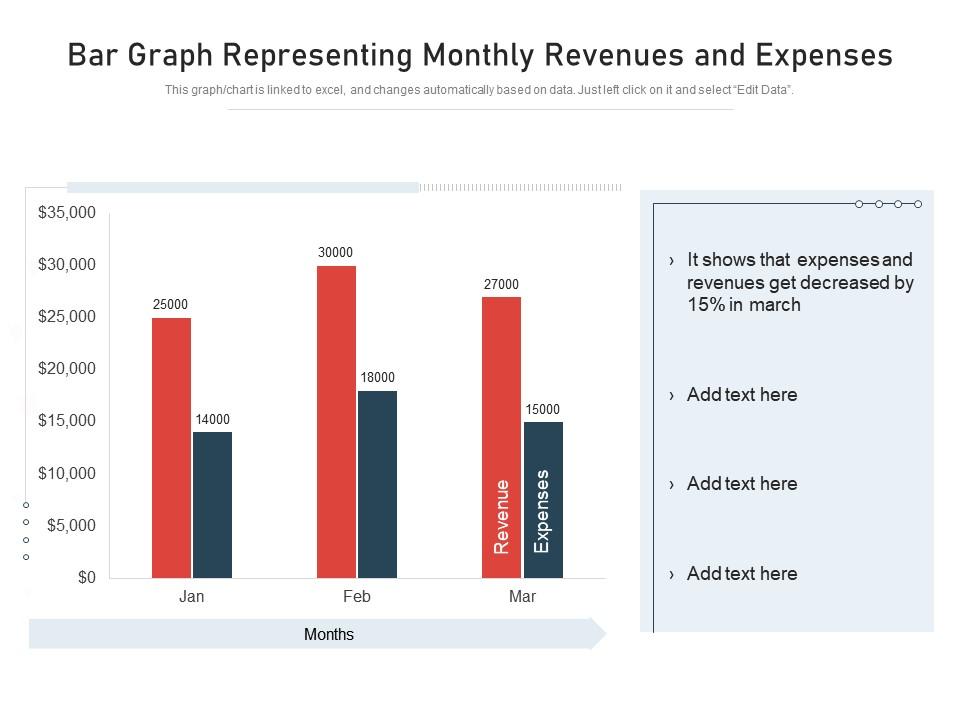
Bar graph representing monthly revenues and expenses
Try Before you Buy Download Free Sample Product
Audience
Editable
of Time
This graph or chart is linked to excel, and changes automatically based on data. Just left click on it and select Edit Data.
People who downloaded this PowerPoint presentation also viewed the following :
Bar graph representing monthly revenues and expenses with all 2 slides:
Use our Bar Graph Representing Monthly Revenues And Expenses to effectively help you save your valuable time. They are readymade to fit into any presentation structure.
FAQs for Bar graph representing monthly
Ok so for bar graphs you basically need five things: decent title, labeled axes, even spacing between bars, and if you've got multiple data sets throw in a legend. Also make sure your scaling isn't wonky - people mess this up all the time! Keep those bar gaps consistent (trust me on this one). Your y-axis should probably start at zero unless there's a good reason not to. Make the labels clear enough that someone could get it without reading your whole thing. Oh and maybe pick colors that work for colorblind people? Honestly these basics will save you from most rookie mistakes.
Colors literally make or break bar charts. Red screams "danger" even for positive data - super confusing. Green feels like growth, which is why finance stuff always uses it for gains. The worst thing? When colors are too similar. I swear some people must be colorblind when they pick chart colors because you can't tell anything apart! Bright colors automatically grab attention, so they'll highlight bars whether you want that or not. Stick with obvious choices - red for bad stuff, green for good. Just make sure there's enough contrast between categories so people can actually read your chart.
Horizontal bars are your friend when category names get long or you've got tons of them - way easier to read. Time series stuff? Go vertical. Short labels that fit under bars nicely? Also vertical. But honestly, I'm team horizontal like 90% of the time. Our brains read left to right anyway, so comparisons just make more sense that way. Plus they look way cleaner in presentations - nobody's craning their neck trying to read sideways text. Quick test: mock up both versions and see which one doesn't make people squint. That's your winner right there.
So for showing trends in categorical data, I'd go with multiple bar charts for different time periods - just put them side by side. Grouped bars work great too, where each time period gets its own color within the same chart. Honestly, the color thing makes such a difference because patterns become way more obvious. Keep your categories the same across all periods though, otherwise people get confused trying to track what's going up or down. Oh, and if you're doing this for a presentation, animated bars are pretty cool - probably overkill for most situations but still fun.
Oh man, don't get me started on messy axis labels - they're the worst! Skip the random colors unless they actually mean something. Your y-axis should start at zero most of the time too. 3D bars are honestly just painful to look at in 2023. Nobody needs that. Put your categories in an order that makes sense, and text needs to be big enough so people in the back can actually see it. If you're cramming like 10+ bars together, just split it up. Seven or eight max before it gets overwhelming. Also kind of obvious but worth saying - don't try to show everything at once.
Your scale can totally destroy what you're trying to show. Compress it too much and everything looks flat - like there's no difference at all. But stretch it out and suddenly tiny changes look massive. I swear, I've seen graphs where a 2% drop looked like the world was ending. You want that middle ground where real patterns show up without making small stuff seem dramatic. Oh, and always start your y-axis at zero unless there's a good reason not to. Keep your intervals consistent too. Honestly? Show it to someone else first and see if they read it the same way you do.
Honestly? Just start with Excel or Google Sheets - they're way better than people give them credit for once you mess around with the formatting. If you're working with tons of data, Tableau and Power BI are solid but there's definitely a learning curve there. I've actually seen some really nice charts made in Canva which sounds weird but works great for presentations. Python or R give you crazy control if you want to go that route, though that's probably overkill unless you're really into coding. Just use whatever you already have first.
Bar graphs are perfect when you're comparing different categories - like sales by region or whatever. Your brain just naturally compares the bar heights, so it's super easy to see what's bigger. Line graphs are better for trends over time though. Honestly, pie charts look nice but they're kind of annoying to read unless you only have like 3 sections max. With bar graphs you can get creative too - horizontal bars, stacked ones, grouped bars. They're just more flexible overall. I'd go with bar graphs anytime you need clear comparisons between distinct things rather than showing how something changes.
Honestly, stacked bars are clutch when you want to show the breakdown AND the totals at the same time. Like if you're looking at quarterly sales by product - you can see which quarter killed it overall, plus how each product contributed. Regular bars just show one or the other, which is kinda limiting. Just don't go crazy with too many categories though. More than 3-4 subcategories and it gets super cluttered. I'd say make both versions and see which one actually makes sense - sometimes the stacked one shows cool patterns you wouldn't notice otherwise. Worth the extra few minutes to compare.
Animated bar charts are honestly game-changers for presentations. Instead of staring at boring static numbers, people actually watch data unfold like a story. You can make bars race each other or reveal info piece by piece - it's weirdly mesmerizing. The movement keeps everyone's attention because they're waiting to see what happens next. I used to think animations were just flashy nonsense, but they genuinely help people absorb complex data without their eyes glazing over. Next time you present, animate one series at a time. Trust me, you'll notice people actually paying attention for once.
Make your axis labels super clear - "Monthly Revenue ($)" beats just "Revenue" every time. Include units when they matter. Start your y-axis at zero (seriously, don't be one of those people who makes tiny changes look dramatic). You can slap value labels right on the bars if it helps, but don't go overboard and make everything look messy. Keep fonts big enough that people aren't squinting. Honestly, if someone can't figure out what your graph shows within like 5 seconds, you've probably overcomplicated it.
Grouped bar charts are probably your best bet - they put related stuff side by side so you can actually compare things. Stacked bars show how parts add up to the whole, but honestly they get confusing fast if you have too many categories. You could also do small multiples, which is basically mini charts for each group. Color coding helps too, especially with a good legend. Oh, and if your category names are super long, just flip to horizontal bars - way easier to read. I'd start with grouped though, they're usually the clearest option for most data.
So it's all about knowing your audience, honestly. If they're already familiar with your topic, you can use jargon and skip the basic explanations - just dive into the interesting patterns. But newcomers? They'll need way more hand-holding. Clear titles, better labels, maybe even little explanation boxes. I bombed a presentation to marketing once because I assumed they knew our metrics... awkward silence everywhere! Short version: always think about what they actually know coming in. Oh, and test it on someone first if you can - saves you from looking like an idiot later.
Bar animations are perfect for guiding attention wherever you need it. Have them grow one by one to build tension, or make a specific bar change color/move to highlight key points. Honestly, I'm obsessed with that classic "rising from zero" effect - never gets old. Time everything with what you're saying so data appears right as you mention it. Side-by-side comparisons work great too, plus entrance effects can really make outliers pop. Just don't get carried away with flashy stuff or you'll lose people. Keep it intentional and your story becomes way more engaging.
Honestly, just don't be shady with your charts. Start that y-axis at zero - unless there's actually a good reason not to (and make it obvious if you do). I've seen so many terrible corporate presentations with wonky bar widths and those awful 3D effects that make everything look distorted. Be upfront about where your data came from and sample sizes too. Oh, and don't make your bars different widths for no reason - drives me crazy! Your whole goal should be helping people see what's really going on, not spinning some story. Quick test: would you feel misled if someone showed you the same chart?
-
Wonderful templates design to use in business meetings.
-
Easily Editable.
-
Best Representation of topics, really appreciable.
-
Awesome presentation, really professional and easy to edit.