


Call Center Report With Key Performance Indicators




Try Before you Buy Download Free Sample Product
 Impress Your
 Audience
 100%
100% Editable
 Save Hours
 of Time


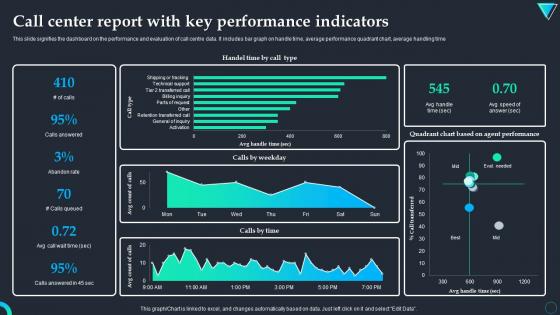
This slide signifies the dashboard on the performance and evaluation of call centre data. It includes bar graph on handle time, average performance quadrant chart, average handling time.
People who downloaded this PowerPoint presentation also viewed the following :
Call Center Report With Key Performance Indicators with all 7 slides:
Use our Call Center Report With Key Performance Indicators to effectively help you save your valuable time. They are readymade to fit into any presentation structure.





FAQs for Call Center Report With
Track First Call Resolution and Customer Satisfaction scores - those are your bread and butter. Average Handle Time matters too, but don't get obsessed with speed over actually fixing stuff. Service Level is usually that 80% answered in 20 seconds thing. Agent Utilization tells you if people are swamped or twiddling thumbs. Call Abandonment Rate is huge because nobody wants to sit on hold listening to terrible muzak for 10 minutes. Start simple with these six before you go crazy building some fancy dashboard. Quality beats speed every time.
Dude, nothing pisses customers off more than having to call back three times for the same stupid problem. When your team actually fixes things on the first call, it shows you're not incompetent and that you respect their time. There's tons of data proving high first-call resolution = happy customers. Makes total sense too - less effort from them means better reviews for you. Oh, and definitely beef up your agent training and make sure they can actually access good info quickly. That's usually where the breakdowns happen.
So AHT tracks how long each call takes from pickup to hangover - wait, hangup lol. It's your go-to metric for seeing how efficient your team is. Shorter calls usually mean faster problem-solving, which saves money and keeps customers from getting annoyed. But don't get crazy about speed or you'll have agents rushing people off before they're actually helped. That backfires hard. Find the middle ground where issues get solved properly but without dragging on forever. I'd check what your current times look like first, then set targets that actually make sense instead of just demanding everything faster.
So abandonment rates are basically your "we don't have enough people" alarm going off. When customers hang up before anyone picks up, you're understaffed. I'd track the patterns by hour and day - Monday mornings are absolutely the worst, aren't they? You'll want to aim for 2-5% abandonment rates. Higher than that consistently? Time to hire more people or shuffle schedules around. The tricky part is balancing staffing costs with actually answering calls, but if you're bleeding customers during peak times, that's where you focus first.
CSAT is your best metric for actually knowing if you're helping people or just checking boxes. Sure, handle time matters, but what's the point of fast calls if customers hang up annoyed? I've seen teams with crazy good speed stats but terrible satisfaction scores - not a fun place to work. High CSAT means fewer angry callbacks and customers who'll actually stick around. The real gold is in those feedback comments though. That's where you'll figure out what's actually working and what isn't.
Look, utilization tracking is basically seeing where your money's actually going vs where it's getting wasted. Agents sitting around doing nothing? Time to shuffle workloads or cut some shifts. But if everyone's constantly slammed, you'll catch burnout before it becomes a real problem - plus you'll know when you genuinely need more people. Honestly, it's probably the most straightforward way to match your labor costs with actual work volume. Oh, and definitely set target ranges for different shifts first. Gives you something concrete to work toward instead of just guessing.
Honestly, start with CSAT and First Call Resolution - they're super straightforward and you'll know right away if things are working. NPS is solid too for the bigger picture. Average Handle Time matters but don't get crazy about speed if it tanks your quality (I've seen teams obsess over this and it backfires). Customer Effort Score is worth adding later. Oh, and call monitoring with quality scores helps a ton. FCR especially - like, if people have to call back constantly, that tells you everything. Focus on those first two though, they'll give you the clearest read on how your team's actually doing.
So NPS tracks whether customers would actually recommend you after a support call - pretty straightforward way to see if you're helping or just pissing people off more. Just ask the standard "how likely to recommend us" question after calls, 0-10 scale. Don't get too hung up on individual scores though (easier said than done, I know). The real value comes from watching trends month-to-month. When your NPS keeps climbing, that's proof your team isn't just rushing through calls to hit metrics - they're actually solving problems. Connect it to whatever training you're doing so you can figure out what's working.
Check what your current phone system can do first - might save you money. Genesys, Avaya, and Five9 all have solid real-time dashboards built right in. Integration's honestly the biggest pain point, but worth it once you get through that mess. For extra analytics, Verint or NICE work great on top of your existing setup. Tableau and Power BI are clutch if you want custom dashboards pulling from different sources - though Power BI's learning curve is steeper than people think. Most contact center platforms track the basics automatically, so don't overthink it.
So basically, tracking the right workforce metrics will actually help you get way more productive. I'd focus on three main ones: schedule adherence, average handle time, and how much your agents are actually utilized. When you start pulling weekly reports on this stuff, you'll probably be shocked at where time gets wasted - like agents being off schedule or stuck on tasks that aren't really moving the needle. The cool thing is you can spot call volume patterns ahead of time instead of panicking when everything hits at once. Honestly, just start with those three metrics and look for trends you can actually do something about.
Set up daily reports for operational stuff like queue times, weekly ones for agent performance, then monthly for the big picture customer satisfaction trends. The worst thing you can do is spam people with massive data dumps - nobody reads those anyway. Pick KPIs that actually matter to your business goals and make them visual with clear benchmarks. Automated alerts are your friend when metrics go sideways, saves you from staring at dashboards all day. Oh, and context is huge. Raw numbers just confuse everyone more.
Yeah, high transfer rates are basically a red flag for customer experience. People hate repeating their story to five different agents - it's maddening. Studies show each transfer bumps up the chance of a bad satisfaction score by like 15-20%. Pretty brutal, honestly. You'll want to watch transfers next to your CSAT scores to catch any weird patterns. Short transfers? Customers stay happy. Long chains of handoffs? They get pissed off fast. Best fix is beefing up agent training and knowledge resources so people don't have to pass customers around as much.
Ugh, high turnover is basically call center poison. Your new hires can't handle angry customers yet, so calls drag on forever and nothing gets resolved properly. Customer satisfaction? Forget about it. You're also hemorrhaging money on constant recruiting instead of actually improving things - which is honestly backwards when you think about it. The worst part? Your good agents get slammed covering for all the empty desks. I've seen centers where experienced reps burn out just from the extra workload. Check your turnover monthly and throw some money at keeping people happy. Way better than this endless cycle of hiring and training people who'll just quit anyway.
Look, benchmarking is basically your sanity check against what other call centers are doing. Say your handle time is 8 minutes - you need to know if that's normal or if you're completely screwing up compared to competitors. Honestly, it's like finally getting the answer key! You can set goals that actually make sense instead of just guessing. When you need budget approval, having real data about where you're falling short makes those conversations way easier. Just make sure you're comparing apples to apples - find benchmarks for your specific industry and call volume, not some random generic stats.
Look, escalation rates basically show you where your support team is hitting walls. When calls keep getting bumped up, it's usually because agents don't have the right training or they can't actually fix what customers need. Sometimes your processes are just way too complicated - I've seen that a lot. Break down which call types get escalated most often. That'll show you the real knowledge gaps. Also check patterns by individual agents - some might need coaching while others are crushing it with tough cases. Honestly, I'd start tracking escalations by category first. Makes it way easier to figure out what training changes will actually move the needle.
-
“Easy to use. I always wanted to have a quick search for products and SlideTeam has helped me have it.”
-
SlideTeam’s pool of 2Million+ PPTs has really benefited my team, everyone from the IT department to HR. We are lucky to have crossed ways with them.