Target Vs Achievement Summary Of Annual And Monthly Budget
Try Before you Buy Download Free Sample Product
Audience
Editable
of Time
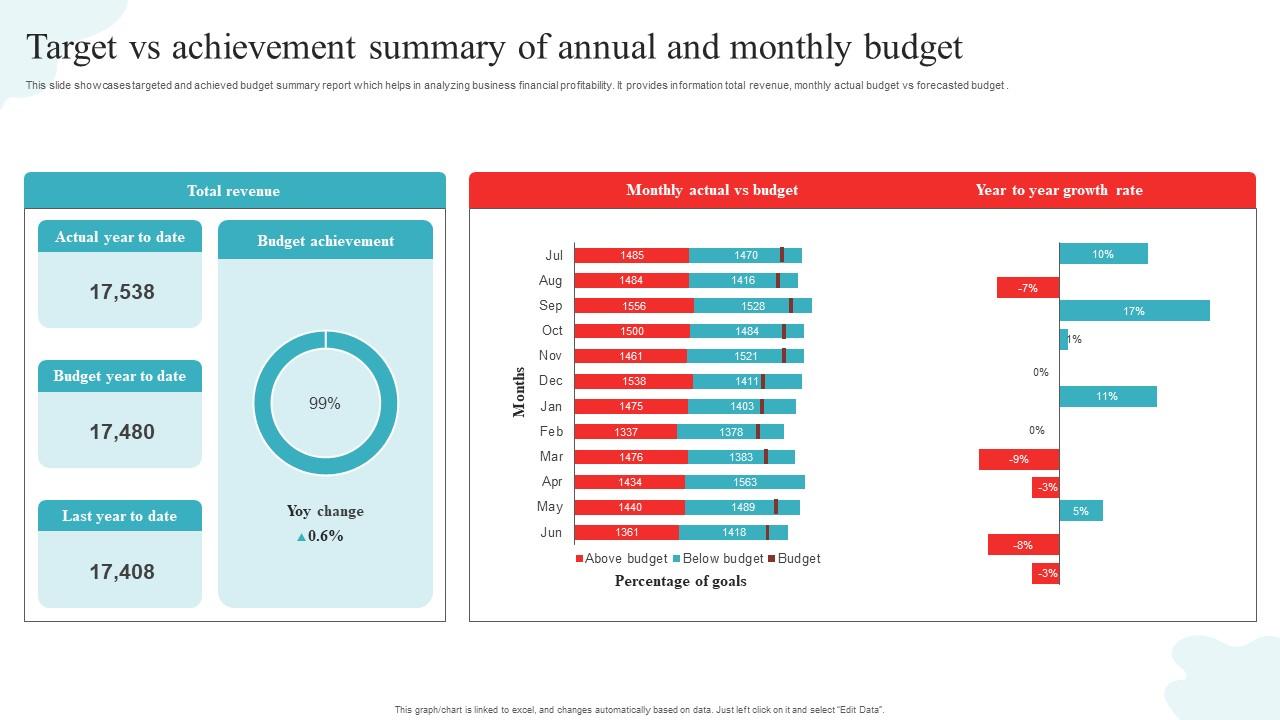
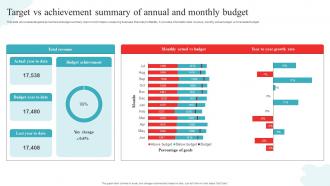
This slide showcases targeted and achieved budget summary report which helps in analyzing business financial profitability. It provides information total revenue, monthly actual budget vs forecasted budget.
People who downloaded this PowerPoint presentation also viewed the following :
Target Vs Achievement Summary Of Annual And Monthly Budget with all 7 slides:
Use our Target Vs Achievement Summary Of Annual And Monthly Budget to effectively help you save your valuable time. They are readymade to fit into any presentation structure.
FAQs for Target Vs Achievement Summary Of Annual
Honestly, I'd tackle the variance analysis first - that's where all the problems jump out at you. Look at five main things: revenue projections, expense breakdowns, variance analysis (actual vs what you planned), cash flow timing, and scenario planning. Split your fixed and variable costs because they behave totally differently. Don't forget seasonal stuff if that applies to you. For scenarios, map out best case, worst case, and realistic outcomes. Oh, and start with last quarter's data as your baseline - makes everything way easier to track.
So variance analysis is basically spotting where you overspent vs your budget - makes waste pretty obvious. Like if you budgeted 5K for office supplies but dropped 8K, that's your cue to investigate. Don't just think "oops, overspent" though. Dig into why it happened. Poor planning? No spending controls? Prices went crazy? I always tell people to do monthly reviews because catching this stuff early saves you from bigger headaches later. Once you figure out the root cause, you can actually fix the process instead of just shrugging it off.
Lead with your main findings - don't make them dig through charts first. Simple dashboards showing actual vs budget work way better than spreadsheet dumps (trust me on this one). Your visuals should tell the story at a glance. Here's the thing though - explain what those numbers actually mean for their decisions. Executives want the big picture impact, but department heads need the nitty-gritty details. You'll want to tailor accordingly. Always bring action items or next steps. Budget talks get heated so leave plenty of time for questions. People have strong opinions about money!
Look, forecasting is what makes your whole budget analysis actually work. You can't spot problems or trends without decent predictions of future revenue and expenses. Historical data alone? Pretty useless for making real decisions. Build your forecasts first, then compare them against actual budget numbers to catch variances early. This way you'll see issues coming before they smack you in the face. I'd honestly focus on getting your forecasting right first - everything else gets way easier after that. Cash flow predictions are huge too, don't skip those.
Honestly, just start with Excel or Google Sheets - they're still the best for most budget stuff and variance analysis. QuickBooks or Sage are decent if you want actual vs budget reporting that syncs up automatically. Power BI and Tableau look amazing for dashboards but fair warning, there's definitely a learning curve there. Bigger companies usually go with SAP or Oracle's planning tools, though that's probably way more than you need right now. My take? Master Excel's pivot tables first, then see what else you actually need. Most people overthink this and end up paying for features they never use.
Honestly, looking at your actual spending from the past few years is way better than just winging it. I usually go back 2-3 years minimum since one year could be weird for random reasons. You'll start seeing patterns - like how certain months always spike, or which budget categories you consistently blow through. The year-over-year increases are pretty telling too. Once you've got those averages by category, just tweak them for stuff you know is coming - new people, contract changes, whatever. It's not perfect but beats guessing completely.
Look, you absolutely need stakeholder input for budget analysis - it's what makes your numbers actually mean something. Department heads know the real operational costs way better than any spreadsheet will show you. End-users spot inefficiencies you'd never catch otherwise. Get them involved early because trying to get buy-in after the fact is honestly a nightmare. They'll tell you what's actually working and what's completely broken with your assumptions. I learned this the hard way on my last project - should've listened to the team from day one. Make it collaborative and your budget will reflect reality instead of some fantasy version.
So rolling budgets are pretty sweet - instead of being locked into some forecast from January that's totally irrelevant by July, you're constantly updating your numbers. Market shifts? You can actually react instead of pretending your old budget still makes sense. It's honestly way better than the traditional "set it and forget it" approach that most companies still do for some reason. You'll spot trends faster and can shift your spending around when needed. Plus you're making decisions with current info, not ancient projections. Maybe start small though - just roll one quarter forward at first.
Start with variance analysis - that'll show you right away where things are going off track. Budget-to-actual ratios and spending velocity are crucial too (basically how fast you're blowing through money). Forecast accuracy matters since your budget's only as good as your predictions. Cost per unit helps with efficiency tracking. Cash flow timing's important for liquidity stuff. Oh, and rolling forecasts are honestly way better than static budgets because they actually look forward. Variance analysis first though - it's like a health check for your numbers and will immediately highlight your biggest problem areas.
Oh man, external stuff will absolutely wreck your budget if you don't plan for it. Inflation hits your costs hard. Interest rates mess with your cash flow timing and revenue assumptions. I got burned by currency swings once - international ops are tricky like that. Market volatility throws everything off too. Don't forget employment rates and how much people are actually spending. Regulatory changes can flip your whole baseline overnight, which honestly sucks but happens. Build in some wiggle room and update your forecasts regularly. Treating budgets like they're permanent is just asking for trouble.
So here's what works for me - score everything 1-10 on business impact first. Then map out urgency because some stuff just can't wait, obviously. The 80/20 thing is huge here: figure out which 20% of budget items will actually move the needle on 80% of your results. Start with "must-have vs nice-to-have" buckets before you get into detailed scoring though. Makes the whole process way cleaner. Oh, and build a simple matrix - impact on one side, urgency on the other. Creates these clear quadrants that make decisions pretty obvious. Honestly saved me so much headache when I was drowning in competing priorities last quarter.
Honestly, you've gotta build way more flexibility into your budget process - nonprofit funding is a nightmare. I'd do three scenarios: best case, worst case, and realistic. Update them quarterly, not just once a year. Track your funding pipeline like your life depends on it because grants fall through all the damn time. Focus on cost-per-outcome stuff that funders actually want to see, not boring line items. Here's what really helped us though: segment everything by funding source so you can pivot fast when those annoying restrictions change. Monthly variance reports will save your ass too.
Honestly, the big things to watch out for are being upfront about your data and not playing favorites with the numbers. Don't cherry-pick stats that just support what you already decided - I've seen so many sketchy budget reports that do this. Also think about who gets hurt if certain programs get cut, especially vulnerable communities. Document everything clearly so people can actually check your work later. Oh, and if you've got any personal stake in whatever you're recommending, say so upfront. Nobody likes finding that out after the fact.
Look, scenario planning basically saves your ass by making you think through different outcomes instead of just hoping everything goes perfectly. Build out a few versions - best case, worst case, realistic case. That way you're not blindsided when things get weird (and they always do). Honestly, it's like having a backup plan for your backup plan. You'll catch cash flow problems before they bite you, plus you can build in some cushion where it makes sense. Just grab your three biggest variables and see what happens if they swing 20% either way. Super eye-opening.
Honestly, most people think basic Excel is fine but you really need the advanced stuff - pivot tables and modeling will save your life. Start with financial analysis fundamentals first. Your team needs solid variance analysis and forecasting skills, plus they gotta understand your company's specific budget processes. Oh and communication is huge too - analysts who can explain complex numbers to regular people are worth their weight in gold. I'd do a formal course first, then add internal training on top. Maybe quarterly refreshers? Systems change all the time anyway.
-
Spacious slides, just right to include text. SlideTeam has also helped us focus on the most important points that need to be highlighted for our clients.
-
What an exhaustive collection of templates you guys have there in slideteam. Impressive!!!