Tracking agile project management activities dashboard digital transformation agile methodology it
Try Before you Buy Download Free Sample Product
Audience
Editable
of Time
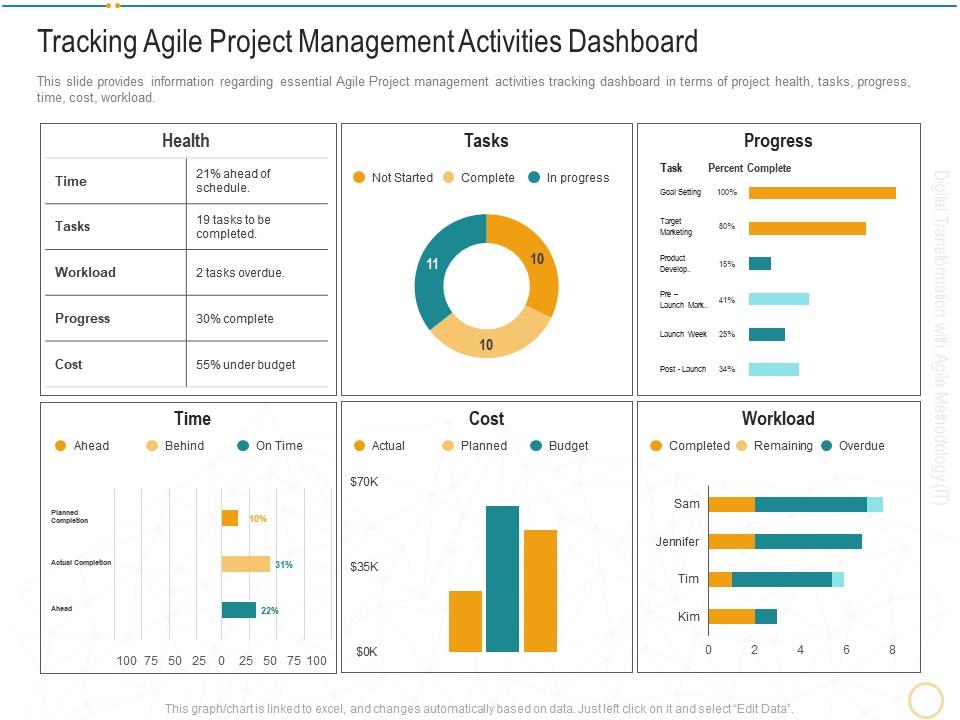
This slide provides information regarding essential Agile Project management activities tracking dashboard in terms of project health, tasks, progress, time, cost, workload.
People who downloaded this PowerPoint presentation also viewed the following :
Tracking agile project management activities dashboard digital transformation agile methodology it with all 2 slides:
Use our Tracking Agile Project Management Activities Dashboard Digital Transformation Agile Methodology IT to effectively help you save your valuable time. They are readymade to fit into any presentation structure.
FAQs for Tracking agile project management activities dashboard digital transformation
Sprint progress tracking is your bread and butter - gotta have backlog status, velocity metrics, and burndown charts. But here's what I see teams screw up constantly: they hide blockers instead of putting them right up front. Real-time story points (completed vs planned) are crucial, plus you need visibility into everyone's workload so nobody drowns. Upcoming deadlines should be obvious, maybe throw in a team mood thing if your tool does that. Keep it visual and super scannable. If someone can't figure out where you're at in 30 seconds, it's too cluttered.
Honestly, it's a game-changer for cutting down those endless "wait, where are we on that thing?" conversations. Everyone can just glance at the dashboard and see what's happening - who's working on what, what's stuck, priorities, all that stuff. No more hunting people down or blowing up the Slack channel every five minutes. We started looking at ours during standups and it seriously cut our meeting time in half. The best part? Blockers become super obvious right away instead of hiding until someone finally mentions them three days later.
Honestly, Agile dashboards are a game-changer for tracking sprints. You get burndown charts and task boards that show exactly what's blocked and how much work is left. Way better than hunting through endless emails or spreadsheets - I learned that the hard way. Your whole team sees the same data, so nobody's confused about priorities. The visual stuff makes spotting bottlenecks super obvious. Set up some alerts for when things start going sideways. You'll catch problems early instead of scrambling at the last minute to hit your sprint goals.
Honestly, Jira's your best bet - it's what everyone uses and has solid burndown charts and velocity tracking built right in. Trello's nice if you want something dead simple and visual, but really only works for smaller stuff. If you're already stuck in Microsoft land, Azure DevOps is actually pretty decent. Monday.com and Asana exist too but they're not really made for Agile workflows specifically. My take? Just use whatever you're already managing your backlog with and see if those dashboards work before adding yet another tool to the mix. Why complicate things, you know?
Honestly, charts and graphs just hit different than staring at endless spreadsheet rows. Your brain processes visual stuff way faster. I can spot bottlenecks instantly when I see sprint burndowns laid out properly - like, the patterns just jump out at you. Same with cycle times and team capacity. Way better than making decisions off gut feelings or some report from two weeks ago. Oh, and here's what actually works: pick the three metrics that matter most for whatever your team's focused on right now. Don't overwhelm your dashboard with everything.
Honestly, just stick to velocity, sprint burndown, and cycle time - those three will tell you everything you need to know about whether your team's actually hitting their targets. Lead time and defect rates are worth tracking too since nobody wants to ship garbage quickly, right? Your dashboard should answer one simple question: are we delivering what we said we would, on time? Don't bother with stuff like hours logged - total vanity metric that tells you nothing useful. Start there, then you can always add more if specific issues come up later.
So basically an Agile Dashboard shows you what's happening with your sprint in real-time. You can see user stories moving around, check burndown charts, spot blockers right away. Perfect for those daily standups where everyone's like "wait, what are we working on again?" Short sentences work great here. The dashboard catches bottlenecks before they become huge problems, keeps your team focused on sprint goals, and honestly makes pivoting way less painful when priorities change. Oh, and set up those automated notifications when stories move between columns - trust me, you'll thank yourself later instead of constantly refreshing to check status updates.
Dude, you absolutely need real-time data for your dashboard to work. Otherwise you're just looking at pretty charts that lie to you. I learned this the hard way when our "on track" sprint was actually falling apart for days before anyone noticed. Your team velocity, blockers, sprint progress - all that stuff needs to update live so you can catch issues during standups. Quick decisions matter in Agile. Connect it straight to your project management tools so you're seeing what's happening now, not some stale snapshot from yesterday. Trust me, flying blind sucks.
Yeah definitely! Most Agile tools let you swap out widgets and mess with the layout however you want. The default setups are usually garbage tbh - like who needs half that stuff? Start by figuring out what your team actually tracks. Maybe you want burndown charts, maybe velocity stuff, whatever works. Then customize your board columns to match your real workflow stages - "Ready for Dev," "In Review," etc. I always tell people to build the dashboard around how you already work, not change your process to fit some template. Try a few different layouts and see what people actually use. Short experiment beats overthinking it.
Don't cram every metric you can think of onto one screen - that's just visual chaos. The real trap is treating it like some fancy status report instead of actually using it. I've watched teams fixate on perfect burn-down charts while completely ignoring the three tickets that have been blocked for two weeks (which is honestly wild). Keep your data fresh and focused on stuff that matters for shipping. Make sure people know how to read it, but use it to start real conversations. Oh, and update it regularly - stale dashboards are worse than no dashboard.
Dude, agile dashboards are game-changers for getting stakeholders actually engaged. Real-time visibility means no more boring status meetings where everyone's checking their phones. You can literally show live progress and blockers right there on screen. Stakeholders eat up those moving progress bars - sounds silly but it works. The transparency thing is huge too. They're not sitting there wondering if you're secretly behind schedule. Oh, and you can customize different views depending on who's looking. Execs want the big picture stuff while product folks need sprint details. Set up automated reports so they stop constantly pinging you with "how's it going?"
So it really depends on your setup. Different teams need different views - like your dev team wants task details while execs just want the big picture stuff. I'd start with one dashboard first though, way easier that way. Then when you notice people only looking at certain sections, that's when you split things up. We did this at my last job and it was honestly a game-changer. Each team could focus on their own sprints without getting distracted by random metrics they don't care about. Same thing works if you're juggling multiple clients or products - keeps everything way more organized.
Honestly, the stuff that actually matters is real-time updates and being able to customize what you see. Nobody wants to click through a million screens just to check sprint progress or see what's blocking the team. Make sure your dashboard shows burndown charts and blockers right upfront. Clean visuals are clutch - plus good filtering so people can focus on their specific role. Oh and it better work on mobile because someone's always checking it during standup. I'd start by figuring out what metrics your team actually uses daily, then build your main view around those. The drag-and-drop thing is nice too if you can swing it.
Honestly, most Agile dashboards connect pretty well with other PM tools through APIs and built-in integrations. Like, you can sync Jira with Confluence for docs, hook up Trello to Slack for notifications, or pull Azure DevOps data into Power BI. I'd definitely pick tools that work together from day one - trust me, it'll save you major headaches later. Monday.com, Asana, and ClickUp are solid choices since they integrate with tons of platforms. Oh, and map out what your team's already using first, then check the integration options before you commit to anything.
Update it during daily standup - perfect timing. Move story statuses, track sprint progress, hit any blockers immediately so everyone knows what's up. Honestly, I've watched teams totally ignore their dashboards and then act shocked when nobody communicates properly! Don't just shuffle cards around mindlessly though - actually look at the trends and patterns. Someone needs to own each section, otherwise it becomes this weird free-for-all where nothing gets updated. Oh, and keep it simple. You'll want to track everything but resist that urge. When sprint planning actually matches reality, you'll be glad you did.
-
Unique research projects to present in meeting.
-
Awesome use of colors and designs in product templates.
-
The Designed Graphic are very professional and classic.
-
Content of slide is easy to understand and edit.